

Year-end and currencies
The Year-End tab is where a reviewed fiscal year is closed, opening balances are entered, and balances kept in other currencies are revalued.
The entity’s Year-End tab (/dashboard/finances/accounting/{entity}/year-end): Fiscal years, Opening
balances and Foreign currency revaluation. Exchange rates of your own are under
Settings.

Closing a fiscal year
Section titled “Closing a fiscal year”The Fiscal years table lists each year with its Dates, number of Entries and Status (Open, In progress, Closed with the date).
- When a year has ended and you have reviewed it, choose Close Year.
- Read the dialog: Income and expenses roll into retained earnings, and the books lock through (the year end). You can reopen the latest closed year later. For personal books the year’s result goes to net worth instead.
- Confirm. You see FY 2025 closed.
Rules:
- A year can be closed once it has ended (A year can be closed once it has ended.).
- Years close in order: Years close in order: close FY 2024 first.
- Closing needs the Close periods permission.
- After the first close, the fiscal year end can no longer be changed.
Reopening a year
Section titled “Reopening a year”Only the latest closed year can be reopened. Choose Reopen Year: The closing entry is reversed and the lock moves back before the year. Say why: it stays on record. The Reason needs at least 5 characters. Reopening needs the Reopen periods permission. To reopen an earlier year, reopen the later ones first.
Opening balances
Section titled “Opening balances”What each account held when these books started. Any difference goes to opening balance equity.
- Choose Enter Opening Balances.
- Set As of: Usually the day before the books start.
- For each account, choose the Account, Debit or credit and the Amount, and a Memo if you like. Add Line adds more.
- Check Debits and Credits. Any difference is shown: … goes to opening balance equity.
- Choose Post Opening Balances.
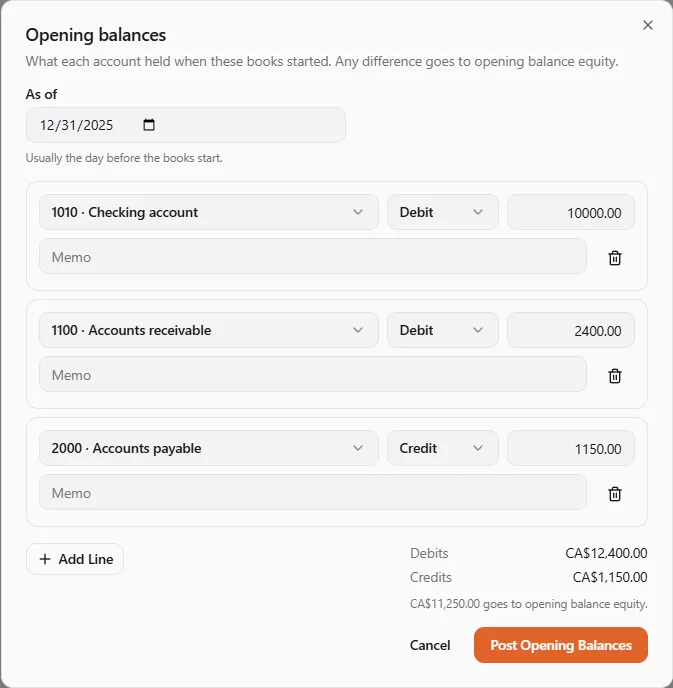
Entering opening balances needs the Adjust journals, rates and opening balances permission. You can also bring them in from another program’s trial balance with the import wizard. A bank account’s own opening balance is entered when you add the account.
Exchange rates
Section titled “Exchange rates”Everything in the books is kept in their currency, chosen at setup. A document, bank account or pay run can be in another currency; its amounts are converted at the rate of their date, and the original currency, amount and rate stay on the line.
A document can carry its own Exchange rate. Otherwise the rate used is the latest one on or before the date:
- your own rate for that pair, from Settings → Exchange rates (Your own rates … are used before the published ones);
- the published daily rates of the Bank of Canada and the European Central Bank, loaded on business days;
- for a pair neither publishes, a cross rate through the Canadian dollar, the euro or the US dollar.
When no rate is known, the books say so (No USD to CAD exchange rate is known for … Add one under exchange rates.) and the posting waits. UPC activity in another currency waits for a rate the same way, then posts.
Foreign currency revaluation
Section titled “Foreign currency revaluation”Brings balances kept in other currencies to (your currency) at a date’s closing rate. Only the change since the last revaluation is booked. Use it at a period or year end.
- Pick Revalue as of and choose Calculate.
- Read the table: each Account, its Balance, the Closing rate, what it is Carried at, its value At the closing rate and the Difference, then Net unrealized gain or Net unrealized loss.
- Choose Post Revaluation.
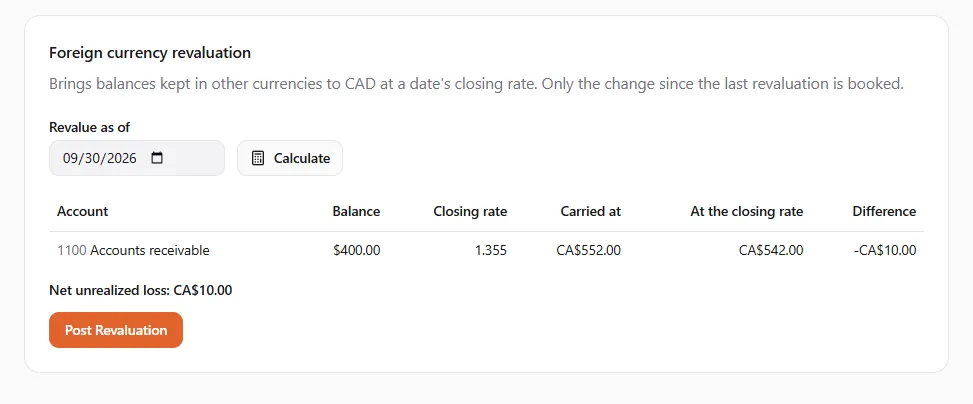
What is revalued: money accounts kept in another currency, and receivables, payables, loans, accrued expenses and balances between your entities in another currency. Cash and bank in the books’ own currency, inventory, prepaids, deferred revenue, deposits and fixed assets never are.
Revaluation is cumulative: each run books only what moved since the last one, so running it again on the same date posts nothing (Nothing changed since the last revaluation, so nothing was posted.). Earlier revaluations lists every run.
It needs the Adjust journals, rates and opening balances permission, a date that has come and is after the lock date, and a closing rate for every currency involved: There’s no closing rate for … on … — add your own rate in Settings, then calculate again.
If something went wrong
Section titled “If something went wrong”- “FY … hasn’t ended yet.” / “Close FY … first: years close in order.” — close years one at a time, after they end.
- “Say why the year is reopened” — the reason needs at least 5 characters.
- “The books are locked through … Choose a later date.” — revalue as of a date after the lock.
- “These books have no account for foreign-exchange gains and losses.” — ask your accountant to add one in the chart of accounts.