

Your quotes (buying a van or trailer)
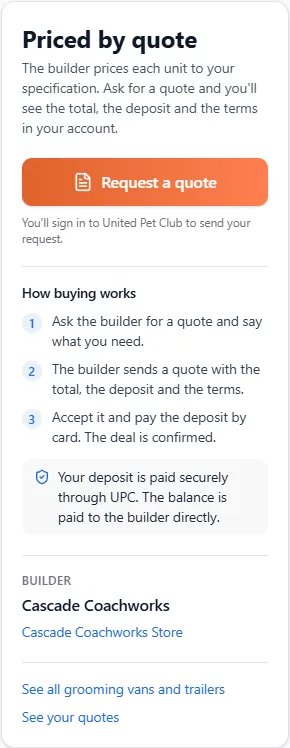
Grooming vans, trailers and mobile units are built to order, so they have no price on the store. They show Priced by quote and a Request a quote button instead. You ask the builder for a quote, the builder sends you one with the total, the deposit and the terms, and when you accept it you pay the deposit by card through United Pet Club. The rest of the price, the balance, you pay to the builder directly.
- On the store: Mobile grooming vans and trailers (
/store/mobile-units) lists the units builders are advertising. Each one’s page has the Request a quote button. - In your account: Account → Quotes (
/account/quotes) lists every quote you asked for, newest first, with its status, the date you asked, the date it’s valid until and the deposit. Select one to open it.
Quotes belong to the profile you asked from. If you open a quote while acting as another of your profiles, the page says so: switch to the profile that asked to answer it.
Ask for a quote
Section titled “Ask for a quote”- On the unit’s page, select Request a quote. You’ll be asked to sign in if you aren’t.
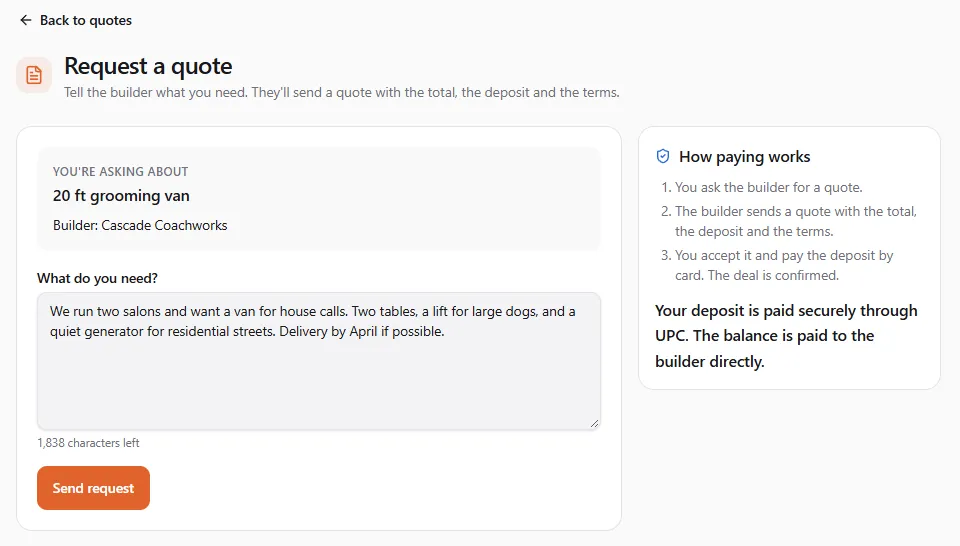
- The Request a quote page shows what you’re asking about and the builder.
- Under What do you need?, describe it: size and layout, equipment, colours, when you need it and where it should be delivered. Up to 2,000 characters.
- Select Send request.
Request sent. The builder will send you a quote. The quote shows Requested, and we send you a notice when the builder answers. You can have one open request per unit: asking again opens the one you already have.
Changed your mind before the builder answers? Open the quote and select Cancel request.
Read the quote
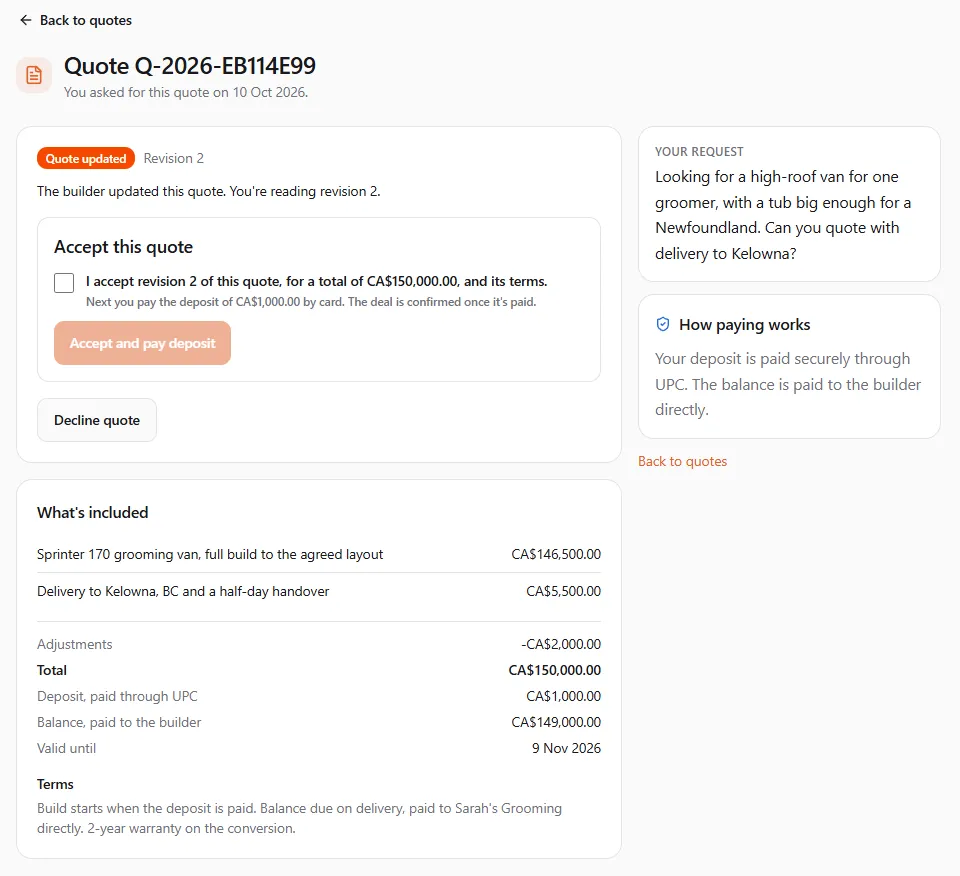
Section titled “Read the quote”When the builder sends it, the quote shows Quote received. It lists:
- What’s included: each line, with the quantity and unit price.
- Total, and any Adjustments the builder made to it.
- Deposit, paid through UPC and Balance, paid to the builder. A quote without a deposit shows Deposit: None through UPC.
- Valid until: the last day you can accept it.
- Terms: build time, what the deposit secures, how the balance is paid, delivery. You accept these with the quote.
Comparing builders. Ask several builders for a quote. Each one appears as its own line under Account → Quotes, with its status and deposit, so you can open and compare them.
When the builder changes the quote, it shows Quote updated and The builder updated this quote. You’re reading revision 2. You always see the latest revision, and only that one can be accepted. If the builder updates it while you’re reading, accepting is refused with The builder changed this quote while you were reading it. Read the new revision, then accept it.
Accept and pay the deposit
Section titled “Accept and pay the deposit”- In Accept this quote, tick I accept revision … of this quote, for a total of …, and its terms.
- Select Accept and pay deposit. (With no deposit the button reads Accept quote, and the deal is confirmed straight away.)
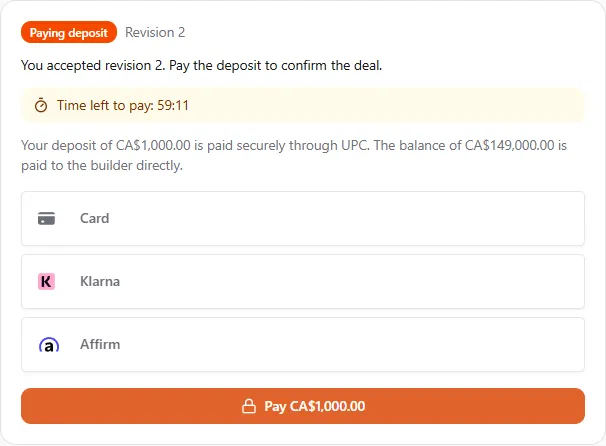
- The quote shows Paying deposit and Time left to pay. Pay within that time, usually an hour.
- Enter your card in the secure form and pay. Your card can be saved for next time; the box is ticked for you. The deposit is billed to the account that owns the profile you’re acting as.
- Confirming your payment… takes a few seconds. You can leave the page; it updates on its own.
When the payment goes through, the quote shows Deal confirmed: You accepted revision 2. Your deposit of … is paid. Pay the balance of … to the builder directly. You and the builder both get a notice.
If the time to pay runs out, the quote goes back to the builder as it was, and you can accept it again while it’s still valid. If your card is declined, try again with another card.
What the deposit is
Section titled “What the deposit is”- It’s part of the price. The deposit counts toward the total. The balance is the total less the deposit.
- It’s paid through United Pet Club and goes to the builder. It’s paid out to the builder on their usual schedule. United Pet Club doesn’t hold it until delivery: this is not a protected deposit like the ones on animal listings.
- The balance is between you and the builder. You pay it to the builder directly, as their terms say. United Pet Club isn’t part of that payment and can’t refund it.
- United Pet Club’s fees are paid by the builder. You pay the deposit and nothing more through UPC.
Read the terms before you accept. They are the builder’s: what the deposit secures, when it can be refunded, how and when the balance is due.
Refunds
Section titled “Refunds”A refund of the deposit comes from the builder and goes back to the card you paid with. Ask the builder first. The quote lists every refund under Refunds:
- Your deposit of … was refunded in full on …
- … of your deposit has been refunded so far (last refund on …).
- A payment of … arrived after the time to pay had passed, so it was refunded in full on … This happens on its own: a deposit paid after the time ran out, or paid twice, is always refunded.
We send you a notice for each refund. If United Pet Club cancels a deal, we tell you that too.
Decline a quote, or when it ends
Section titled “Decline a quote, or when it ends”- Decline quote tells the builder you’re not taking it. You can ask for a new quote later.
- Expired: This quote expired before it was accepted. We remind you about 48 hours before a quote expires, and tell you when it has.
- Withdrawn: The builder withdrew this quote.
On an expired or withdrawn quote, Ask for a new quote sends a fresh request to the same builder.
Statuses
Section titled “Statuses”| Status | What it means |
|---|---|
| Requested | You asked. Waiting for the builder’s quote. |
| Quote received | The builder sent a quote. You can accept or decline it. |
| Quote updated | The builder sent a new revision. Read it before you accept. |
| Paying deposit | You accepted. Pay the deposit to confirm the deal. |
| Deal confirmed | The deposit is paid (or there was none). Pay the balance to the builder. |
| Declined | You declined the quote or cancelled your request. |
| Expired | The date passed before you accepted. |
| Withdrawn | The builder withdrew it. |
If something went wrong
Section titled “If something went wrong”- “This listing isn’t available right now.” The builder paused or ended the ad. Try again later, or look at other builders’ units.
- “This quote has expired.” Ask the builder for a new one with Ask for a new quote.
- “Card payments aren’t available right now.” Try again later. Your acceptance waits until the time to pay runs out.
- I can’t accept or decline. You may be acting as another profile. Switch to the profile that asked.