

Refer a friend
United Pet Club runs its own referral program, and some businesses, clubs and shelters run theirs. You share your personal link or code; when a friend signs up through it and takes the step the program asks for, you earn a reward, and your friend may earn one too.
Refer a friend to United Pet Club
Section titled “Refer a friend to United Pet Club”Dashboard → Store → Refer a friend (/dashboard/store/refer-a-friend). Each of United Pet Club’s live programs
has a card saying who gets a reward and when it is earned, for example It’s earned when they start their first paid
plan. A program for new people only says For people new to United Pet Club.; one that counts existing members too
says Members who already have an account count too.
- Select Get my referral link.
- The card shows Your code and your Link with Copy code and Copy link.
- Share it your way:
- Share on Facebook, WhatsApp, LinkedIn, Telegram or Email, or More ways to share on a phone.
- Download QR: print it or show it; a phone camera opens the link.
Under the card, Referred, Qualified and Rewarded count your friends so far, and Your referrals in … lists them as Friend 1, Friend 2 and so on (never their names) with where each one is: Invited, Joined, Qualified, Rewarded or Didn’t count.
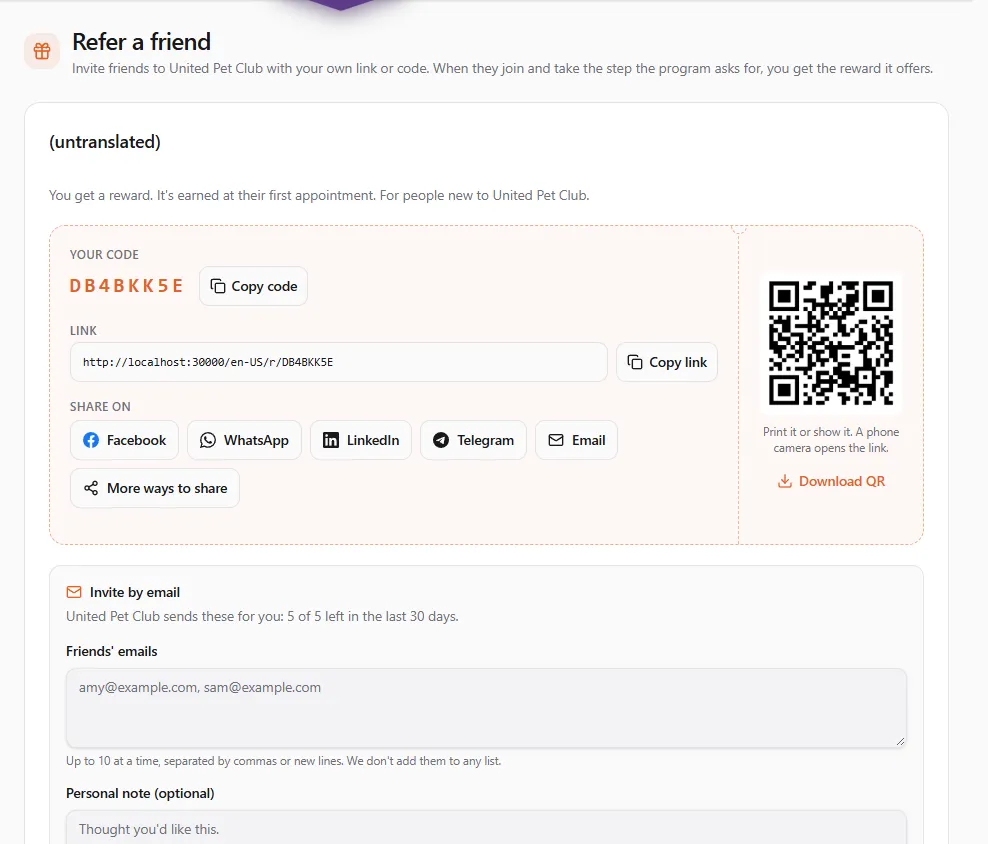
Invite by email
Section titled “Invite by email”On the same page, Invite by email sends your friends an invitation with your link. Type up to 10 addresses at a time under Friends’ emails, separated by commas or new lines, add a Personal note (optional), and select Send invitations. We don’t add the addresses to any list, and an address you invited in the last 30 days is skipped (Already invited in the last 30 days: …).
How many you can send depends on the program:
| Program | Who pays for the email | Allowance |
|---|---|---|
| A United Pet Club program whose reward is earned on a paid plan or order | United Pet Club | a small number every 30 days, more as the friends you referred spend on United Pet Club, never more than 50. The box shows … {remaining} of {cap} left in the last 30 days. |
| Any other program you share as a referrer | you | each invitation uses one email send from your email marketing allowance; Buy email credit adds more |
| A business’s program, sent by the business | the business | the business’s own email allowance |
When none are left, share your link or code instead.
Your link opens the right page
Section titled “Your link opens the right page”Your referral link is a United Pet Club address ending in /r/YOURCODE. When a friend opens it:
- signed out, they land on sign-up with your code already filled in;
- already a member, they land on United Pet Club’s home page, and the referral is recorded for them if the program counts existing members.
Your code is remembered on their browser for 30 days, so they can sign up later and still be counted.
Share a business’s program
Section titled “Share a business’s program”On a business’s public profile page (/accounts/<handle>), in the Refer a friend card. The card is only
there when the business runs a live program. It names the program, says who earns a reward, and when, for example
Earned on their first paid order.
Get your referral link
Section titled “Get your referral link”- Sign in. Signed out, the card shows Sign in to get your link and brings you back after you sign in.
- Select Get my referral link.
- The card shows Your code and the Link with Copy code and Copy link, the Share on buttons and a QR code with Download QR.
Share the link however you like. It opens United Pet Club’s sign-up with your code already filled in.
If the business approves new referrers, the card says … approves new referrers. Your link appears here once they do. Come back to the same page later to get your link.
If your link was paused by the business, the card says Your referrals for this program are paused.
Programs that start later
Section titled “Programs that start later”A business can set a program up ahead, for example for the holidays. If it chose to show it early, the card shows the program with Starts …. Come back then to get your link. and no button. Come back on or after that date to get your link. When a program’s end date passes, it disappears from the card; a referral you already made can still earn its reward.
Programs for some places only
Section titled “Programs for some places only”A program can be limited to some countries, provinces or states. Then:
- You can join it only if the address on your profile is in one of those places. Otherwise you see This program isn’t available where you live.
- Your friend’s referral counts only if your friend lives there too, and a purchase counts where it happens (where the order is delivered, or where the appointment takes place).
Where you live comes from your profile’s address, or the country you signed up from, never from where your device is. If you see We couldn’t check where you are just now, try again in a moment.
What your friend does
Section titled “What your friend does”Your friend opens your link and signs up. Your code is filled in under Have a promo or referral code? They can also type your code there themselves. Then, depending on the program, they:
- pay for their first order from the business,
- come to their first booked appointment with it, or
- join the organization and pay its dues.
When that happens, the reward is issued as a single-use code for one of the business’s promotions, to use on its products or services. Rewards can’t be exchanged for cash.
A friend has to sign up within the time the program allows after opening your link. If their order or dues are fully refunded, or lost to a chargeback, the referral is voided. You can’t refer yourself.
A program can be for new people only (the friend must sign up through your link or code) or for everyone (a friend who already has an account counts once they open your link and take the step).
My reward codes
Section titled “My reward codes”Dashboard → Store → My reward codes (/dashboard/store/reward-codes) lists every code a referral earned you,
newest first, marked Ready to use, Used or Expired, with when it was issued and the date to use it by.
For referring a friend or For joining through a friend’s link says why you got it, and Works on that seller’s
items only marks a business’s reward.
- Copy code copies it for the Promo code box at checkout.
- Use it in the store opens the store with the code already applied at checkout.
Each code works once, only for you. A notification in the bell tells you when a new one is issued.