

A quote a business sent you
A groomer, trainer, vet clinic or any other business on United Pet Club can send you a quote: what they’d do for you and at what price, often with a few options to choose from. You pick what suits you and send your choices back. The business checks them and sends you the final quote, which you accept. If the quote has a deposit, you pay it by card through UPC when you accept; the rest, the balance, you pay to the business directly.
- The private link the business sent you, for example by email: it opens the quote on unitedpetclub.com without signing in, until the quote’s Open until date. Keep it to yourself: anyone with the link can read the quote.
- Account → Quotes (
/account/quotes), once you’re signed in and the quote is yours: every quote, with its status. A quote sent to your account appears here directly.
Ask for a quote from a business’s website
Section titled “Ask for a quote from a business’s website”Some businesses put a quote request form on their own website. You don’t need to sign in:
- Type Your name, Email, a Phone number if you like (with its country code, for example +1 604 555 0100), and What do you need?: the job, your pet, timing, anything that matters.
- Select Send request. We email you a 6-digit code (Your United Pet Club verification code) to confirm it’s you.
- Under Check your email, type the Code and select Confirm and send. No email? Send a new code.
- You see Request sent: the business has your request, with its number, and will email you a quote with a private link to review it.
The business gets your name, email, phone and message. If something stops you:
| You see | What to do |
|---|---|
| That code didn’t match. | Check the email and type the code again. |
| That code has expired. Start again to get a new one. | A code works for 10 minutes, and a request must be confirmed within 30 minutes. Select Start again. |
| You’ve sent the most requests for today. Try again tomorrow. | You can send a business up to 3 requests a day. |
| This website isn’t taking quote requests. | Contact the business directly. |
Read the quote
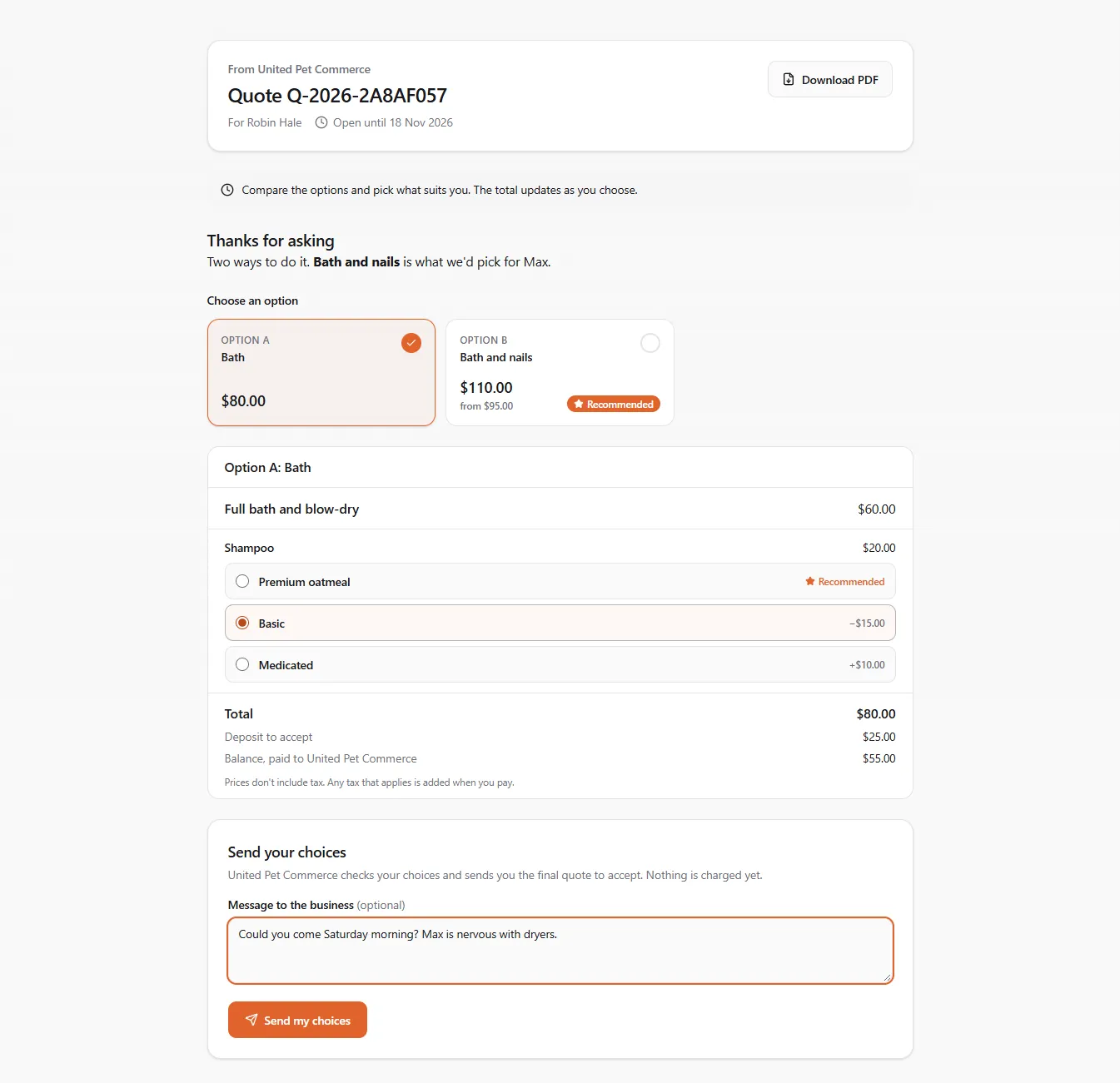
Section titled “Read the quote”The quote shows who it’s from, the quote number, who it’s for and Open until. Then:
- the business’s cover note;
- the options as cards, each with its total. The one the business recommends is marked Recommended and shown first;
- what the chosen option includes. Where the business offers choices on a line (for example three shampoos), the recommended one is selected for you, and each other shows the difference, for example −$15.00 or +$10.00. Pick another and the Total updates;
- Deposit to accept and the Balance, paid to the business; prices don’t include tax, and any tax that applies is added when you pay;
- the Terms.
Download PDF saves the quote as a file.
Send your choices
Section titled “Send your choices”Under Send your choices, add a Message to the business if you like (questions, timing), then select Send my choices. Nothing is charged yet.
From the private link you need a free account to reply: select Sign in to send my choices, sign in or sign up, and you come back to the quote with your picks kept. The quote becomes yours when the email address it was sent to is a verified email on your account. If it was sent to another address, you see This quote was sent to a different email address: add and verify that address in your account, or ask the business to send it to you.
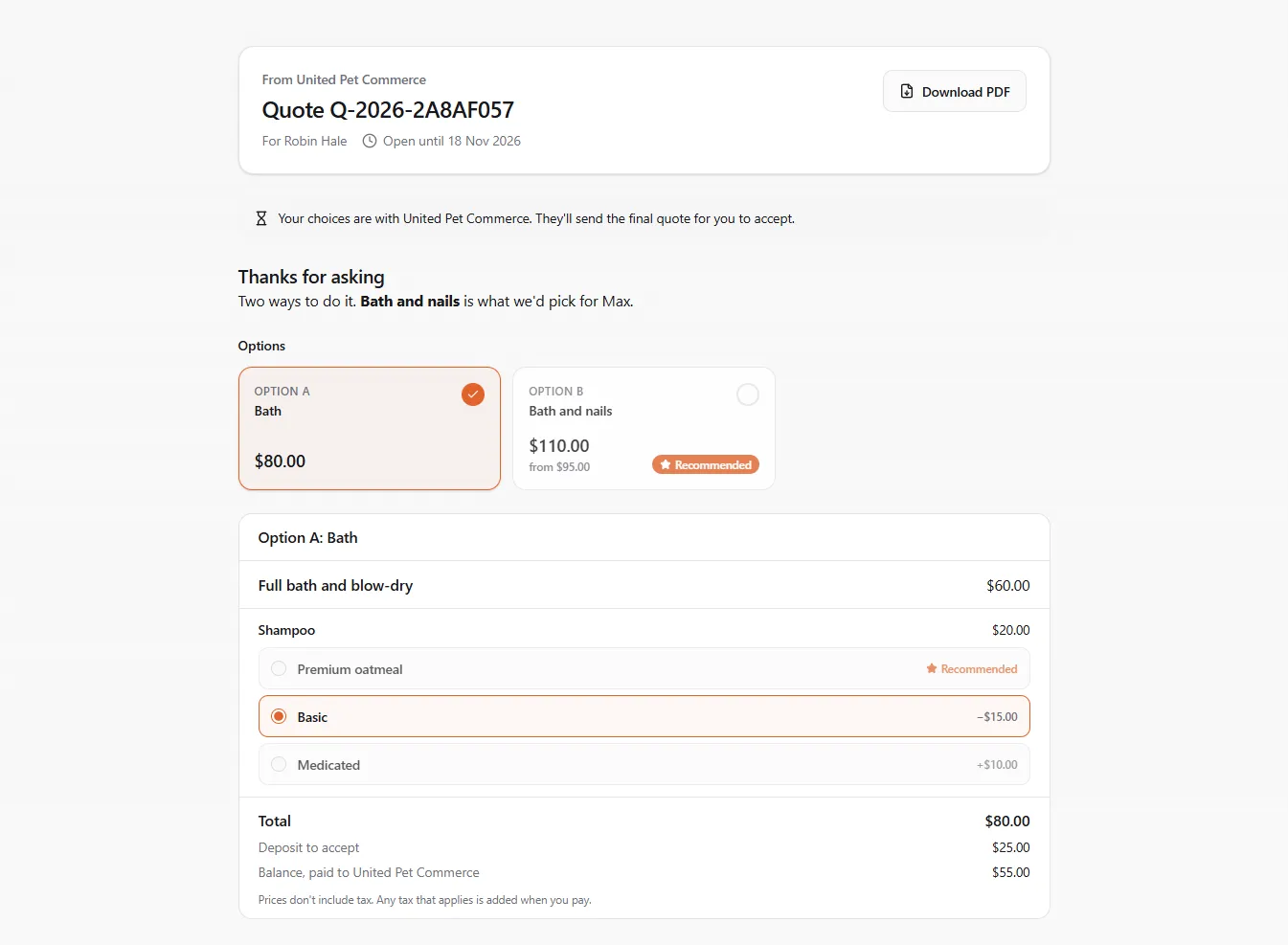
You then see Your choices are with the business. They check them and send you the final quote.
A preliminary quotation
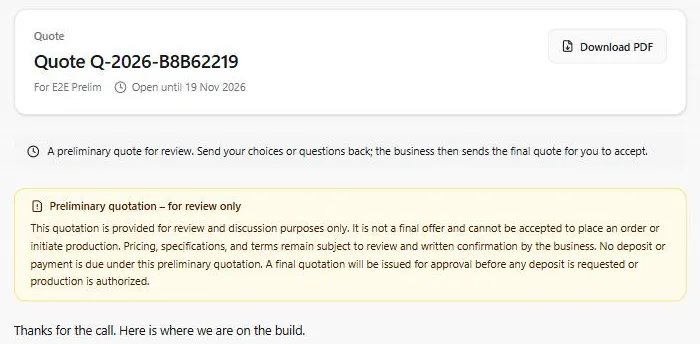
Section titled “A preliminary quotation”Some businesses send a preliminary quotation first, for a large job whose details are still being worked out. It says Preliminary quotation – for review only at the top, on the private link, under Account → Quotes and on the PDF, with the business’s notice:
- it is for review and discussion only, not a final offer, and can’t be accepted to place an order or start work;
- prices, specifications and terms may still change until the business confirms them in writing;
- nothing is due: no deposit or payment is asked under it.
You can still compare the options, pick the alternatives you prefer and Send my choices with your questions. The business then sends the final quote, which you accept as below; any deposit is asked for only then.
Accept the final quote
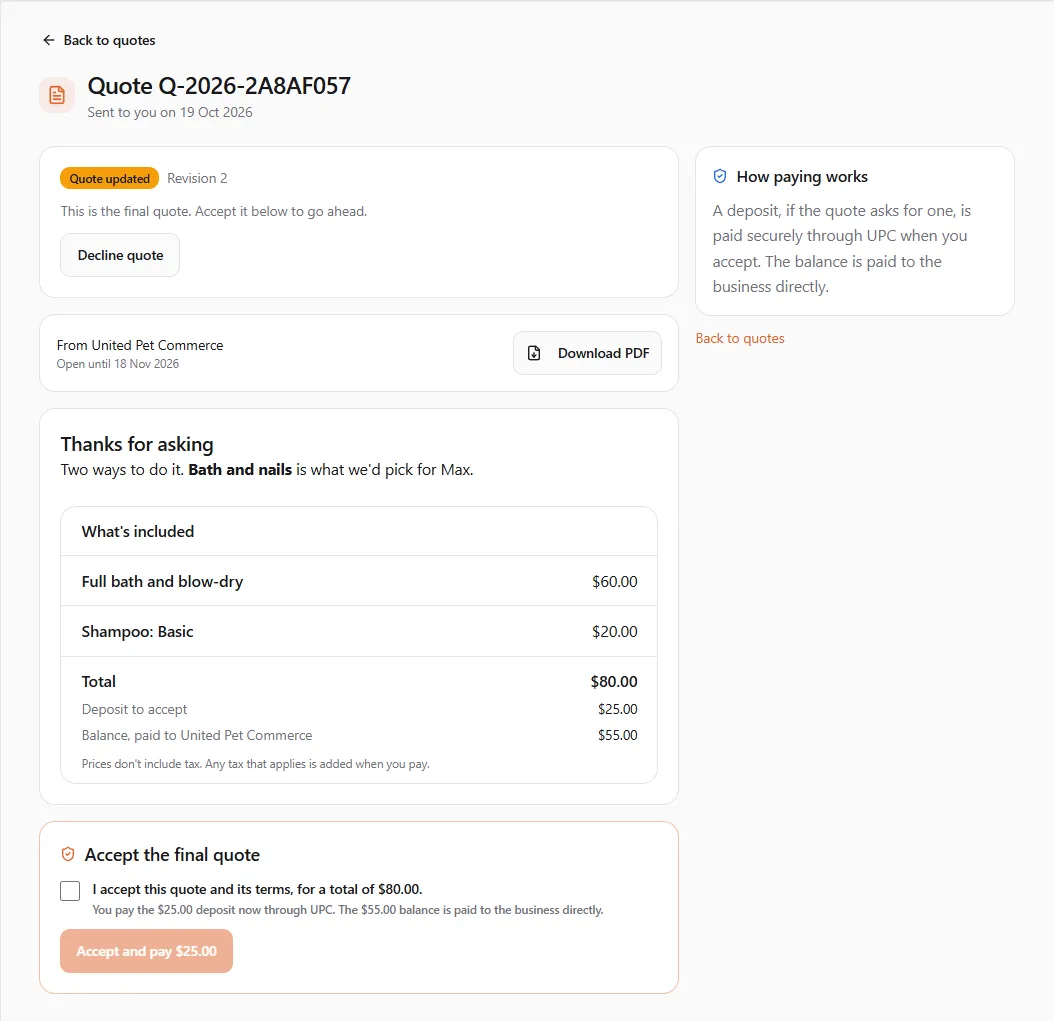
Section titled “Accept the final quote”When the business sends the final quote, it shows Final quote under Account → Quotes, and the private link says it’s ready to accept (Accept in my account). The final quote holds only the option and choices you agreed on.
- Open it under Account → Quotes.
- Under Accept the final quote, tick I accept this quote and its terms.
- If the business asks for it, type Your full name.
- Select Accept quote, or Accept and pay with the deposit amount. If the business asks for a signed contract, the button reads Prepare the contract to sign instead: see Sign the contract.
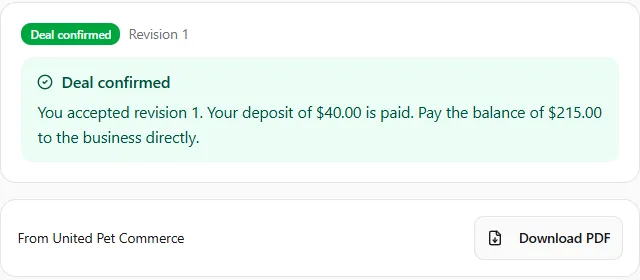
With a deposit, the quote shows Paying deposit and the card step opens, with the time left to pay. Once it’s paid, the deal is confirmed: Deal confirmed says your deposit is paid and what balance to pay the business directly. Without a deposit, it’s accepted at once and you pay the business directly.
Sign the contract
Section titled “Sign the contract”Some businesses ask you to sign a contract holding the quote. Under Accept the final quote it says This quote is accepted by signing a contract. Next, you sign it with your UPC account.
-
Tick I accept this quote and its terms and select Prepare the contract to sign.
-
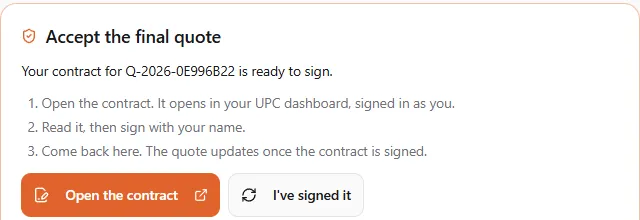
You see Your contract for the quote is ready to sign. Select Open the contract: it opens in your UPC dashboard, signed in as you.
-
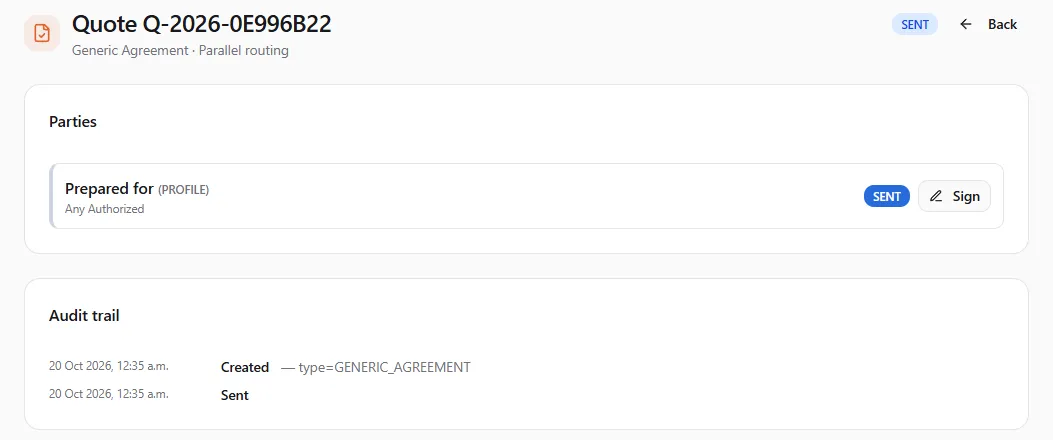
The contract carries the quote’s number. Select Sign.
-
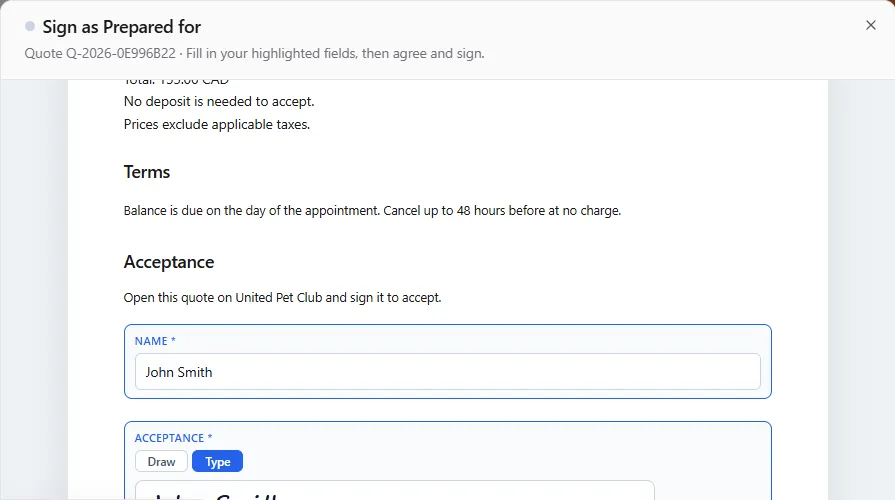
Read the quote in it (the option, its lines, the total, the deposit and the terms), fill in your Name, sign (draw or type your signature), agree, and select Sign & Submit.
-
Come back to the quote and select I’ve signed it. You can also just wait: the page checks for your signature by itself for 15 minutes.
Once it’s signed, the quote is accepted as if you’d selected Accept: with a deposit, the card step opens to pay it; without one, the deal is confirmed.

A quote sent to your email address needs a free account to sign, like accepting any quote: signing is never anonymous.
| You see | What to do |
|---|---|
| This quote can’t be signed yet | The business can’t open a contract right now. Let them know so they can check their contract credits, then try again. |
| The signing step couldn’t open | Try again in a moment. |
If you don’t sign (you decline the contract, or it expires), the quote stays open and you can prepare the contract again.
Book your appointment
Section titled “Book your appointment”Some quotes include one appointment you book yourself. Under Accept the final quote it says After you accept, you pick a time for your appointment. The quote pays for it. Accept the quote (and pay the deposit, if there is one), then Book your appointment appears:
- If the business offers more than one service, pick What you’re booking.
- Pick a day and a time. You see two weeks at a time; Earlier and Later move through the dates. The page says which time zone the times are in.
- Add a Note for the business if you like.
- Select Book with the day and time.
Nothing more is charged: the quote pays for the appointment.
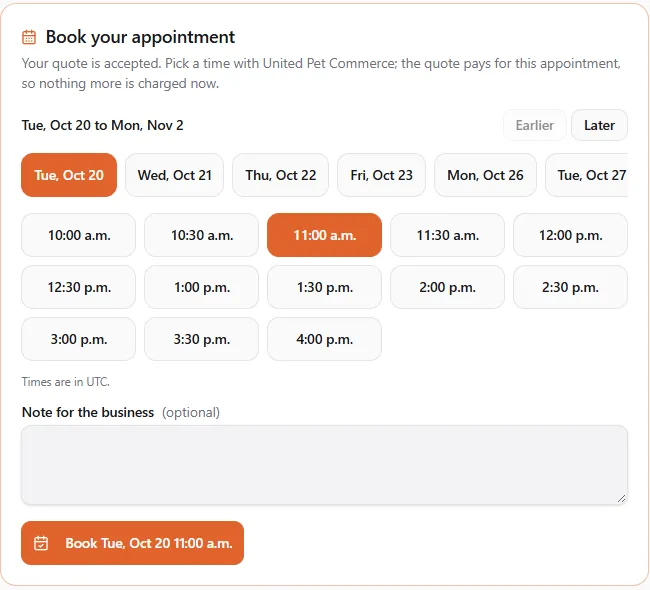
You then see Appointment booked on the date, and See your bookings opens your bookings in the Dashboard (see Appointments & Booking). A quote books one appointment only.

If the business isn’t taking online bookings right now, the page says so: contact them to set a time.
Not for you? Decline quote turns it down. The quote shows Declined, and it can no longer be accepted.
When a link stops working
Section titled “When a link stops working”| What you see | What happened | What to do |
|---|---|---|
| This quote has expired | The quote’s open date has passed, or the business withdrew it. | Sign in to view it in your account, or ask the business for a new quote. |
| This link doesn’t work | The business replaced the link with a new one. | Ask the business to send it again. |
| This link is incomplete | Part of the link was cut off. | Open the link exactly as the business sent it. |