

Applying for a tax exemption
United Pet Club adds GST or HST to its own fees for profiles in Canada (see Taxes on United Pet Club fees). If your profile doesn’t have to pay it, you can apply for a tax exemption. United Pet Club staff review every application. Once yours is approved, your platform fees carry no GST/HST in the region it covers.
Finances → Tax numbers in the Dashboard (/dashboard/finances/billing/tax-numbers), the Tax exemption card
under your tax numbers. See Tax numbers for the rest of that page.
The card is for the profile you are acting as. To apply for a business, switch to the business’s profile first. Only the profile’s owners, admins and team members who can manage its finances see the card and can apply, the same people who can manage its tax numbers.
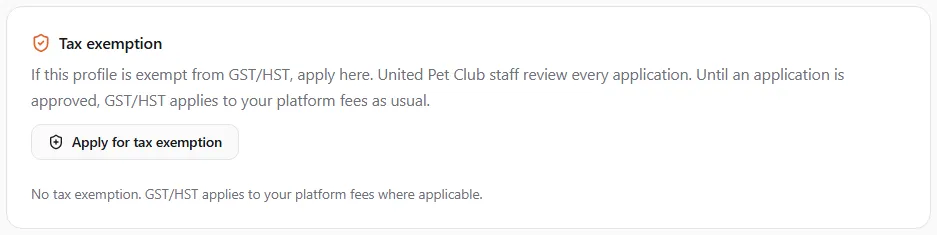
The card starts by saying If this profile is exempt from GST/HST, apply here. United Pet Club staff review every application. Until an application is approved, GST/HST applies to your platform fees as usual. With nothing on file it reads No tax exemption. GST/HST applies to your platform fees where applicable.
Who can apply
Section titled “Who can apply”Pick the reason that fits your profile:
| Reason | For example |
|---|---|
| Status First Nations individual or band | A person registered under the Indian Act, or a First Nations band |
| Diplomat or foreign mission | A foreign diplomat, consular officer, embassy or consulate |
| Government body | A government department or agency |
| Charity or nonprofit (exempt supply) | A charity or nonprofit that believes our services to it are exempt |
| Reseller | A business that resells what it buys from us |
| Other | Any other reason. You must explain it |
Not sure whether you qualify? Ask your accountant before applying. A GST/HST-registered business can usually claim back the tax it pays on our fees instead, and simply keeping your GST/HST number on the profile doesn’t make it exempt.
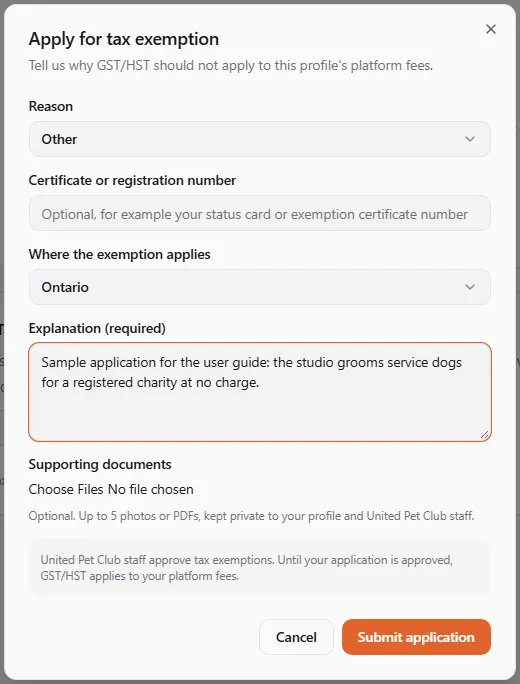
- Select Apply for tax exemption. The Apply for tax exemption window opens: Tell us why GST/HST should not apply to this profile’s platform fees.
- Reason: pick one from the list above (Select a reason until you do).
- Certificate or registration number (optional, up to 80 characters): for example the number on your status card or exemption certificate.
- Where the exemption applies: All of Canada, or one province or territory.
- Explanation: anything that helps us review your application, up to 2,000 characters. With the reason Other, the field reads Explanation (required) and you have to fill it in.
- Supporting documents (optional): up to 5 photos or PDFs, such as your status card or certificate. They are kept private to your profile and United Pet Club staff.
- Read the reminder at the bottom: United Pet Club staff approve tax exemptions. Until your application is approved, GST/HST applies to your platform fees.
- Select Submit application. You’ll see Application submitted for review.
When an application can’t be sent
Section titled “When an application can’t be sent”| Message | What to do |
|---|---|
| Select a reason. | Pick a reason. |
| Explain why this profile is exempt. | With the reason Other, write an explanation. |
| Attach at most 5 documents. | Remove documents until 5 or fewer are left. |
| Already covered | The profile already has an application under review, or an exemption in force, for that region. Wait for the review, or withdraw the pending application first. |
| You cannot manage this profile | Switch to this profile with an account that has a finance role on it (owner, admin, manager or accounting). |
| A prompt that your storage is full | The documents count against the profile’s storage. Get more storage or free some up, or apply without documents and explain instead. |
After you apply
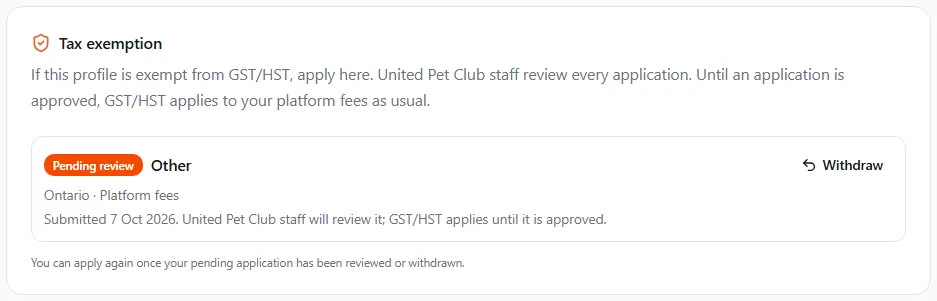
Section titled “After you apply”Your application shows in the card with its status. While it is pending, the card says Submitted (date). United Pet Club staff will review it; GST/HST applies until it is approved. Under it: You can apply again once your pending application has been reviewed or withdrawn. The Apply for tax exemption button comes back once nothing is pending.
The decision shows here, on the card; there is no e-mail about it yet. Until an application is approved, the tax keeps being added as usual.
| Status | What it means |
|---|---|
| Pending review | We have your application and haven’t decided yet. GST/HST still applies. |
| Approved | Your platform fees carry no GST/HST in the region shown. The card shows the dates: Valid from date, Valid from date to date, or No end date. |
| Expired | The approval’s end date has passed. GST/HST applies again; apply again if you still qualify. |
| Not approved | Staff turned the application down. Their reason shows after Reviewer’s note:. GST/HST applies. |
| Withdrawn | You withdrew the application before it was reviewed. |
| Revoked | An approved exemption was ended by staff, with their reason after Reviewer’s note:. GST/HST applies again. |
Each entry also shows the reason you gave, the number if you entered one, and where it applies, for example All of Canada · Platform fees or Ontario · Platform fees.
What an approval changes
Section titled “What an approval changes”- From the next time the tax is worked out, United Pet Club’s fees to this profile carry no GST/HST in the region the exemption covers: plans, add-ons, renewals, recovery plans, our own membership dues, shipping labels, and the platform fees and commissions on your statement.
- Fees already charged keep their tax. An approval doesn’t refund tax you paid before it.
- At checkout the tax line simply doesn’t appear, and your receipt shows no tax.
- An exemption for one province covers fees taxed in that province only. If you move, your fees are taxed where your profile’s address is; apply again for the new province, or ask for All of Canada.
Withdraw an application
Section titled “Withdraw an application”You can withdraw an application while it is Pending review:
- Select Withdraw on the application.
- Withdraw this application? asks you to confirm: United Pet Club staff will no longer review it. You can apply again later.
- Select Withdraw. You’ll see Application withdrawn.
An approved exemption can’t be withdrawn from the card. If it no longer applies to you (you stopped being a reseller, for example), contact us and we’ll end it.
Related
Section titled “Related”- Tax numbers: keep your GST/HST, business or VAT numbers on the profile.
- Taxes on United Pet Club fees: who pays how much, and on what.