

Asking a question
You ask a question (or start a discussion) from one form. The form checks, while you type, whether someone has already asked the same thing, and lets you attach your pet’s details as a card so people can answer for your pet.
Ask a question in the forum bar (/forum/ask), or:
- Ask on the forum home after typing your question (your words carry over to the form);
- Ask in this topic on a topic page (the topic is already chosen);
- Ask about the <breed> on a breed page (the post is linked to that breed: This post will be linked to …);
- Post in this group on a group page you belong to (Posting in the group …);
- Ask the community in your Dashboard’s forum home.
Signed out, the form is replaced by Sign in to ask. Your question appears under your profile and you get a notice when someone answers.
Filling in the form
Section titled “Filling in the form”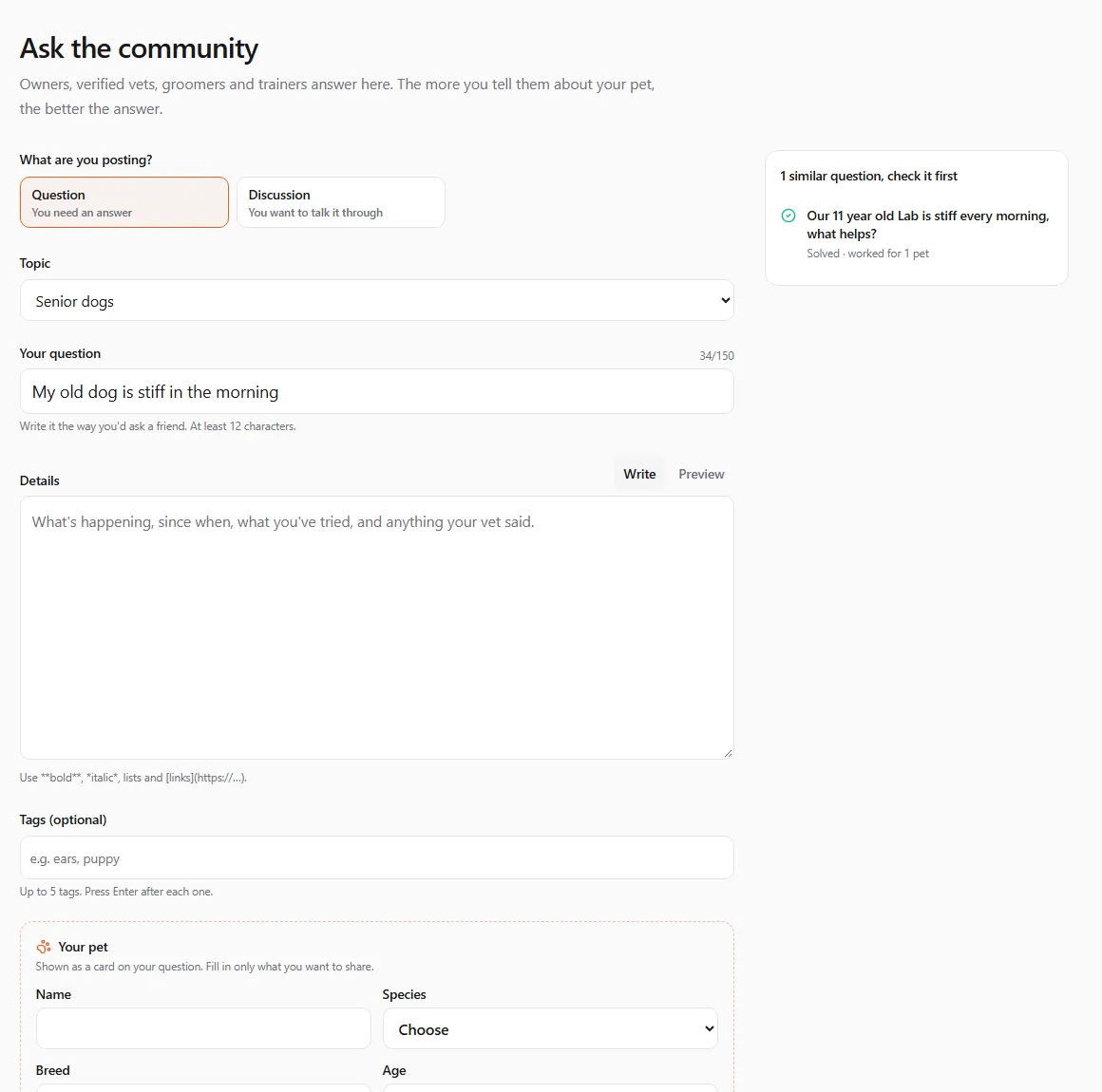
- What are you posting? Choose Question (You need an answer) or Discussion (You want to talk it through).
- Topic: pick the closest one. Each main topic also has an …: anything else choice (for example Dogs: anything else) for posts that fit no sub-topic.
- Your question (or Title for a discussion): write it the way you’d ask a friend. At least 12 characters, at most 150.
- Details: what’s happening, since when, what you’ve tried, and anything your vet said. At least 20 characters. The editor takes bold, italic, lists and links; switch to Preview to check how it looks.
- Tags (optional): up to 5. Press Enter after each one (
ears,puppy…). - Add your pet’s details (optional): Name, Species, Breed, Age (e.g. 5 months) and Weight (e.g. 12 kg). They show as the About my pet card on your question. Fill in only what you want to share; Remove pet details takes the card off.
- Click Post your question (or Start the discussion).
The side card Get a better answer sums it up: say your pet’s age, breed and weight; say what you’ve already tried; ask one question per post.
”Has this been asked?”
Section titled “”Has this been asked?””As you type the question, the box beside the form looks for similar questions: Checking for similar questions…, then either N similar questions, check these first (solved ones are marked) or No similar questions yet. Open one in a new tab: if it already has an answer that worked, you have your answer without waiting.
When it may be an emergency
Section titled “When it may be an emergency”If your words suggest an emergency (poisoning, a seizure, not breathing and similar phrases, in several languages), the form shows this before you post:

You can still post, and every reader of the question sees the same notice. But please call a vet or an emergency clinic first.
Questions for United Pet Club support
Section titled “Questions for United Pet Club support”The UPC Support topic and its sub-topics (Getting started, Profiles and pets, Store and selling, Bookings and services, Websites and domains, Feature requests) are answered in public by the United Pet Club team, whose answers carry a Staff answer badge.
Billing, payments and getting into your account are different: they involve your private details. If your UPC Support question mentions things like a charge, a refund, your card, a subscription, a password or signing in, the form suggests:

Open a private support request takes you to a new request in your Dashboard (see Help & support). Only the support team sees it.
Limits for new members
Section titled “Limits for new members”To keep the forum free of spam, new members post at a gentle pace: under 50 reputation you can ask one question every 10 minutes and up to ten a day. If you hit the limit you see You’re posting quickly. Wait a minute and try again. Verified professionals have no such limit.
After you post
Section titled “After you post”- You follow your own question automatically and get an e-mail and a bell notice for each answer.
- When an answer solves it, accept it, and later tell people whether it worked: see Accepting an answer.
- You can edit or close your question: see Following, flagging, editing and closing.