

Following, flagging, editing and closing
This page covers the controls you use to keep track of the forum and to keep it tidy.
Following
Section titled “Following”Follow appears on a question, a topic page, a tag page and a group page. What you follow shows its new posts in the Following tab of your Dashboard forum home, and the What you follow card there lists everything you follow with Unfollow next to each.
You follow a question automatically when you ask it, answer it, or click Same with my pet. Following a question means you get a bell notice for each new answer. Click Following to stop.
Flagging
Section titled “Flagging”If a question, answer or comment is spam, rude, unsafe or shares someone’s private information, click Flag under it.
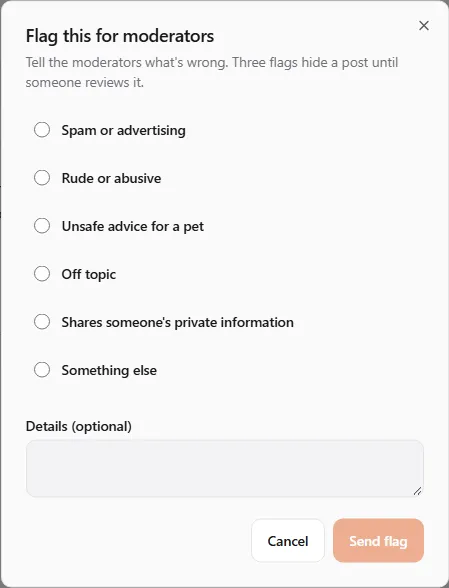
- Choose a Reason: Spam or advertising, Rude or abusive, Unsafe advice for a pet, Off topic, Shares someone’s private information or Something else.
- Add Details (optional) that help the moderators decide (up to 500 characters).
- Click Send flag. The button changes to Flagged.
What happens next:
- Three open flags hide the item from everyone except its author until a moderator reviews it.
- In a group, the group’s owner and moderators decide; everywhere else the United Pet Club team does.
- If a moderator agrees the item was spam, rude or unsafe advice, its author loses 20 reputation.
- You can’t flag your own posts.
Editing
Section titled “Editing”Edit under your question or answer opens it for changes. Add What did you change? (optional) (for example Added the vet’s diagnosis) and click Save changes. Earlier versions stay in the post’s history.
Members with 2,000 reputation can also edit other people’s posts, for example to fix a title or formatting. Group moderators can edit inside their group.
You can’t edit a locked post, and nothing can be edited while your forum access is paused.
Closing and reopening
Section titled “Closing and reopening”A closed post keeps its answers but takes no new ones. It can be reopened.
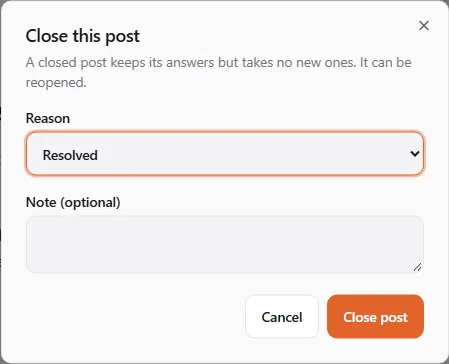
- Your own question: click Close, choose a Reason (Resolved, Duplicate, Off topic, Needs more details, Opinion-based, Other), add an optional note and click Close post. Reopen opens it again.
- Someone else’s question: with 3,000 reputation you see Vote to close. It takes three close votes to close a post (Close vote cast (1 of 3)), and three reopen votes to reopen it (Vote to reopen (1 of 3)).
- Group moderators close posts in their group straight away, and so does the United Pet Club team anywhere.
A closed post shows Closed: <reason> at the top. A post closed as a duplicate links to the post that answers it (Answered in).
Statuses you may see
Section titled “Statuses you may see”| Status | Meaning |
|---|---|
| Open | Takes answers, comments and votes. |
| Closed | Keeps its answers; takes no new ones; can be reopened. |
| Locked | Frozen by a moderator: readable, but nobody can answer, comment, vote or edit. |
| Hidden for review | Out of every list while moderators look at it. Its author still sees it. |
| Deleted | Removed. Its address shows This post was deleted. |
If your forum access is paused (Your forum access is paused. You can still read posts.), you can still read and follow, but not ask, answer, comment, vote or flag until the suspension ends.