

Marking a booking paid in cash
Some clients pay you on the spot. Mark paid outside records that the booking was settled outside the platform, closes any payment request that was still open, and adds the Commission for that booking to your next payout deduction. Only you (the provider) and your staff can do it — a client cannot mark their own booking as paid.
Schedule → Appointments → an appointment (/dashboard/appointments/{id}) → the Payment
card → Mark paid outside. The button appears while the appointment is confirmed, in
progress, completed or a no-show and the booking is not already settled.
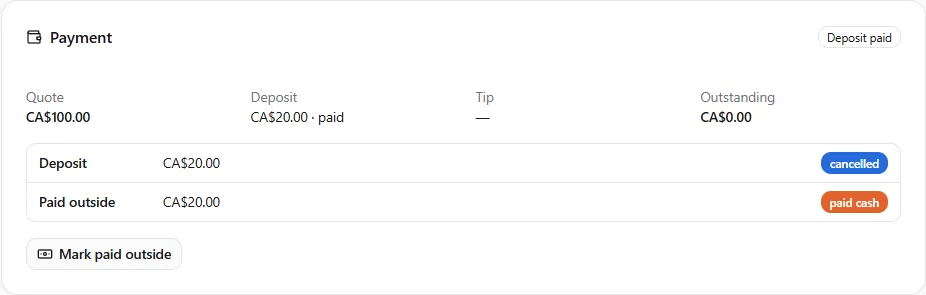
Recording an outside payment
Section titled “Recording an outside payment”- Open the appointment and, on the Payment card, choose Mark paid outside.
- Enter the Amount received in the booking’s currency. The field starts at what is still owed on the quote (the quote minus a deposit already paid); change it to what the client actually handed you.
- Pick the Method — Cash, e-Transfer or Other.
- Read the Commission line: Commission of CA$X is deducted from your next payout (1.25%, minimum CA$0.50). This is what the entry will cost you. For a class it shows the class rate, for example (7%, minimum CA$0.50).
- Choose Confirm.
The dialog explains: Cash, e-Transfer or another method the customer used directly with you. Every booking pays its commission however it is paid — it is deducted from your next payout.
After confirming:
- the Payment card’s badge becomes Paid outside and a Paid outside row shows the amount and method;
- any request still waiting for the client (a deposit or balance) is cancelled — there is nothing more to collect on the platform;
- the Commission appears on your statement in the Platform fees card under Finances → Billing as Commission — booking paid outside, linked to the appointment, and is deducted from your next payout.
The appointment’s history records the entry, including the quoted total, so a booking marked paid for much less than its quote stays visible to the platform.
When the amount is below the reference price
Section titled “When the amount is below the reference price”Each type of service has a reference price. If the amount you enter is lower than the reference price of the booked service (for that size of pet, where you work), the Commission is worked out on the reference price, and the dialog tells you so under the Commission line: The amount is below CA$70.00, the reference price for this service, so the commission is based on CA$70.00 (Platform Agreement 13.5). The Commission line then shows that Commission. Entering the amount you actually received is all you need to do; the booking is never refused.
A booking paid partly by card and partly in cash pays one Commission on its whole total: only the part not already taken from the card payment is deducted. A completed booking left unsettled for 14 days is charged on its quoted price; recording the payment afterwards gives back anything charged twice.
Taking the deposit in cash
Section titled “Taking the deposit in cash”If the client pays the deposit in cash at booking time rather than by card, use the deposit’s Mark deposit paid action instead (the appointment leaves its hold exactly as it would after a card deposit). That records a cash settlement of the deposit amount and its fee in the same way; the balance is still requested at completion and can then be paid by card or marked outside.
A card on file, or a positive balance
Section titled “A card on file, or a positive balance”Because the Commission on a cash booking has no card payment to come out of, the platform needs one of two things before it records the payment: a positive balance on your payout ledger that covers it (clients paying by card through the platform give you that), or a card on file — a $0 verification with your bank, no setup fee, charged only if a month ends with fees owing and no payout to deduct them from. If neither is there, the dialog answers “Add a card to continue” and shows an Add a card — nothing is charged step right where you are; verify the card and choose Confirm again. See Why we ask for a card. If you’ve finished the Schedule setup checklist, your card is already on file. The same check runs when you mark a cash deposit as paid.
What you cannot do
Section titled “What you cannot do”- Mark a booking paid outside before it is confirmed (a booking still on hold for its deposit), or after it is already settled — the button is not offered and the request is refused.
- Mark a booking paid outside with no card on file while your balance cannot cover the Commission — the dialog asks for the card first (above).
- Undo an outside payment. If you recorded the wrong amount, contact support with the appointment; the Commission follows the amount recorded.
Frequently asked
Section titled “Frequently asked”Do I owe the Commission even if the client never pays me? It follows what you record. Record nothing until you are paid.
I never take card payments — how do I pay the fees? They accumulate against your balance and are charged to your card on file at month-end, or you can settle them any time with Pay … now on the Platform fees card under Finances → Billing. See Getting paid for bookings.