

Pet Care Plus
Pet Care Plus is the plan for pet owners. While it is active:
- Recall alerts cover every pet you own: when a food or product your pet uses is recalled, we alert you right away by notification, e-mail, text and push.
- Complete recovery cover goes to up to 3 of your pets, which you choose: every alert channel, and members nearby are alerted if one of those pets goes missing.
Every kind of profile can have it, a personal profile or a business one, and it covers the pets that profile owns.
- Pets → My Pets → a pet → Recovery protection: the Pet Care Plus card for that pet.
- Pets → My Pets → a pet → Diet: the recall notices, and, while you don’t have the plan, the Pet Care Plus card under the diet’s warnings.
- Pets → My Pet IDs (
/dashboard/pet-id): the Pet Care Plus card for all your pets, and Choose covered pets. - Finances → Billing (
/dashboard/finances/billing): the plan’s payments and its card. - The Upgrade button at the top of the Dashboard: Pet Care Plus is one of the things you can buy there.
What it costs
Section titled “What it costs”The price is shown when you choose how to pay, and on the public pricing page. You can pay:
- monthly, renewing each month,
- yearly, renewing each year,
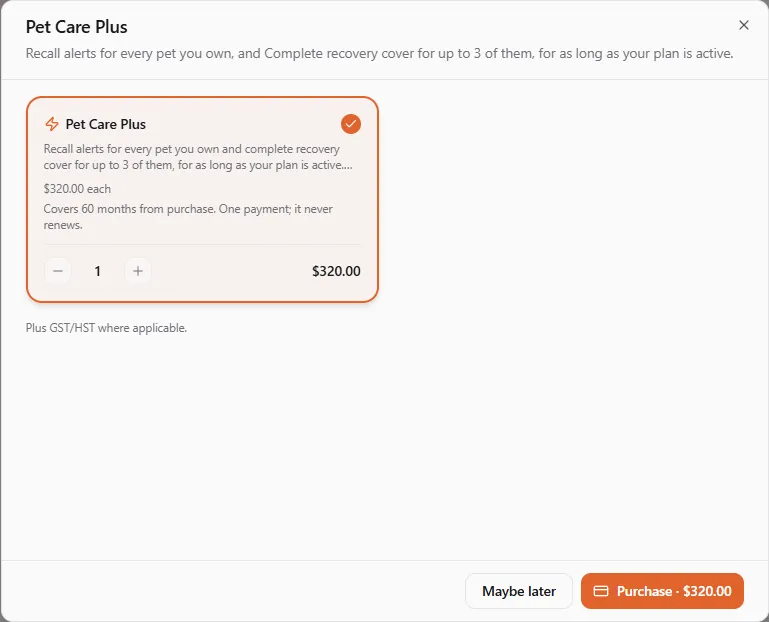
- for 5 years at once: one payment that covers 60 months from the day you buy. It never renews.
Prices are in US dollars. Canadian buyers pay GST/HST on top.
Getting Pet Care Plus
Section titled “Getting Pet Care Plus”-
Open My Pet IDs, or the Recovery protection panel of one of your pets.
-
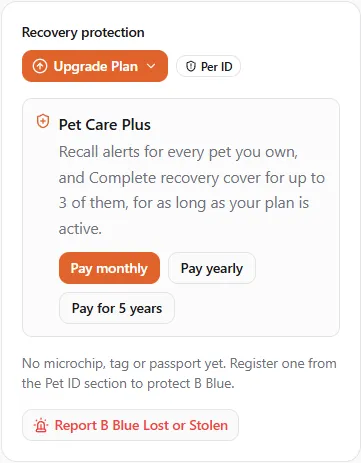
On the Pet Care Plus card, choose Pay monthly, Pay yearly or Pay for 5 years.
-
The purchase window shows the price and, for the 5-year option, how long it covers. Choose Subscribe (monthly or yearly) or Purchase (5 years), then pay with a saved card or a new one.
Your pets are covered as soon as the payment goes through.
Which pets are covered
Section titled “Which pets are covered”Recall alerts cover all your pets. Complete recovery cover goes to up to 3 of them:
- Until you choose, the plan covers your first 3 pets (the ones you registered first that are alive).
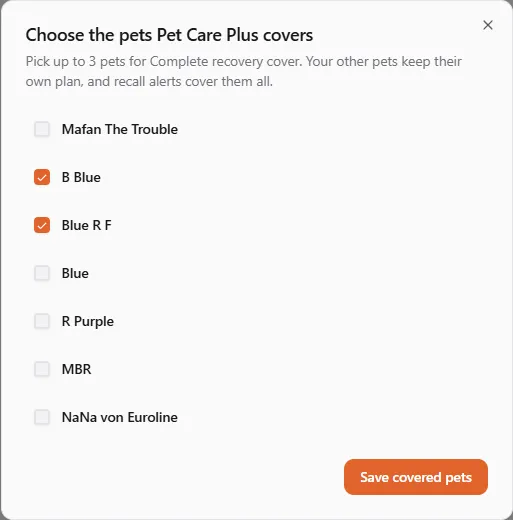
- To choose, open My Pet IDs and select Choose covered pets on the Pet Care Plus card. Tick up to 3 pets and select Save covered pets. Once 3 are ticked, the others can’t be ticked until you untick one. A pet that has passed away is not on the list.
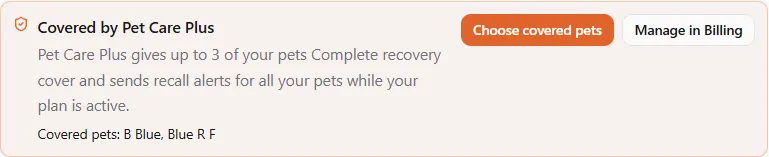
On My Pet IDs, every ID of a covered pet carries a Pet Care Plus label next to its own recovery plan.

On a covered pet’s page, the card says the pet has Complete recovery cover and which plan it goes back to if Pet Care Plus ends.
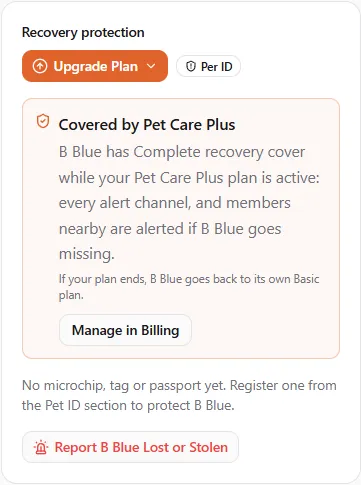
A pet that is not one of your covered pets says so, keeps its own plan, and links to Choose covered pets.
When the plan ends
Section titled “When the plan ends”When you cancel, a payment fails and the plan is suspended, or the 5 years run out, each pet goes back to its own recovery plan: a lifetime plan you bought for its microchip or tag (Plus, Deluxe or Complete) stays with the pet, and a pet without one goes back to Basic. Nothing you bought for a pet is lost.
Your choice of covered pets is kept. If you get Pet Care Plus again, the same pets are covered.
When a pet changes hands
Section titled “When a pet changes hands”Pet Care Plus belongs to you, not to the pet. If you transfer a pet to someone else, it is no longer one of your covered pets, and you can choose another. The new owner’s own Pet Care Plus covers it if it is one of their covered pets.
A lifetime recovery plan bought for a pet’s microchip or tag still goes with the pet. See Pet ID and Pet transfers.