

UPC Accounting (Preview)
UPC Accounting keeps the books of the companies and households you run: bills, receipts, invoices, bank accounts, payroll, fixed assets, reports and year-end, one set of books for each entity. Business profiles and personal profiles can both use it, and one account can keep the books of many entities.
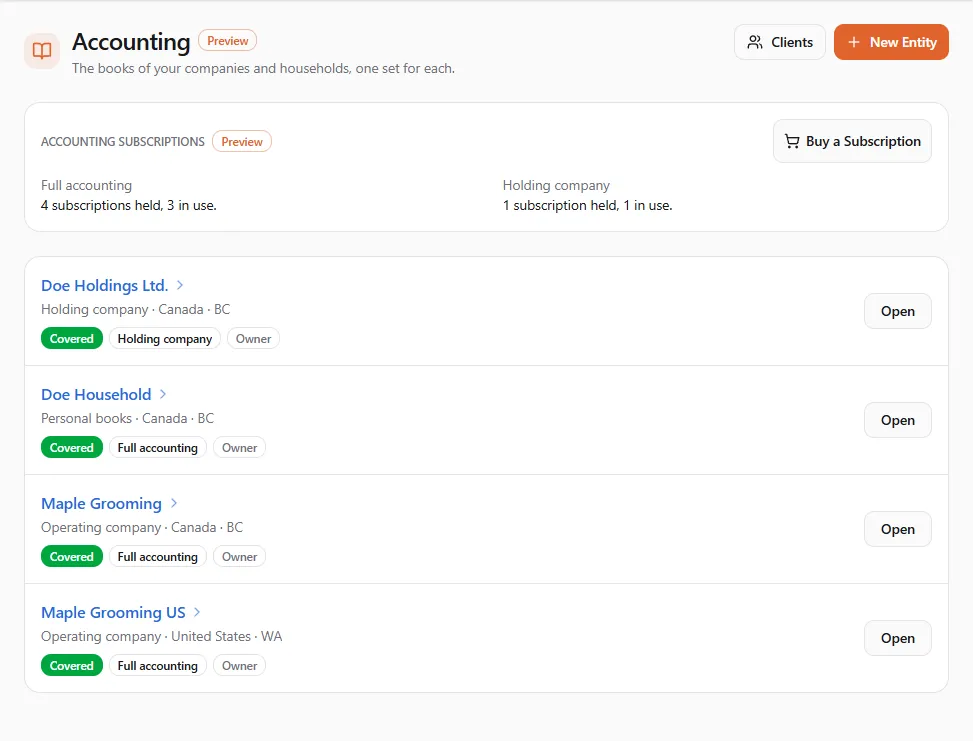
Finances → Accounting → Entities (/dashboard/finances/accounting) lists the entities whose books you can open,
with a New Entity button and the Accounting subscriptions panel. Finances → Accounting → Clients
(/dashboard/finances/accounting/clients) lists books other people shared with the profile you are acting as.
Entities and books
Section titled “Entities and books”An entity is a company or household whose books you keep. You pick its kind when you create it:
| Kind | What it is |
|---|---|
| Operating company | A company that sells, serves customers or employs people. |
| Holding company | Owns other companies or investments. Its books are kept by hand: no linked profile and no automatic posting. |
| Asset-holding company | Holds property, vehicles, equipment or other assets. |
| Branch company | A separate legal company owned through another of your entities. |
| Sole proprietorship | A business you run in your own name. |
| Partnership | A business owned by two or more partners. |
| Nonprofit | A charity, rescue or society. |
| Personal books | Household income, spending and what you own. |
Each entity has its own books: its own currency, fiscal year, chart of accounts, bank accounts, cash, assets, payroll and reports. A salon chain whose salons are not separate companies is one entity, with each salon added as a location, so reports can show profit and loss by location.
An entity can be linked to one of your UPC profiles. Its UPC activity — marketplace sales, payouts, invoices, membership dues, donations, the UPC fees it pays — then posts into the books automatically. An entity can also have no linked profile; you then enter everything by hand or import it.
What it costs
Section titled “What it costs”Each entity’s books need their own subscription, billed to the profile that owns the entity:
- Full accounting — for every kind of entity except holding companies: automatic posting from UPC, documents, banking, payroll and reports. Monthly or yearly.
- Holding company — a simpler ledger kept by hand, up to 500 entries a year.
The price is shown at checkout. During the Preview, prices are Preview prices: they rise at full release, with at least 30 days’ notice, and you can cancel before then. If you already subscribe when the Preview ends, you finish the term you paid for at the Preview price. There is no free trial. RetrieverAI features (receipt scans, category suggestions, the assistant) spend your RetrieverAI credits.
If a subscription stops covering an entity’s books, they stay open for a short grace period and then turn read-only: you can still read them, run reports and export everything, but nothing new can be recorded until a subscription covers them again. Nothing is deleted.
A tour of an entity’s books
Section titled “A tour of an entity’s books”Open an entity and its tabs appear across the top. You only see the tabs your access includes.
| Tab | What you do there | Page |
|---|---|---|
| Overview | Facts about the books, history from UPC, the nightly books check, quick links | Setting up the books |
| Documents | Bills, receipts, invoices, credit notes, journals; scan a receipt | Documents |
| Banking | Bank, card and cash accounts, statements, matching, rules, reconciliation | Banking and reconciliation |
| Payroll | Employees, pay runs, remittances, year-end slips | Payroll |
| Parties | Customers, suppliers, contractors | Parties, accounts and categories |
| Chart of Accounts | Accounts and entry types (categories) | Parties, accounts and categories |
| Fixed Assets, Schedules | Asset register and depreciation; deferrals, loans, recurring entries | Fixed assets, Schedules |
| Inventory, Deposits, Gift Cards | Stock, customer deposits, gift cards (not for holding companies) | Inventory, Customer deposits, Gift cards |
| Notes | Notes and files on entries | Notes and attachments |
| Group | Consolidated statements across your entities | Group consolidation |
| Reports | Statements, ledgers, customers, suppliers, tax form | Reports |
| Import, Export | Bring in another program’s books; take yours out | Importing and exporting |
| Year-End | Close a fiscal year, opening balances, currency revaluation | Year-end and currencies |
| Settings | Fiscal year end, time zone, period lock, your own exchange rates | Setting up the books |
| Access | Who may open these books, and what they may do | Entities and access |
Getting started
Section titled “Getting started”- Create the entity and decide who has access.
- Set up its books: currency, fiscal year, history, the Accounting Terms and a subscription.
- Add your bank accounts and enter opening balances.
- Record documents, import statements, and reconcile.
- Check the reports with your accountant.
If you are an accountant or bookkeeper someone invited, start at Books shared with you.
If something went wrong
Section titled “If something went wrong”- “This entity isn’t available” — it doesn’t exist, or your access to it ended. Ask the owner.
- “Your access couldn’t be confirmed” — the books could not check your access at that moment. Try again in a moment.
- The books are read-only — the banner says why: the subscription isn’t paid, the entity is closed, or its kind changed and needs the matching subscription. Reports and exports still work.
- “New terms to accept” — the Accounting Terms changed; see When the Accounting Terms change.