

Owner loans — terms, payments and the agreement
Owner loans are loans between your business and one of its owners, on written terms: an amount, a yearly rate and a payment schedule, with late fees and late interest if you want them. Interest, late charges and reminders follow the schedule by themselves; you record the payments.
It works both ways: an owner lends to the business (the business pays them back), or the business lends to an owner (the owner pays the business back). Money an owner paid in without terms is tracked on Owners instead.
Finances → Owner loans in the Dashboard (/dashboard/finances/loans), while you act as the business. Add the
owners on the Owners page first.
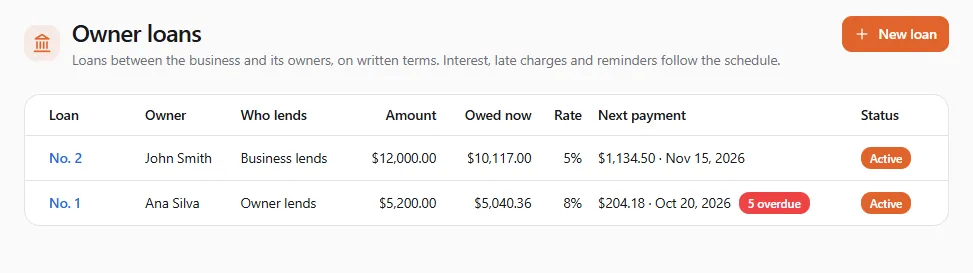
The list shows each loan’s Owner, Who lends, Amount, what is Owed now, the Rate, the Next payment (with how many are overdue) and its Status: Draft, Active, Paid off, In default, Forgiven, Converted to equity or Cancelled.
Set up a loan
Section titled “Set up a loan”Select New loan. The schedule sits beside the form on a wide screen (under it on a narrow one) and updates as you type.
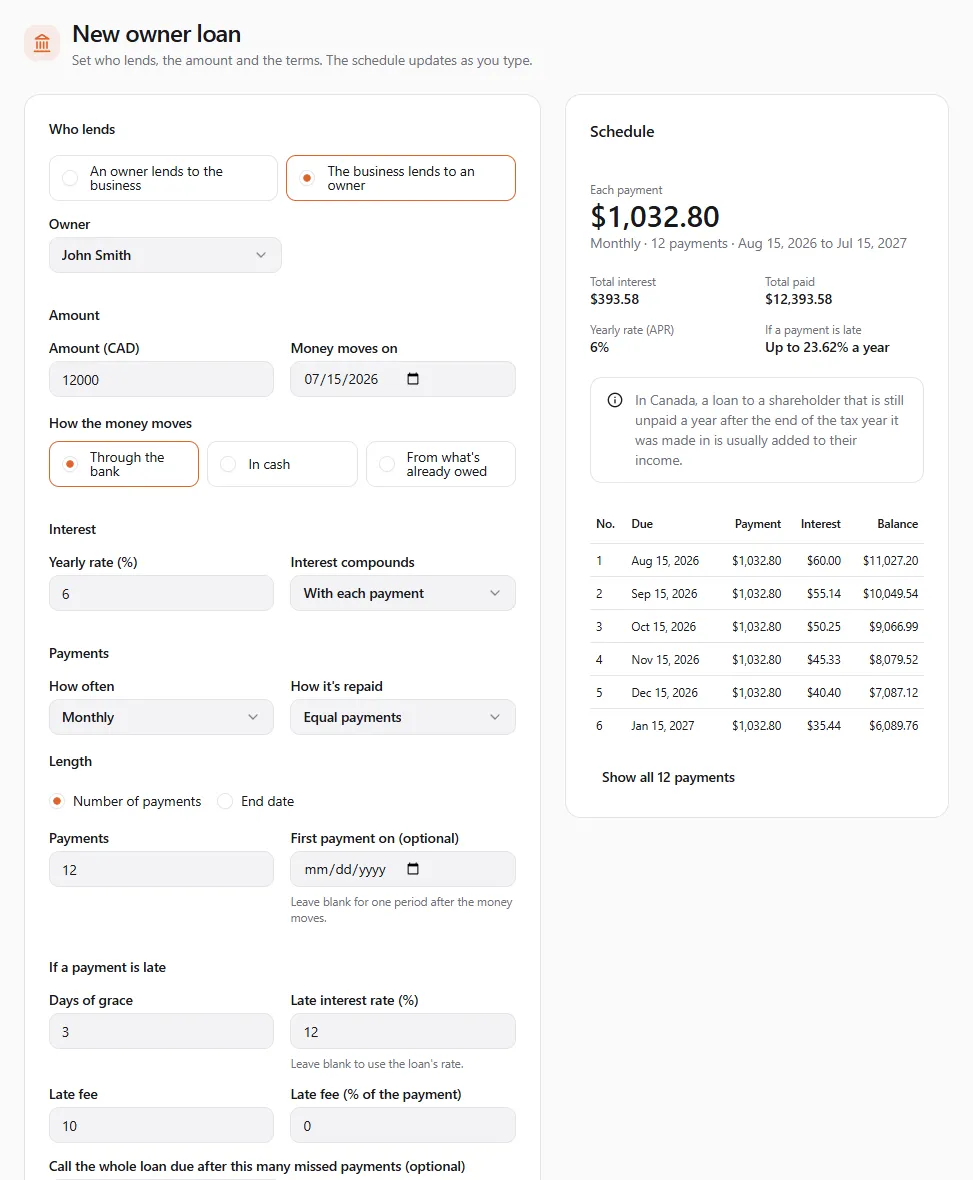
- Who lends: An owner lends to the business or The business lends to an owner, then the Owner.
- Amount and Money moves on: the day the money changes hands.
- How the money moves: Through the bank, In cash, or From what’s already owed. The last one moves no new money: the balance the owner already has with the business becomes this loan, so an informal loan gets written terms.
- Interest: the Yearly rate (%) (0 is fine) and how Interest compounds: With each payment, Yearly, Twice a year, Monthly or Daily.
- Payments:
- How often: Weekly, Every two weeks, Twice a month (pick the two days), Monthly, Every two months, Quarterly, Twice a year, Yearly or One payment at the end.
- How it’s repaid: Equal payments, Same principal each time, Interest only, principal at the end, or Payments you set (your own dates and amounts; the last one is adjusted so the balance ends at zero).
- Length: a Number of payments or an End date. First payment on (optional): leave it blank for one period after the money moves.
- If a payment is late (all optional):
- Days of grace before a payment counts as late.
- Late fee (an amount) and/or Late fee (% of the payment), charged once per late payment.
- Late interest rate (%) on overdue amounts. Leave it blank to use the loan’s rate.
- Call the whole loan due after this many missed payments (optional).
- Paying early: Keep the payment, end sooner, or Keep the dates, pay less each time.
- Details (optional): the Purpose, any Security pledged (blank = unsecured) and Notes.
The schedule
Section titled “The schedule”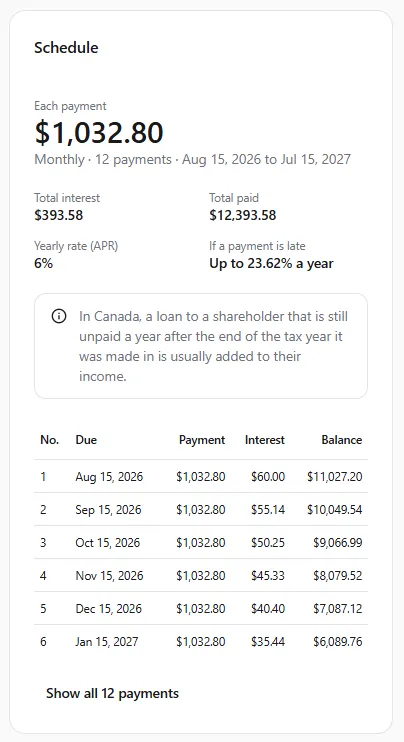
- Each payment and the dates, Total interest and Total paid.
- Yearly rate (APR), and If a payment is late: Up to …% a year: the late interest plus the late fee spread over one payment period, the most a late payment could cost.
- The first six payments, with Show all … payments for the rest. If the first period is longer than the others, a note shows the extra days of interest.
- Notes that apply to your terms. In Canada, a loan to a shareholder that is still unpaid a year after the end of the tax year it was made in is usually added to their income. In the US, states cap interest rates, so check yours.
Select Save draft to finish later, or Save and start the loan.
Start the loan
Section titled “Start the loan”A draft puts nothing on the books. Start the loan records the money as lent on its date and starts the schedule. If the loan really started earlier and some payments were already made, add them under Payments already made (Add a payment) so no late charges are posted for them.
The loan’s page
Section titled “The loan’s page”Select a loan’s number in the list.
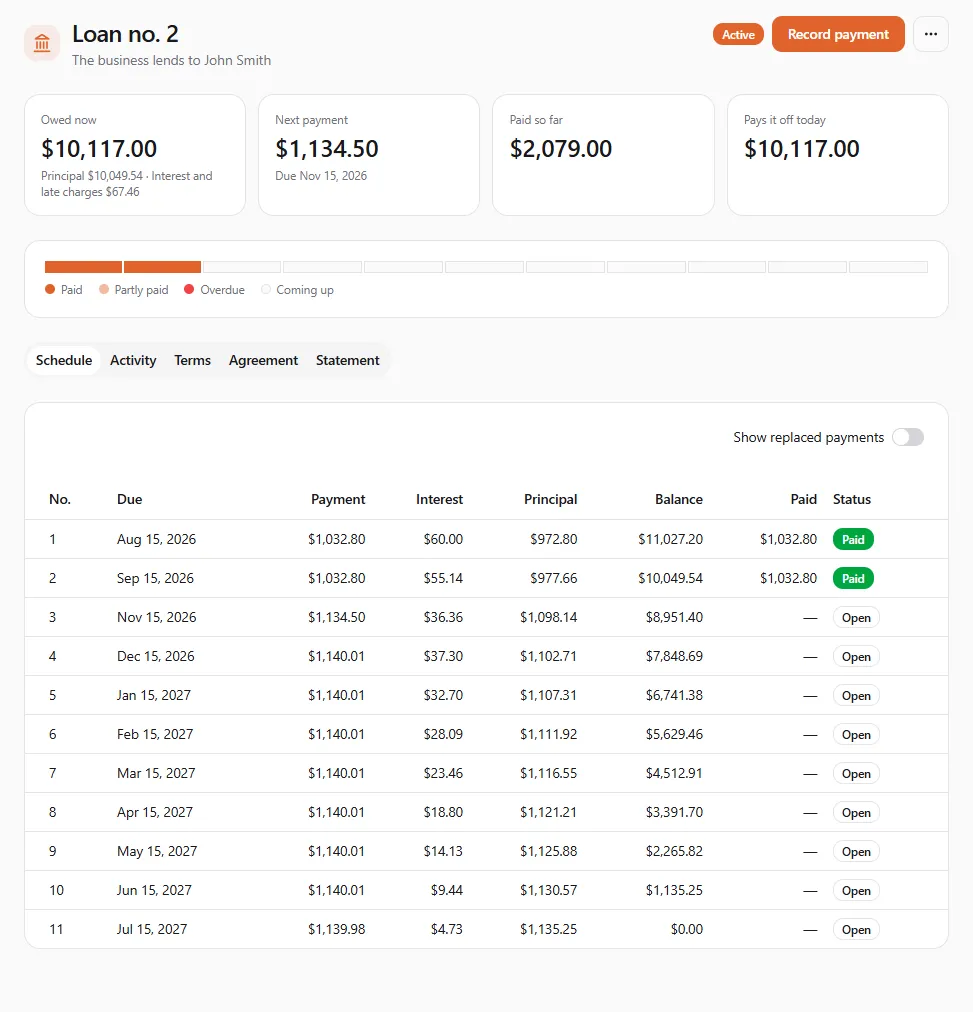
- Owed now (principal, interest and late charges), Next payment (in red with the overdue amount when payments are late), Paid so far and Pays it off today.
- The payment strip: one block per payment, Paid, Partly paid, Overdue or Coming up.
- Tabs: Schedule (every payment; Show replaced payments after a change of terms), Activity (every interest charge, late charge and payment, with the balance after), Terms (each version of the terms), Agreement and Statement (by year: interest, late charges and payments).
Record a payment
Section titled “Record a payment”Select Record payment.
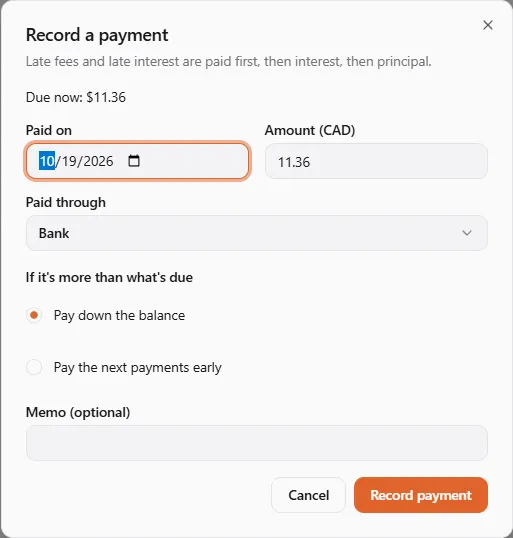
- Paid on and Amount. Due now shows what’s owed today, overdue payments and late charges included.
- Paid through: Bank or Cash.
- If it’s more than what’s due: Pay down the balance, or Pay the next payments early.
- Memo (optional), then Record payment.
Each payment pays late fees first, then late interest, then interest, then principal. Payments go in date order: you can’t date one before the last payment you recorded, or in the future.
Late payments
Section titled “Late payments”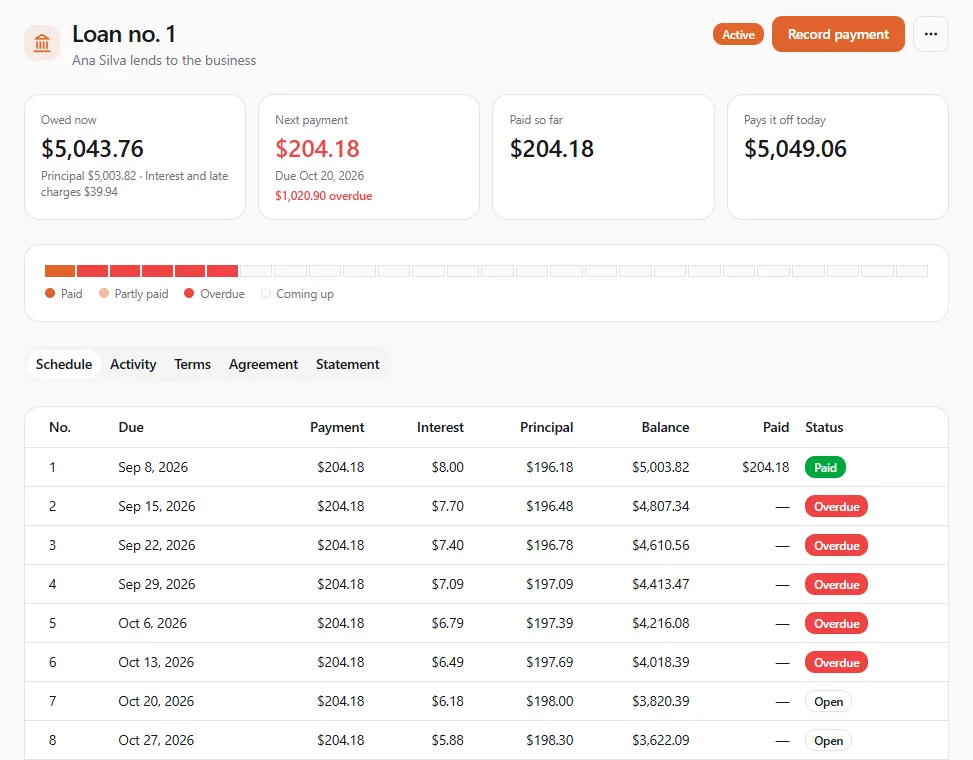
- A payment is overdue the day after its due date.
- After the days of grace, the late fee is charged once for that payment.
- Late interest runs on the overdue amount, day by day, until it’s paid.
- If you record a payment late with its real, earlier date, the late charges that wouldn’t have applied are taken back and worked out again, so the books end up as if you had recorded it on time.
To let a late fee go, open ⋯ → Waive late fees, enter the Amount to waive (at most the late fees still owed) and an optional Reason.
Reminders
Section titled “Reminders”The borrower gets bell notices (Other tab): Loan payment due soon up to three days before a payment, and Loan payment missed after one is missed. For a loan from an owner, the business is the borrower. For a loan to an owner, the reminder goes to the owner’s own UPC profile, if they have one linked. Reminders are written in the language of the account that owns that profile (Account → Preferences → Language & region).
Change the terms
Section titled “Change the terms”Open ⋯ → Change terms to lower the rate, stretch the length or change the frequency.
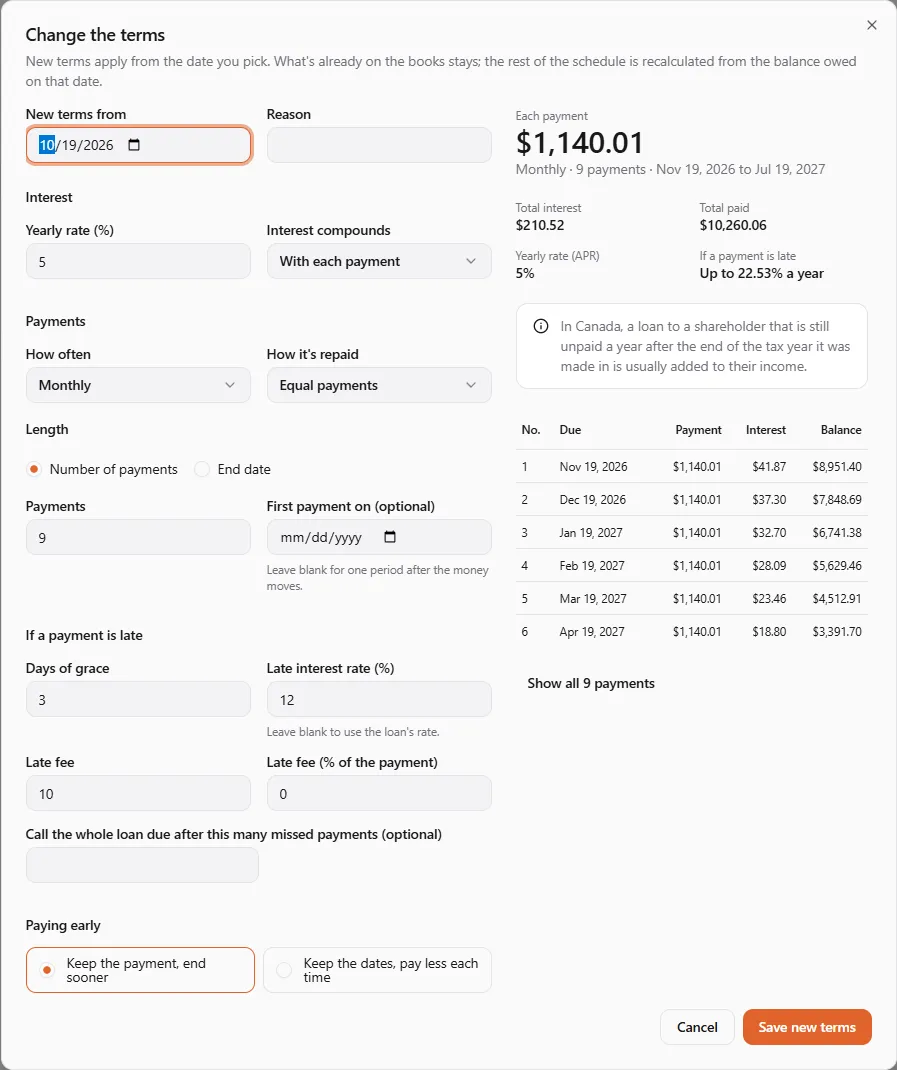
Pick New terms from (today or earlier, and not before the last payment or change) and a Reason, set the new terms, check the new schedule and select Save new terms. Everything already on the books stays. The rest of the schedule is recalculated from what’s owed on that date, any overdue payment included, and the Terms tab keeps each version.
End a loan
Section titled “End a loan”A loan that is paid in full ends by itself (Paid off). To end it otherwise, open ⋯ → End loan, pick the date (On) and How it ends:
| Choice | What it means |
|---|---|
| Convert it to the owner’s equity | What the business owes becomes the owner’s investment, Into Share capital or Owner’s equity. Only for a loan from an owner. |
| Forgive it | The lender gives up what is still owed. Tick I understand a forgiven loan is usually taxable to the owner. |
| Call it in default | The whole balance falls due now, and late interest keeps running. |
Interest is posted up to the date first. Select End the loan.
The loan agreement
Section titled “The loan agreement”The Agreement tab prints the terms and the full schedule, with a signature block for each party.
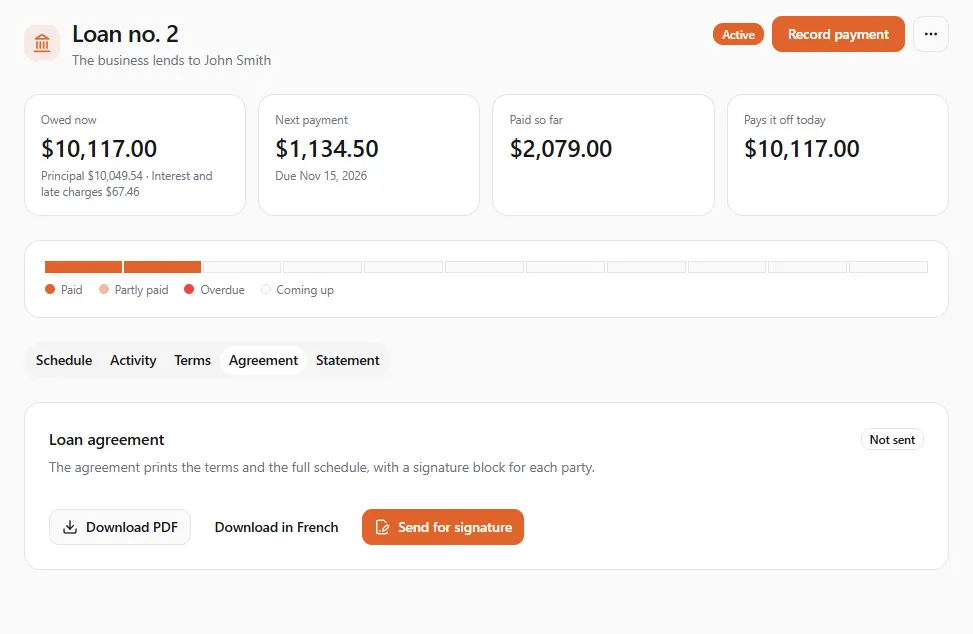
- Download PDF (or Download in French) to print it and sign on paper.
- Send for signature sends it to both parties to sign electronically. Pick the Language and add a Message (optional). Sending uses one contract credit from the business. If it has none left, you’re offered contract credits to buy.
- Before sending, add the business’s legal name on Owners (How the business is owned), and link the owner’s UPC profile or add their email.
- The status shows Not sent, Out for signature, Signed, Declined, Voided or Expired. Select Check signing status to refresh it. After you change the terms, the page tells you the signed terms are older: send the new terms for signature.
The agreement is prepared from the terms you entered and isn’t reviewed by United Pet Club. Check it with your accountant and the law where you are.
If something went wrong
Section titled “If something went wrong”| You see | What to do |
|---|---|
| Payments are recorded in date order. Pick a date on or after the last payment. | Record payments oldest first. |
| A payment can’t be dated in the future. | Use today or an earlier date. |
| That’s more than it takes to pay the loan off. | Lower the amount to Pays it off today at most. |
| New terms can’t start before the last payment or change. / New terms start today or earlier. | Pick a date between the last payment and today. |
| Only a loan from an owner can become equity. | Forgive it or call it in default instead. |
| Add the business’s legal name on the Owners page first. | Fill in Legal name under How the business is owned. |
| Link the owner’s UPC profile or add their email on the Owners page first. | Edit the owner on Owners. |