

Group consolidation
If you run more than one company (a holding company, an operating company, a company that holds the building, a branch in another country), group consolidation shows them as one: a column for each company in the parent’s currency, an eliminations column, and the consolidated total. Consolidation never posts anything: the statements are worked out each time you open them.
Finances → Accounting, then the parent company, then the Group tab
(/dashboard/finances/accounting/{entity}/group). It has three tabs: Groups, Intercompany and
Ownership.
The Group tab shows only when your access includes View reports: “Consolidated statements are reports. Ask the owner for the Viewer role or higher.”
Before you start: ownership
Section titled “Before you start: ownership”The group is built from who owns whom. Ownership shows what the company Owns and who it is Owned by, with each Share (%) and the date Since. To add one, choose Add Subsidiary, pick the Company, its share and the date it holds from. End closes a link from today.
“Ownership is managed by the owners and admins of the account that runs this company.” Companies must belong to the same account. See Entities and access.
Creating a group
Section titled “Creating a group”-
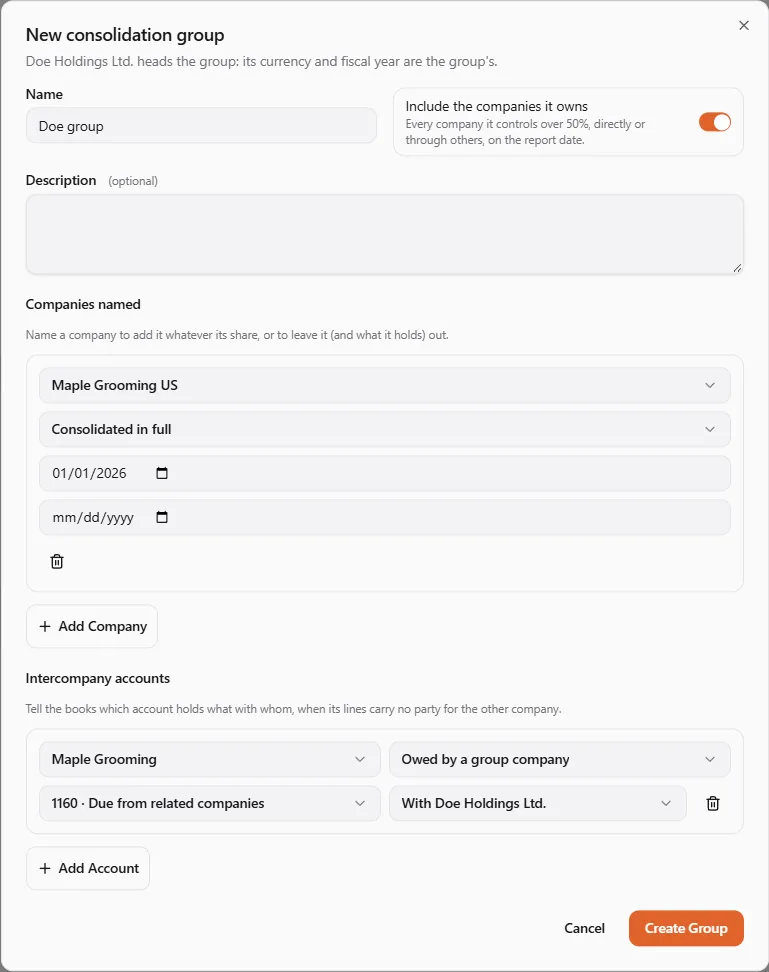
On Groups, choose New Group. The company you are in heads the group: “its currency and fiscal year are the group’s.”
-
Enter a Name and a Description.
-
Leave Include the companies it owns on to take in “Every company it controls over 50%, directly or through others, on the report date.”
-
Under Companies named, add a company (Add Company) to change that:
- Consolidated in full: add a company whatever its share, for example a sister company under the same owners;
- Left out: leave a company out, and with it what it holds.
Give each one the date it applies from and, optionally, until.
-
Under Intercompany accounts, tell the books which account holds what with whom, when its lines carry no party for the other company (see Intercompany amounts).
-
Choose Create Group.
A company owned 50 % or less is left out by default: its investment stays at cost in its owner’s books, and its dividends count as ordinary income.
Reading the consolidated statements
Section titled “Reading the consolidated statements”Open a group from Groups.
Members shows, on an As of date, each company in the group, how it is Included (The parent, Consolidated in full), the share Held by the group, the share Owned by the parent (through every chain), the Non-controlling share, and the date it Joined.
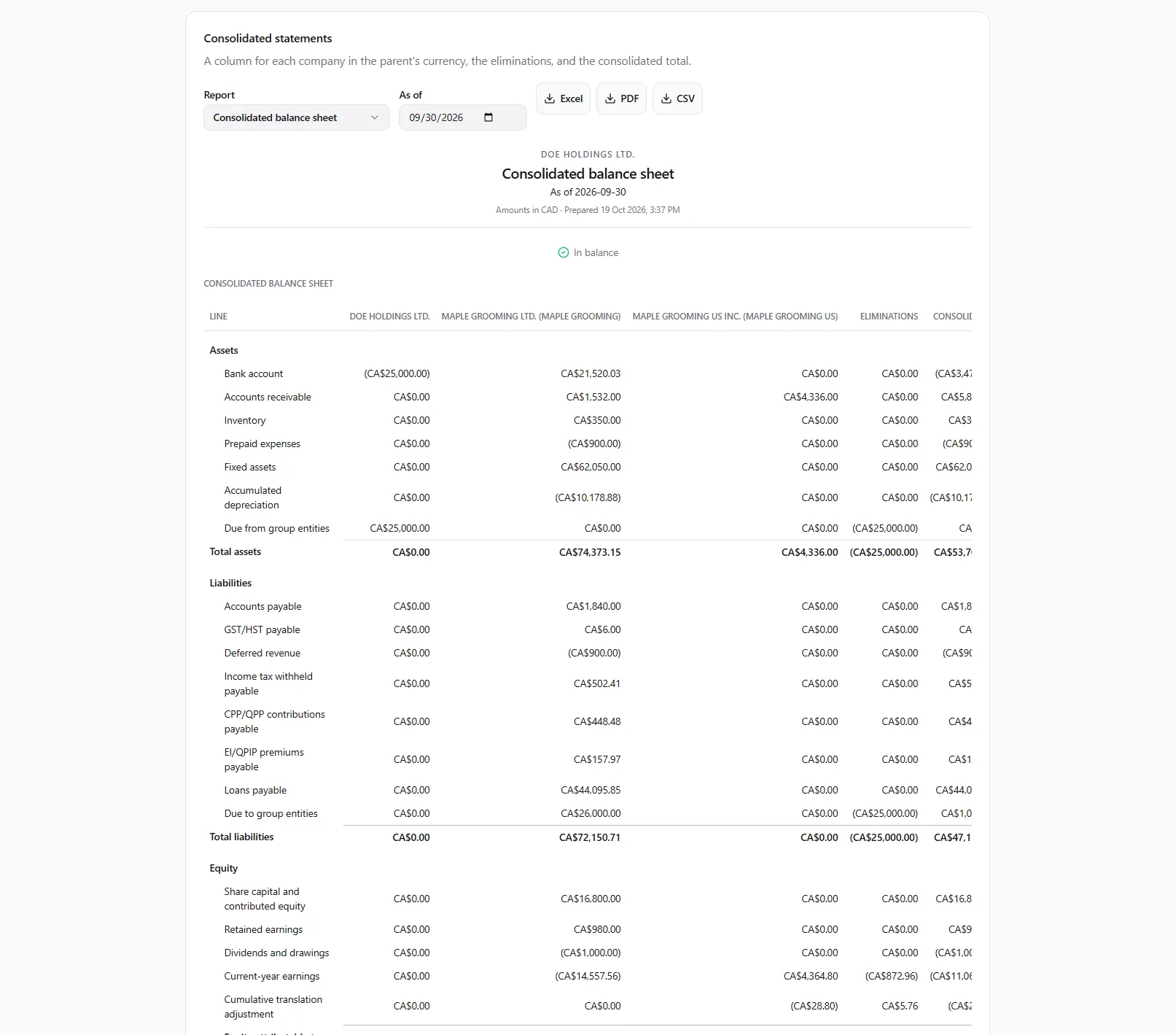
Consolidated statements gives “A column for each company in the parent’s currency, the eliminations, and the consolidated total.”
- Pick the Report: Consolidated balance sheet, Consolidated profit and loss or Intercompany balances.
- Choose the As of date (balance sheet) or From and To (profit and loss, intercompany).
The statements show on screen. Each one ends with a check that it balances, the eliminations made, any unmatched intercompany amounts, the members and the rates used.
What is eliminated
Section titled “What is eliminated”| Elimination | What happens |
|---|---|
| Balances between companies | what one company is owed by another comes off against what the other owes it; any difference is listed as unmatched |
| Charges between companies | revenue one company recorded from another comes off against the other’s expense |
| Dividends inside the group | dividends a company received from another member come out of income |
| Investment in a subsidiary | the owner’s investment comes off against its share of the subsidiary’s equity when it joined; what is left is goodwill |
Companies in other currencies
Section titled “Companies in other currencies”Every amount is shown in the parent’s currency. Assets and liabilities use the rate on the balance sheet date; income and expenses the average rate of the period; share capital and dividends the rate on their own dates. The difference shows as a cumulative translation adjustment.
Rates come from the parent’s own exchange rates first, then published rates. If a currency has no rate at all, the report stops: “No exchange rate for …”. Add the rate in the parent company’s settings: see Year-end and currencies.
Non-controlling interests
Section titled “Non-controlling interests”When the group owns less than all of a company, the part owned by others shows as non-controlling interests in equity, and net income is split between the owners of the parent and the non-controlling interests.
Intercompany amounts
Section titled “Intercompany amounts”The books recognize an amount as intercompany when its line names a party that stands for the other company, or when the group names its account under Intercompany accounts. The roles are Owed by a group company, Owed to a group company, Revenue from a group company, Charges from a group company, Investment in a subsidiary, Dividends from a group company and Dividends declared. An amount on an intercompany account with no other company identified is shown, never eliminated.
Posting an intercompany entry
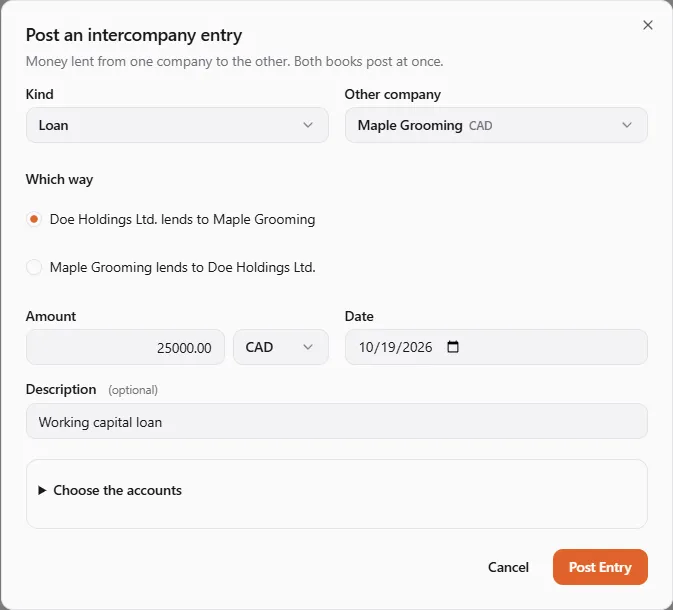
Section titled “Posting an intercompany entry”The surest way to keep both sides matched is to post them together. Post Intercompany Entry writes a matching entry in both companies’ books at once, or in neither.
- On the Group tab, choose Post Intercompany Entry.
- Pick the Kind: Loan, Recharge (fees, rent or costs one company charges the other), Dividend, Settlement (paying back what one owes the other) or Capital contribution.
- Choose the Other company and Which way (for example “{self} lends to {other}”).
- Enter the Amount, Currency, Date and Description.
- Under Choose the accounts, leave each company’s chart default or pick the accounts on each side.
- Choose Post Entry. “Intercompany entry posted in both companies’ books.”
You need the journals permission (Adjust journals, rates and opening balances) in both companies’ books, and both books must be open on that date. The two companies must belong to the same account or be linked by ownership. Intercompany lists the entries this company is part of. To undo one, post the opposite entry (or a settlement): an intercompany entry can’t be voided yet.
Who can do what
Section titled “Who can do what”| To do this | You need |
|---|---|
| See the Group tab and its groups | View reports on the parent |
| Read a group’s members and statements | View reports on every company in the group |
| Create, edit or retire a group | Change settings on the parent |
| Post an intercompany entry | the journals permission on both companies |
If even one company in the group isn’t open to you with report access, you see none of the group’s figures: “You need report access to every company in this group.” Ask the owner of each company for the Viewer role or higher.
Not included yet
Section titled “Not included yet”- The equity method for companies owned 20 to 50 %.
- Fair-value adjustments at acquisition, goodwill impairment, and unrealized profit on stock or assets sold inside the group.
- Companies with a different year end: every member is cut on the parent’s calendar.
- Changes in a holding during a period: the present share applies to the whole period, and a company that left the group during a period is left out of it.
If something went wrong
Section titled “If something went wrong”“You need report access to every company in this group.” See Who can do what.
“A company in this group has no books yet.” Set up its books, or leave it out of the group.
“No exchange rate for …” Add a rate from that company’s currency to the parent’s on or before the report date.
“The entry wasn’t posted in either company.” Nothing was written to either book. Check the dates (both books must be open), your permission on both companies, and the accounts, then try again.