

Why we ask for a card
The booking software is free, and most of what you do never needs a card. A card on file is asked for when a fee could come due that cannot be taken out of a payout. That is also why your Schedule asks for one before you take bookings: a booking paid in cash still owes its small fee, and the card is there for when no payout can cover it. Adding it is a $0 verification — your bank confirms it is really you (3-D Secure), no money moves, there is no setup fee and nothing to refund. Nothing is charged until a fee is actually due, and every charge shows on your fee statement.
Finances → Billing (/dashboard/finances/billing), the Card on file card at the top. The
same card appears under Account → Billing → Funding sources.

When a card is needed — and when it is not
Section titled “When a card is needed — and when it is not”| You are… | Card needed? |
|---|---|
| Signing up, setting up your profile, listing services | No |
| Using your Schedule: taking bookings, the calendar, staff, vehicles, the 3 included text reminders | Yes — it’s step 3 of the Schedule setup checklist, with connecting payouts and agreeing to the service fees. Until the date United Pet Club announces, the checklist only asks; from that date, new bookings wait for it. Bookings already made are never affected |
| Taking card payments from clients through the platform | No — the fee comes out of your payout |
| Marking a booking paid outside (cash, e-Transfer, other) — including a cash deposit | Only if your balance can’t cover the fee (see below) |
| Buying add-ons, credit packs or the Pro plan | The card you pay with at checkout is saved for you — no extra step |
| Turning on platform video for a service | Only if your balance can’t cover it |
| Adding businesses and sending messages in Sales & Marketing | Only if neither your balance nor your prepaid balance can cover the fee |
| Connecting an app — a WordPress booking plugin, a booking website or an AI agent | Yes, always — the app connection is free, but it needs a valid card on file (a positive balance does not count) |
The balance rule. When your clients pay by card through the platform, the fees are simply deducted from your payouts and your balance stays positive. That positive balance also covers the fee on the occasional cash booking — so if that is how you work, a cash booking never asks you for a card. (Your Schedule still asks for one once, in its setup checklist.) You are asked only when a fee would accrue with nothing to take it from: a cash booking while your balance is zero or negative, for example.
Apps are the exception. A booking plugin, website or AI agent books and changes appointments for you without anyone watching, so connecting one always needs a valid card on file, whatever your balance. Without one, the Allow button on the app’s connection page stays off and Settings → Apps links you here. If the card is removed or stops being valid, your apps stop working within about a minute, and they work again as soon as a valid card is back. You don’t need to reconnect them. Nothing is charged for the connection itself.
Adding a card
Section titled “Adding a card”- Go to Finances → Billing and choose Add a card (or, when a screen asks for it, Add a card — nothing is charged right there in the prompt).
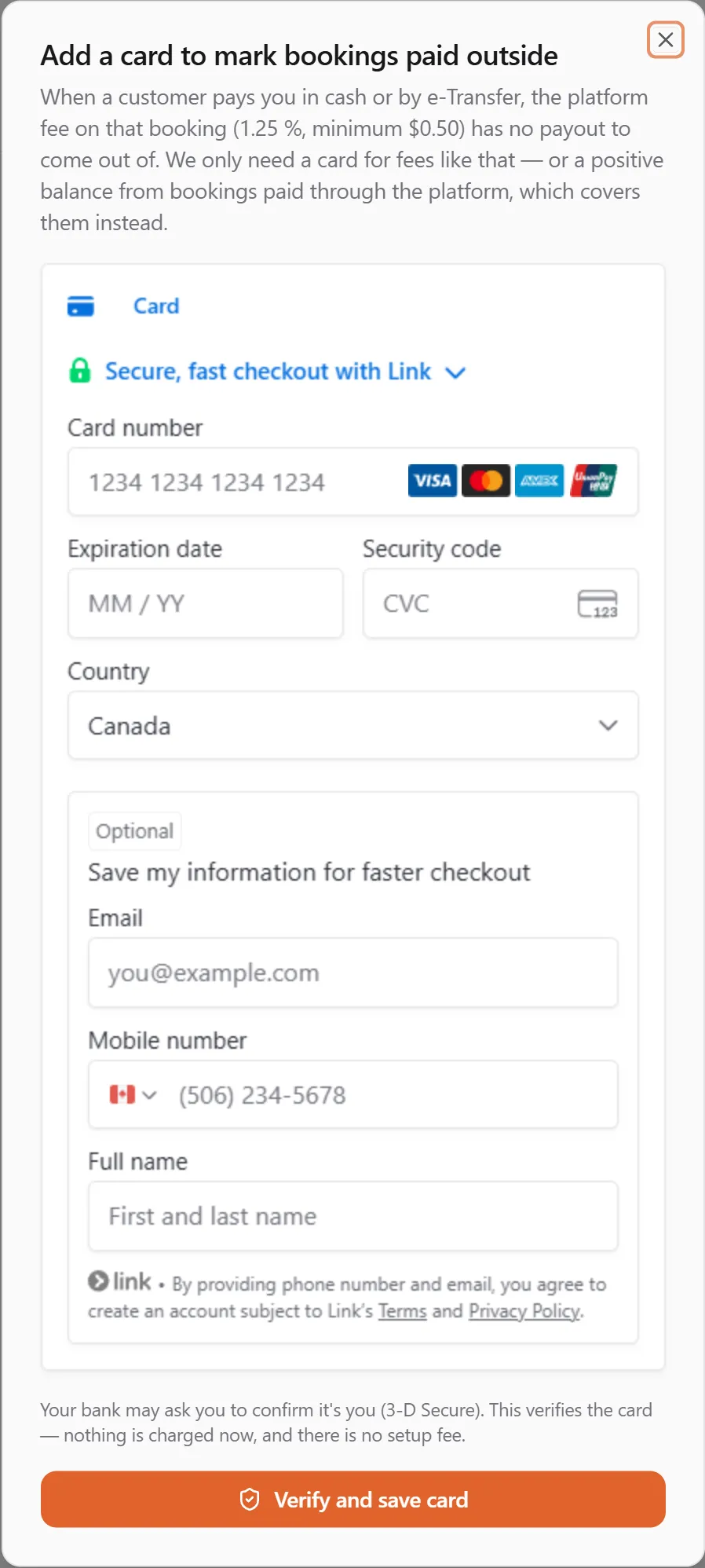
- The dialog explains why the card is needed for that purpose. Enter the card in the secure form. The form is hosted by Stripe; we never see the card number.
- Choose Verify and save card. Your bank may show its usual confirmation step (a push notification, a text code, or a “confirm it’s you” page). Complete it.
- The dialog waits for your bank’s answer, then shows “Visa ···· 4242 is now on file.” The card badge reads Verified.
Nothing is charged. If your bank declines the verification you see “We couldn’t verify that card” — nothing was charged; try another card or contact your bank.
What the badge means
Section titled “What the badge means”| Badge | Meaning | What to do |
|---|---|---|
| Verified | the card can be charged for fees when they come due | nothing |
| Expires soon | the card expires within 60 days | replace it when your bank sends the new one (many banks renew it for us automatically) |
| Needs re-verification | your bank asked to confirm it’s you again before we can charge the card | Re-verify — the same $0 check, same card |
| Declined | the last fee charge was declined | Replace the card, then pay any fees owing from the Platform fees card on Finances → Billing |
| Expired | the card has expired | Replace |
Replacing or removing the card
Section titled “Replacing or removing the card”- Replace verifies the new card the same way and retires the old one the moment the new one is verified. A failed verification leaves your current card in place.
- Remove takes the card off file. It is refused while fees are owing or while a Pro plan or add-on subscription still bills that card — settle the fees or end the subscription first. With no card on file you can still do everything else the free account offers; you will be asked for a card again the next time a fee cannot come out of a payout, and your Schedule’s setup checklist shows its card step again (once the checklist is required, new bookings wait for a card).
When the fee is charged
Section titled “When the fee is charged”Fees are normally deducted from your next payout. Only when a month ends with fees owing and no payout in that month is the card on file charged, once, for the outstanding amount — you will see “Fees paid by card” on your fee statement (the Platform fees card on Finances → Billing).
Small amounts are not charged every month, because every card charge costs a processing fee. We charge your card once you owe $10, or at least every 3 months, whichever comes first. Less than that is carried over to the next month (the Platform fees card says Carried to next month) and is still netted from your next payout if one comes first. If what you owe reaches your credit limit ($25 at first, rising to $200 as you have good months), we charge it right away instead of waiting for the end of the month — see Credit limit and prepaid balance. We never charge less than $0.50. While fees are owing, even carried ones, you cannot remove the card; use Pay now to settle them first.
If there is no chargeable card, the fees stay owing (“in arrears”): paid add-ons and platform video pause until you Pay now from that card or add a card, while the free features keep working. We also try your card again 1, 3 and 7 days later; if every try fails, paid services pause until you pay, and an account still unpaid two weeks after that moves to prepaid billing (what that means). Fees past due also show on your standing as Platform fees past due, with an Action required banner and a Pay platform fees button, until they are paid.
Your card on file and your saved cards
Section titled “Your card on file and your saved cards”You can keep several cards, saved when you pay at checkout or added under Saved cards on this page. One of them is your preferred card, and the preferred card is your card on file: choosing Make preferred on another saved card, or ticking Make this my preferred payment method at checkout, also changes the card platform fees are charged to. Your previous card on file stays saved. See Saved cards.
Your card on file and your plans
Section titled “Your card on file and your plans”The card on file is not charged for your plans or add-ons unless you put it on a plan yourself. On the same page, under Plan payments, choose Use my card on file when you add a backup card to a plan, or a card to a plan that has none. Until you do, a plan is paid only by the cards on that plan. See Paying for your plan. (2026-09-23)
What we send you
Section titled “What we send you”You never have to watch the Billing card yourself — the platform tells you, in your Dashboard inbox and by email (when your profile has an address), the moment the card on file needs attention:
| Message | When | What to do |
|---|---|---|
| Re-verify your card on file | Your bank asked for a fresh verification (3-D Secure) before the card could be charged without you present — usually after a month-end fee charge. | Open Finances → Billing and re-verify the card. It is the same quick check as when you added it; nothing is charged. |
| Your card on file was declined | The month-end fee charge was declined (the message says why: insufficient funds, a lost or stolen card, invalid details…). | Replace the card under Finances → Billing. The fees it should have paid are still owing and are collected at the next month-end charge once a working card is on file; paid add-ons pause until then. |
| Your card on file has expired | The card passed its expiry date. | Add a new card under Finances → Billing. |
| Your card on file expires soon | About 30 days before the card’s expiry month ends — sent once per card. | If your bank sent a replacement, add it before then. Many banks update the card automatically; when that happens the Billing card shows the new expiry and no action is needed. |
Each message links straight to Finances → Billing. You will not get a message when you add, replace or remove a card yourself, or when a charge simply goes through — the Billing card and your fee statement show those.
”Switch to the account that owns this profile”
Section titled “”Switch to the account that owns this profile””If the card panel — or the add-ons dialog — shows an amber notice instead of the Add a card button, you are signed in under an account that can’t be billed: the platform operator account that United Pet Technologies staff sign in with by default. Add-ons, Pro and cards on file belong to the account that owns the profile you’re acting as, so the notice names that account and offers Act in {account} when you’re a member of it. Click it: the Dashboard switches accounts, reloads, and the billing pages work as usual. If you’re not a member of the owning account, ask its owner to add you (Account → Members) or to make the purchase themselves.
Frequently asked
Section titled “Frequently asked”Is there a setup fee or a hold on my card? No. The verification is $0 — the platform never places a hold or a test charge.
Why was I refused when marking a booking paid in cash? Your balance couldn’t cover the fee on that booking and there was no card on file. The message names the fee; add a card (nothing is charged now) or take the payment through the platform instead.
Can I use a different card for fees than for my add-ons? There is one card on file per account, and it is used for all of them. The card you pay an add-on or the Pro plan with becomes the card on file when you had none. Once saved cards are live, you can keep other cards for checkout too, and change which one is preferred (and so on file) at any time.