

Tax numbers
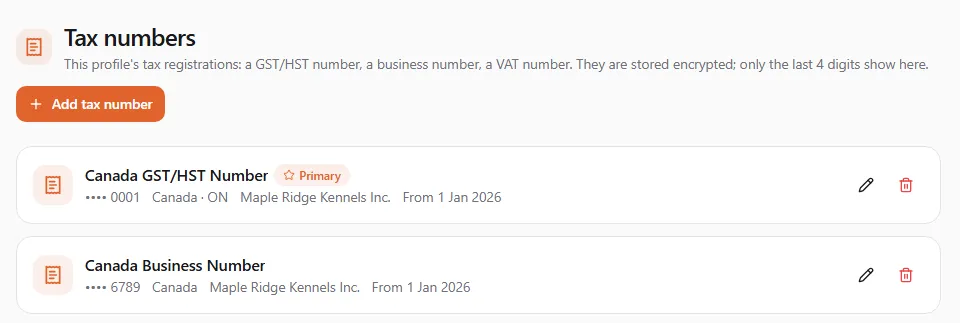
Each profile can keep its tax numbers on United Pet Club: a Canadian GST/HST number, a business number, a provincial sales tax number, a VAT number and many more. They are stored encrypted, and only their last four digits are ever shown again.
Finances → Tax numbers in the Dashboard (/dashboard/finances/billing/tax-numbers), just under
Add-ons. You can also open it from the Tax numbers button at the top of Finances → Billing.
The page shows the numbers of the profile you are acting as. To manage a business’s numbers, switch to the business’s profile first.
Who can change them
Section titled “Who can change them”The profile’s owners and admins, and team members whose role lets them manage the profile’s finances, can see, add, edit and remove its tax numbers. Anyone else sees Only the profile’s owners and admins can manage its tax numbers and is asked to have an owner or admin make the change.
What each number shows
Section titled “What each number shows”Each number is a card with:
- its type, for example Canada GST/HST Number;
- Primary, on the number you chose as the profile’s main one;
- Verified, once the number has been checked;
- the last four digits (•••• 0001), the country and the province, and the legal name if you gave one;
- the date it applies from: From date, or From date until date for a number that ended.
A profile with no numbers yet shows No tax numbers yet with an Add tax number button.
Add a tax number
Section titled “Add a tax number”- Select Add tax number, on the left just under the page heading.
- Pick the Country. Canada is first in the list.
- For Canada, pick the Province or territory, or leave it on Not province-specific. A GST/HST number or a business number is national; a provincial sales tax number needs its province.
- Pick the Registration type. Only the types that belong to the country you chose are offered. Quebec Sales Tax sets the province to Quebec for you.
- Enter the Registration number. Spaces are ignored and letters are made upper case.
- Optional: the Legal name, as registered with the tax authority.
- Check Effective from: the day the registration took effect. It starts on today’s date.
- Optional: tick Use as this profile’s primary tax number.
- Select Add tax number. You’ll see Tax number added.

The GST/HST number format
Section titled “The GST/HST number format”A Canadian GST/HST number is your 9-digit business number, the letters RT, and a 4-digit account
reference: for example 123456789RT0001. A number in any other shape is refused with A GST/HST number
is 9 digits, RT and 4 digits, for example 123456789RT0001. Other types are checked against their own format
where one is set (This number does not match the format for the selected type.).
When a number can’t be added
Section titled “When a number can’t be added”| Message | What to do |
|---|---|
| Select a country. / Select a registration type. | Pick one. |
| Select the province for a provincial sales tax number. | Pick the province the number was issued in. |
| Enter the registration number. | Type the number. |
| Enter the date the registration took effect. | Fill in Effective from. |
| The profile already has that number | A profile keeps one current number of each type for the same country and province. Edit the one you have, or remove it first. |
Edit a number
Section titled “Edit a number”Select the pencil on the number’s card. You can change the province, the legal name, the Effective from date and whether it is the primary number. The country and the type can’t be changed; to change those, remove the number and add a new one.
The number field starts empty and says Leave blank to keep the number ending in last four digits. Leave it empty to keep the number, or type a new one to replace it. A new number has to be checked again, so it loses its Verified badge. Select Save; you’ll see Tax number updated.
Remove a number
Section titled “Remove a number”Select the bin on the number’s card. Remove this tax number? asks you to confirm: the number will no longer appear on the profile’s billing paperwork. Select Remove; you’ll see Tax number removed.
A removed number ends today. We keep a record that it was in force until then, so past paperwork stays correct.
Is it safe?
Section titled “Is it safe?”Tax numbers are encrypted when you save them. The page, and anyone on your team, only ever sees the last four digits. The full number is read only by United Pet Club’s own systems, for your billing paperwork.
Your number and the tax on our fees
Section titled “Your number and the tax on our fees”Keeping your GST/HST number here doesn’t change the GST/HST United Pet Club adds to its own fees: Canadian businesses pay it too. A GST/HST-registered business can usually claim it back; ask your accountant. See Taxes on United Pet Club fees.
Tax exemption
Section titled “Tax exemption”Under your numbers, the Tax exemption card is where a profile that doesn’t have to pay GST/HST (a status First Nations individual or band, a diplomat, a government body, a charity or nonprofit making exempt supplies, a reseller) applies to be exempt. United Pet Club staff review every application; until one is approved, the tax is added as usual. See Applying for a tax exemption.