

Owners — shares, money in and evening out
Owners keeps track of who owns your business and what each of them has put in. When partners pay for things out of their own pockets, it shows who is ahead of their fair share and who still has to put in, and it records the payments that even it out.
It’s for any business with owners: a sole proprietor, partners, or the shareholders of a small corporation. For loans between the business and an owner on written terms (a rate, a schedule, late fees), see Owner loans.
Finances → Owners in the Dashboard (/dashboard/finances/owners), while you act as the business. The page has
three tabs: Balances, Owners and shares and Statements. Record owner money and Add owner are at
the top.
Set up the owners
Section titled “Set up the owners”Open Owners and shares.
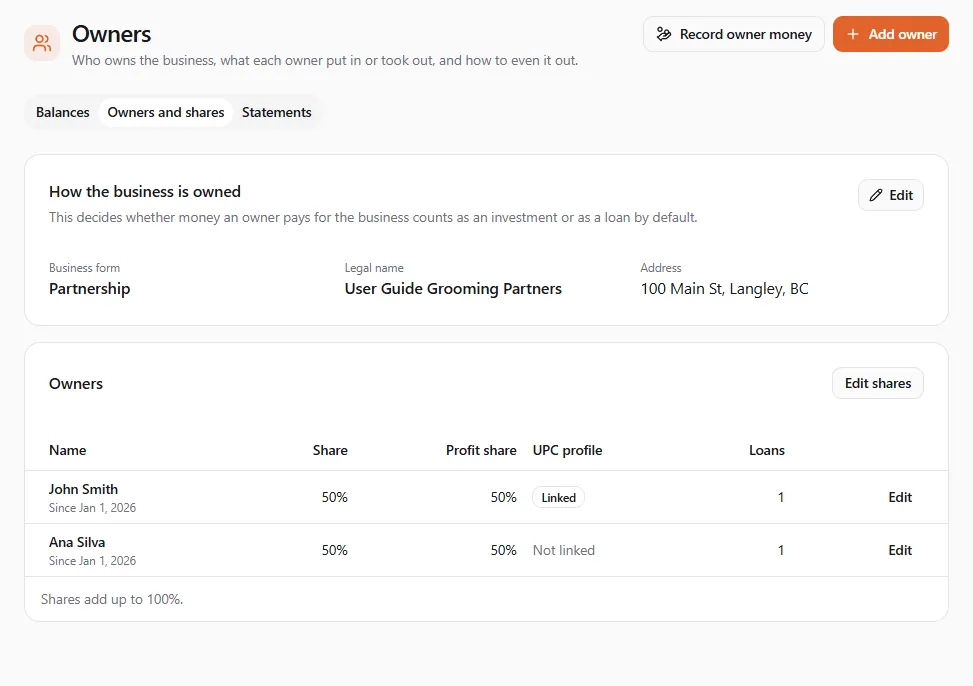
How the business is owned
Section titled “How the business is owned”Select Edit on How the business is owned and fill in:
- Business form: Sole proprietor, Partnership or Corporation. This decides how money an owner pays for the business counts by default. Owners of a corporation lend to it by default; partners and sole proprietors invest. You can change the choice each time you record money.
- Legal name: printed on loan agreements.
- Address: printed on loan agreements too.
Add each owner
Section titled “Add each owner”Select Add owner:
- Name: as it should appear on statements and agreements.
- Currency of the books: the currency the business keeps its books in.
- UPC profile (optional): find the owner’s own profile. A linked owner can confirm payments from other owners (see below) and sign loan agreements in the app.
- Email (optional): used to sign loan agreements when the owner has no UPC profile.
Select Save owner. To change an owner later, select Edit on their row. When someone stops being an owner, untick Active owner: their history stays, and they drop off the balances once they hold no share and have no money left in the business.
Set the shares
Section titled “Set the shares”Select Edit shares. Each owner gets a Share (%); leave Profit share (%) blank to use the same shares for profit. Shares must add up to 100%: the Total under the list tells you where you are.
Pick the date in Shares apply from. New shares apply from that date and the earlier shares stay on record, so a report for an earlier date still uses the shares of that time. Until the shares add up to 100%, the Balances tab says Set the shares to 100% to see who is ahead.
Record money an owner paid
Section titled “Record money an owner paid”When an owner pays for the business with their own money (a supplier invoice, the rent, a deposit into the business’s account), select Record owner money.
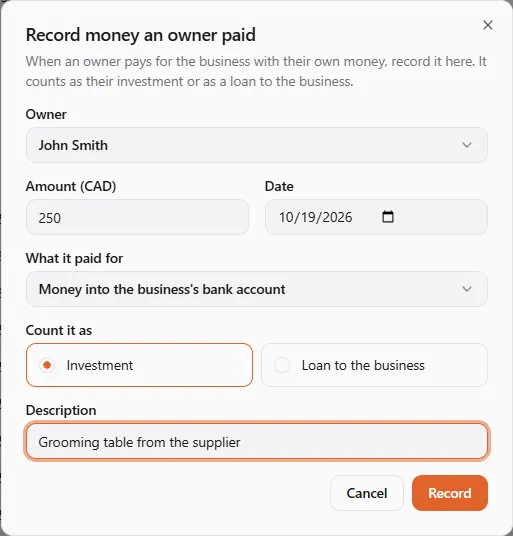
- Owner: who paid.
- Amount and Date.
- What it paid for: Money into the business’s bank account, Cash put into the business, or the cost it covered (supplies, rent and the rest of your bookkeeping categories) when the owner paid a bill directly.
- Count it as: Investment (the owner’s capital) or Loan to the business (the business owes it back). The choice starts from the business form.
- Description: for example Grooming table from the supplier.
Select Record. It goes straight onto the books.
See who is ahead
Section titled “See who is ahead”The Balances tab compares what each owner has put in with their fair share: the total all owners put in, times their share.
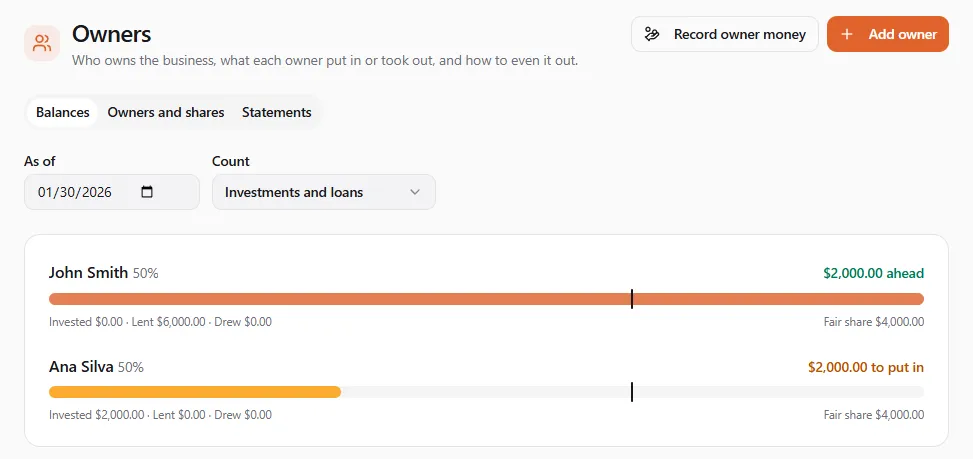
- As of: the date the balances are for. Pick an earlier date to see the balances back then.
- Count: Investments and loans, Investments only or Loans only: what counts as money put in.
- Each owner shows their share, a bar, and Invested · Lent · Drew. On the right: … ahead (more than their fair share), … to put in (less) or Even.
- Lent is what the business owes the owner, less anything the owner owes the business. A loan from the business to an owner lowers it.
- Loan interest and charges appears for owners with loans on written terms. Interest and late charges are owed on the loan; they never count as money put in.
In the example above, John lent the business CA$6,000 and Ana paid CA$2,000 of supplies as an investment. Together they put in CA$8,000, so each owner’s fair share at 50% is CA$4,000: John is CA$2,000 ahead and Ana has CA$2,000 to put in.
Even it out
Section titled “Even it out”Ways to even out offers three ways to settle. Each card lists exactly what it records.
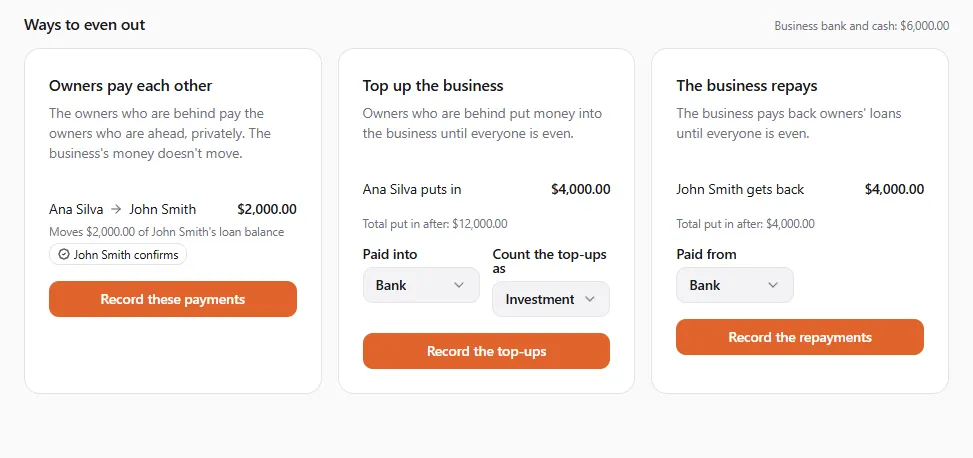
| Way | What happens | What it records |
|---|---|---|
| Owners pay each other | The owners who are behind pay the owners who are ahead, privately. The business’s money doesn’t move. | Part of the receiving owner’s balance becomes the payer’s: their loan balance first, then their capital. Shares don’t change. |
| Top up the business | Owners who are behind put money into the business until everyone is even. | Money in from each owner. Pick Paid into (Bank or Cash) and Count the top-ups as (Investment or Loan to the business). |
| The business repays | The business pays back owners’ loans until everyone is even. | A repayment from the business to each owner who is ahead. Pick Paid from (Bank or Cash). |
Select the card’s button (Record these payments, Record the top-ups or Record the repayments). Record these? asks once more; each entry is recorded as of the As of date.
A payment to an owner with a linked UPC profile waits for that owner. The card shows … confirms under it. The owner gets a bell notice and confirms or declines; only a confirmed payment goes on the books. A payment to an owner without a profile is recorded straight away.
When a way can’t be used, its card says why:
| The card says | What to do |
|---|---|
| Add the owners first. | Add the owners on Owners and shares. |
| Set the shares to 100% first. | Edit the shares until they add up to 100%. |
| The owners are already even. | Nothing to settle. |
| An owner with no share has money in. Give them a share or settle their money first. | Give that owner a share, or record their money out. |
| Only loans can be repaid. Count loans to use this. | Set Count to include loans. |
| That would repay an owner more than they lent. | Use another way, or record more money in first. |
| Part of this is a loan with terms. Record those payments on the loan. | Repay that part on the loan’s own page in Owner loans. |
Read an owner’s statement
Section titled “Read an owner’s statement”The Statements tab lists every entry on one owner’s capital, loans and drawings. Pick the Owner, and a From and To date if you want a period.
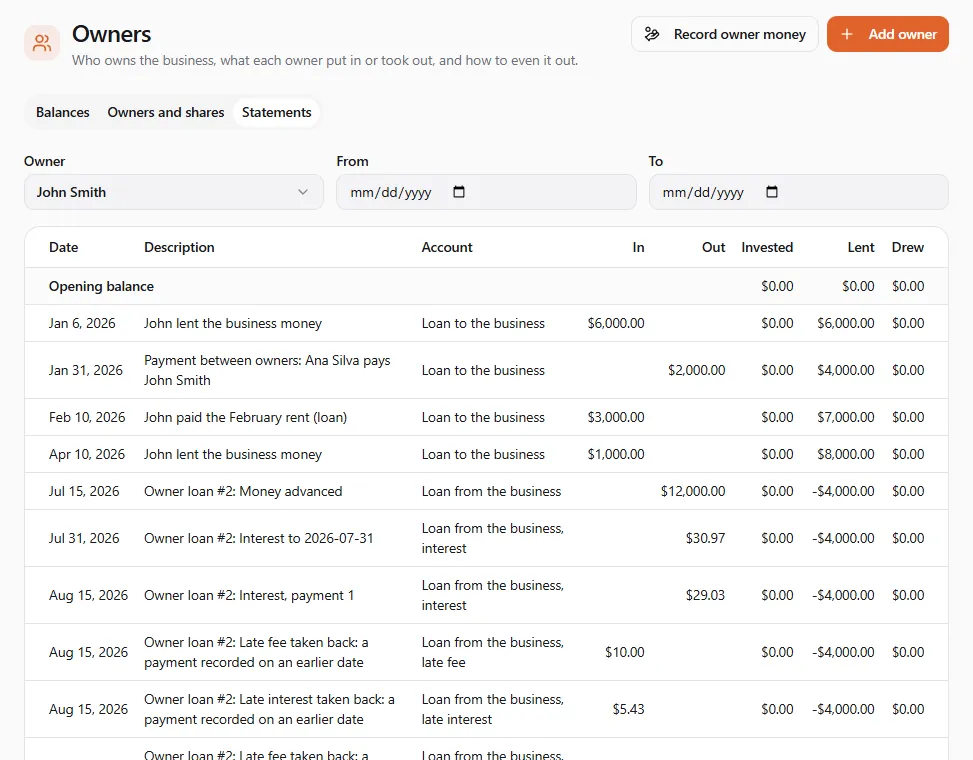
In is money the owner put in (or paid back), Out is money they took out or that moved away from them, and Invested, Lent and Drew show their balances after each line. Entries from owner loans appear here too, with their interest and late charges on separate lines.
If another owner says they paid you
Section titled “If another owner says they paid you”When another owner records a payment to you to even things out, you get a bell notice (Other tab), in your account’s
language: Confirm a payment from …. Open it, or go to Finances → Payments to confirm
(/dashboard/finances/owner-confirmations) on your personal profile.
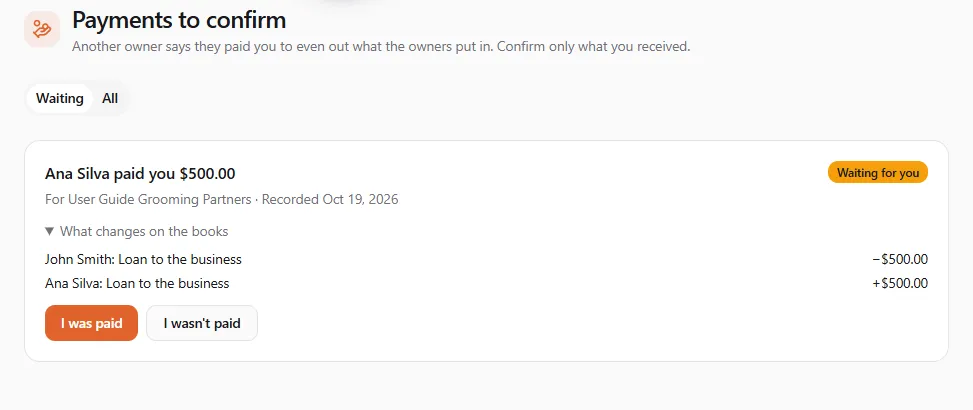
- Check the amount and the business. What changes on the books shows whose balance moves.
- Select I was paid if the money reached you. The payment goes on the business’s books.
- If it didn’t, select I wasn’t paid. You can add a Note (optional) for the other owners. The payment stays off the books.
Waiting lists what needs your answer; All keeps the history (Confirmed, Declined).
If something went wrong
Section titled “If something went wrong”- “Couldn’t save that. Check the details and try again.” A field is missing or out of range: check the amounts, the date and that the shares add up to 100%.
- The balances look wrong. Check As of and Count first, then open the owner’s statement to see each entry.
- A payment between owners is still waiting. The receiving owner hasn’t answered yet; it’s not on the books until they select I was paid.