

Fixed assets
Fixed assets are what the business owns and uses for more than a year: grooming tables and dryers, a van, kennels, furniture, leasehold improvements. The register keeps what each one cost, posts its depreciation month by month, and works out the tax depreciation schedule for your accountant.
Finances → Accounting, then the entity, then the Fixed Assets tab
(/dashboard/finances/accounting/{entity}/assets). It has four tabs: Register, Depreciation, Tax and
Reports.
Anyone with access to the books can see the register. Adding, changing, disposing of and depreciating assets needs the journals permission (Adjust journals, rates and opening balances). See Entities and access.
The register
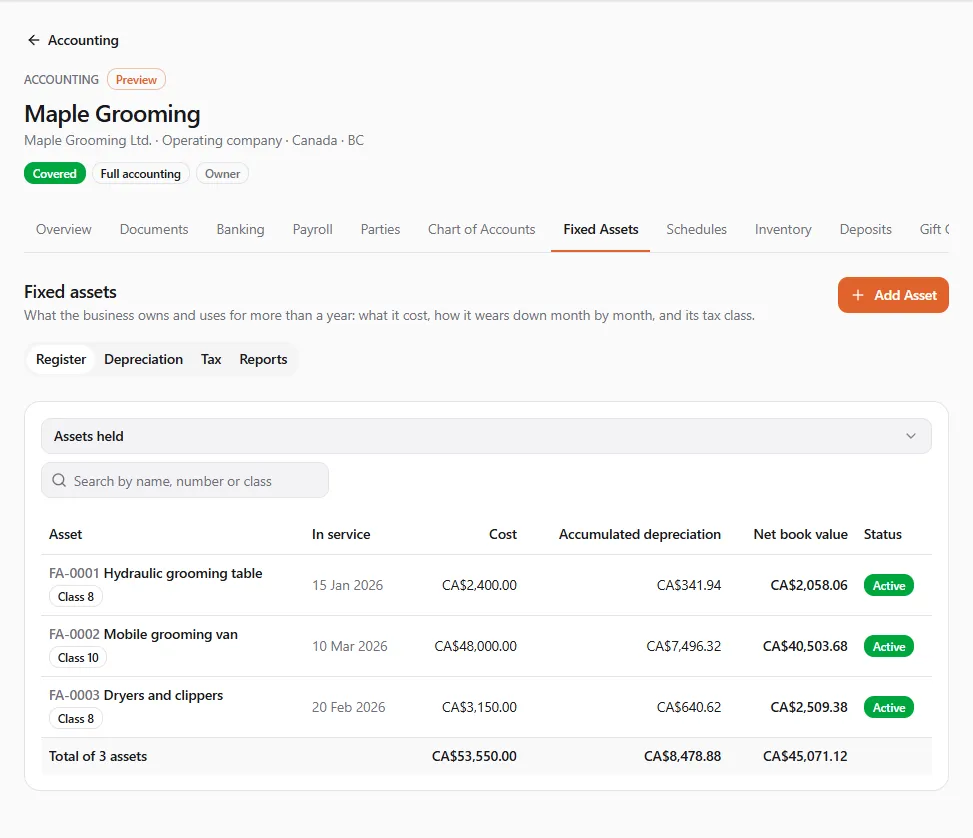
Section titled “The register”The Register lists each asset with its number, In service date, Cost, Accumulated depreciation, Net book value and Status (Active, Fully depreciated or Disposed), with totals at the bottom. Use Show to switch between Assets held, each status and All assets, and search by name, number or class.
Adding an asset
Section titled “Adding an asset”- Choose Add Asset.
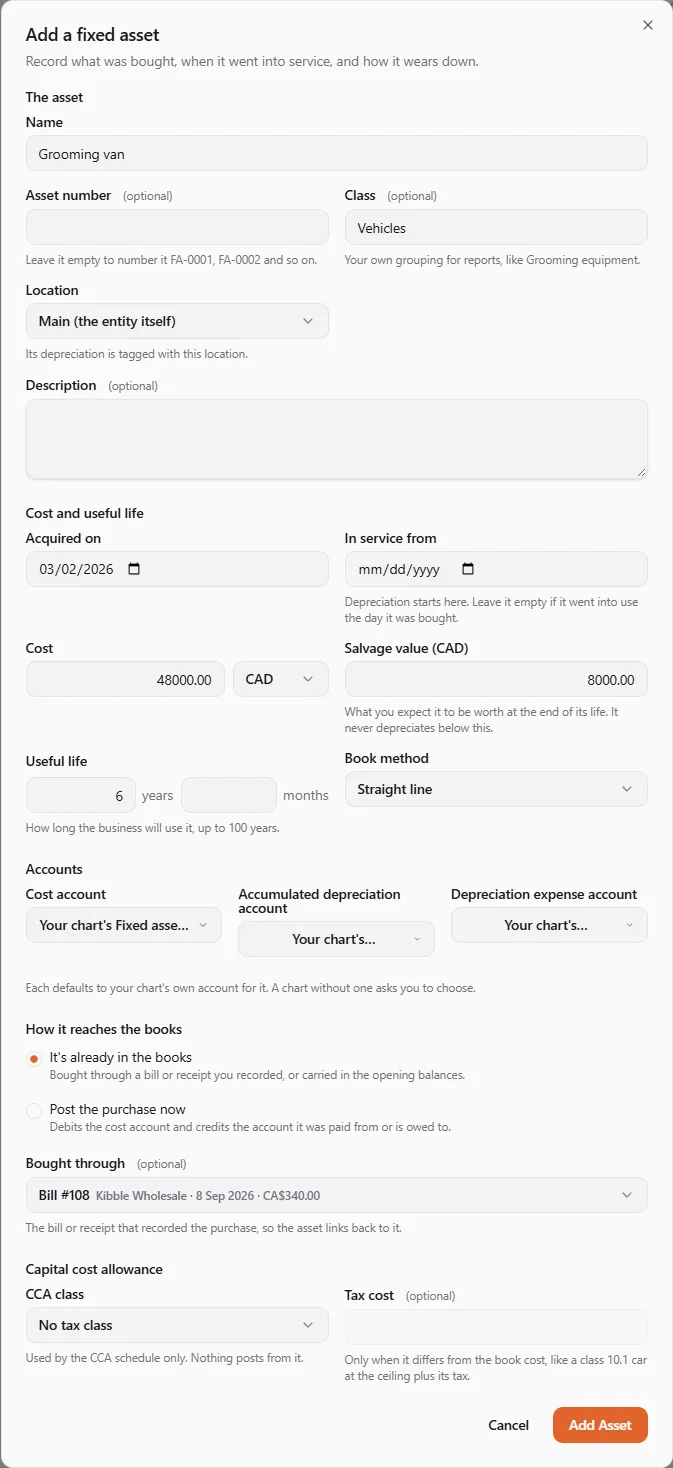
- The asset. Enter its Name. Leave Asset number empty to number it FA-0001, FA-0002 and so on. Class is your own grouping for reports (like Grooming equipment); Location tags its depreciation with one of your locations.
- Cost and useful life.
- Acquired on, and In service from if it went into use later: depreciation starts on the in-service date.
- Cost and Cost currency. A cost in another currency is restated at that currency’s rate on the purchase date.
- Salvage value: what you expect it to be worth at the end of its life. It never depreciates below this.
- Useful life in years or months (up to 100 years).
- Book method: Straight line, or Declining balance with an Annual rate (%) (like 30).
- Accounts. The Cost account, Accumulated depreciation account and Depreciation expense account each default to your chart’s own account. A chart without one asks you to choose.
- How it reaches the books.
- It’s already in the books: you recorded the bill or receipt, or it is in your opening balances. Pick the document under Bought through so the asset links back to it.
- Post the purchase now: the books debit the cost account and credit the account under Paid from or owed to (a bank account, a loan or the owner’s equity).
- Tax. See The tax side below.
- Choose Add Asset. You see “{name} added as FA-0004.”
Once anything has posted for an asset, its cost, dates, cost account and accumulated depreciation account stay as they are (“To correct them, dispose of it and add it again.”). The life, salvage value, method, expense account, location, class and tax details can still change; changes apply from the next depreciation run.
Running depreciation
Section titled “Running depreciation”Depreciation posts when you run it, usually once a month.
- Open Depreciation.
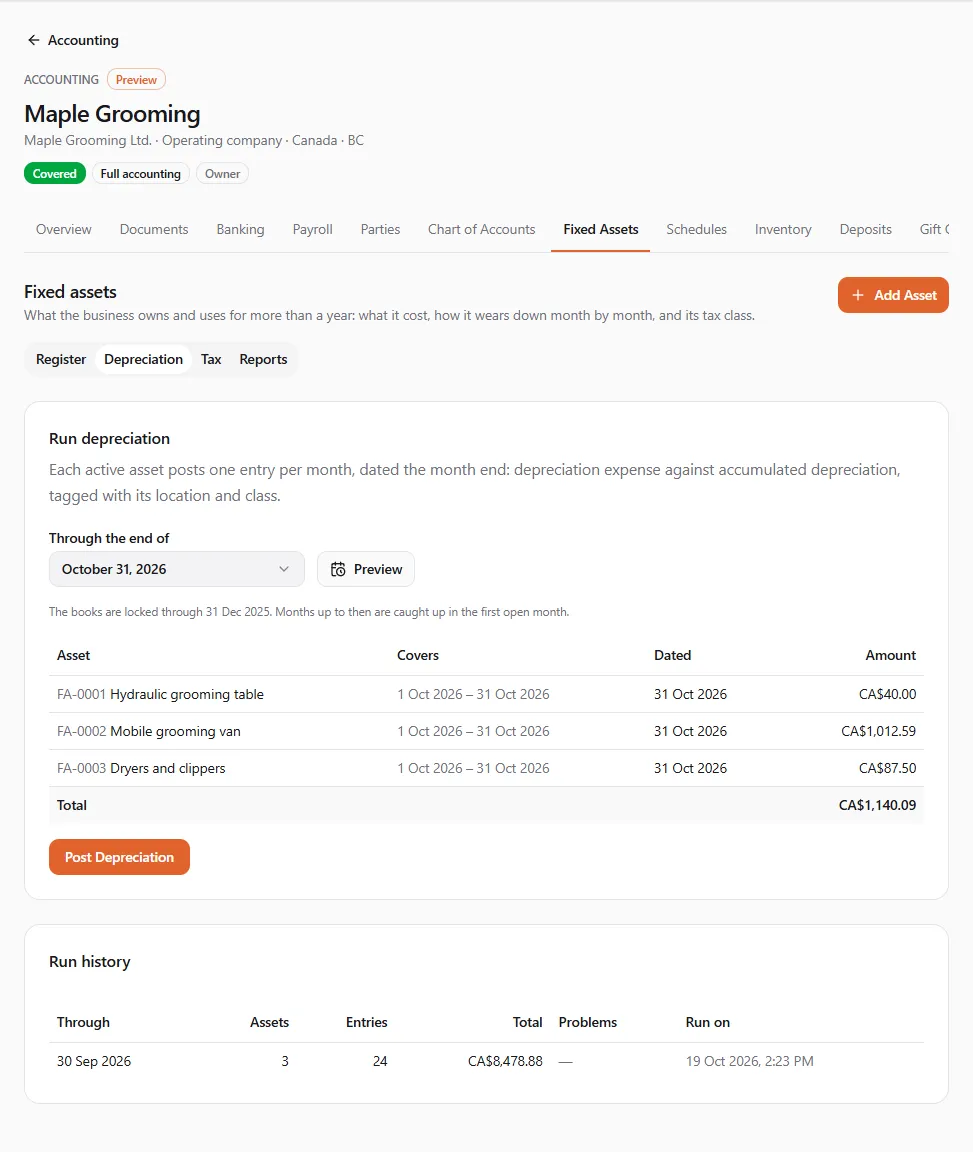
- Choose the month under Through the end of (the current month at the latest).
- Choose Preview. Each asset shows what it would post, the months it Covers, the date and the amount. Assets that can’t post (a missing account, for example) are listed with the reason.
- Choose Post Depreciation and confirm. “A second run through the same month posts nothing more.”
Each active asset posts one entry per month, dated the month end: depreciation expense against accumulated depreciation, tagged with its location and class. The first and last months count by days. If your books are locked through a date, the months up to then are caught up in the first open month’s entry. Run history lists every run.
Disposing of an asset
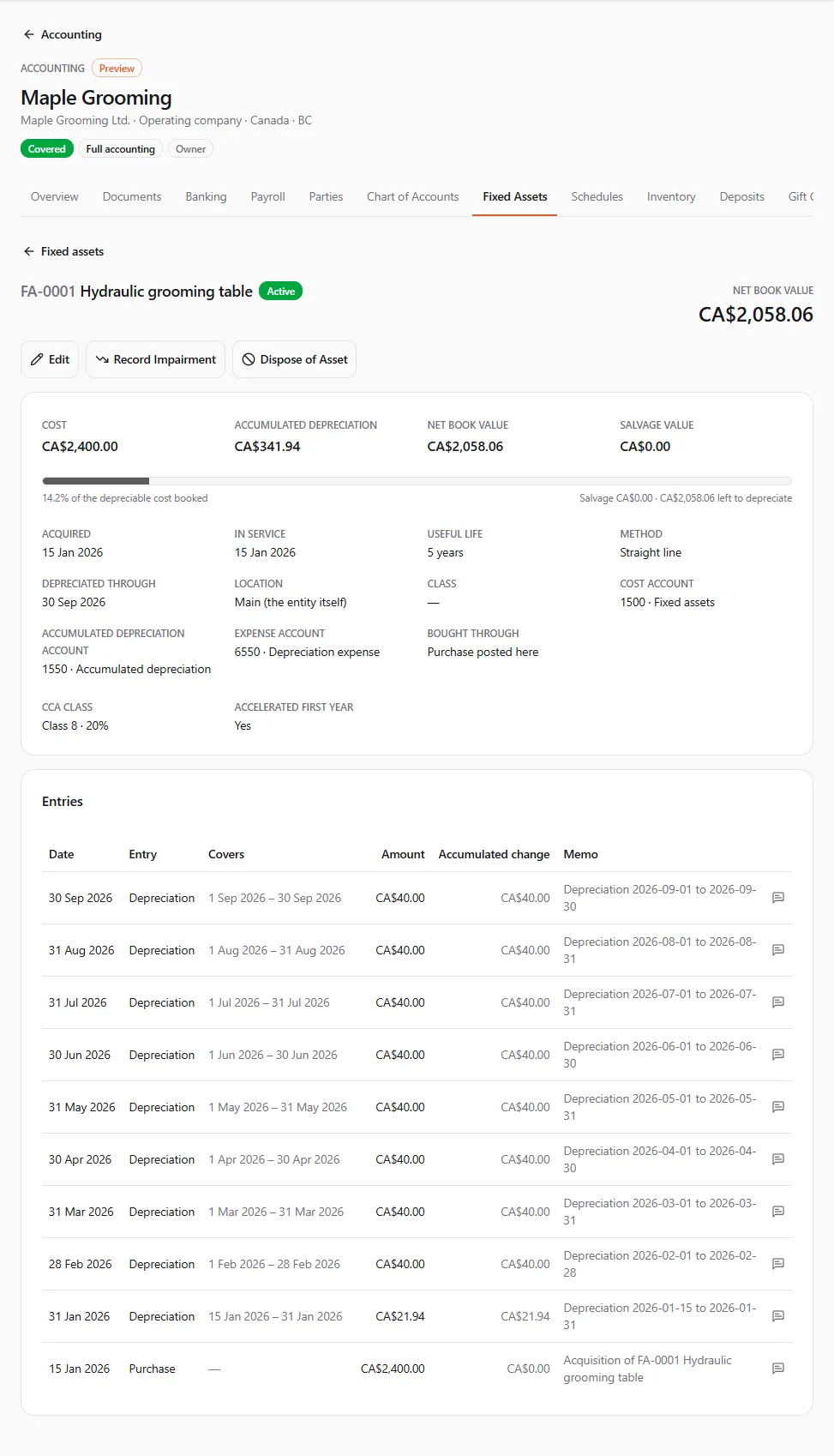
Section titled “Disposing of an asset”Open the asset from the register and choose Dispose of Asset when it was sold, scrapped or given away.
- Enter the date it was Disposed of on (after the books’ lock date, not in the future).
- Enter the Proceeds (zero when it was scrapped or given away), the Proceeds currency, and the account it was Paid into.
- Optionally change the Gain to and Loss to accounts.
- Read the estimate (“Net book value today is …, so this is a gain of … before the depreciation still owed to the date.”) and choose Dispose of Asset.
The books first catch depreciation up to the disposal date (or take back any booked past it), then take the asset off and book the gain or loss. A disposed asset keeps its figures; only its name, description and tax class can change. Disposing of part of an asset isn’t supported.
Recording an impairment
Section titled “Recording an impairment”Choose Record Impairment when an asset has lost value suddenly (damage, obsolescence). Enter the Date, the Write-down (at most its carrying amount), the Loss to account and a Reason. Later months depreciate what is left over the remaining life.
The tax side
Section titled “The tax side”The book depreciation above is for your financial statements. Tax depreciation follows different rules, so each asset can also carry a tax class. Nothing posts from it: it feeds the tax schedules only. The classes offered come from the tables in force for the asset’s in-service date, so the choices change with the date you enter.
Canada: capital cost allowance (CCA)
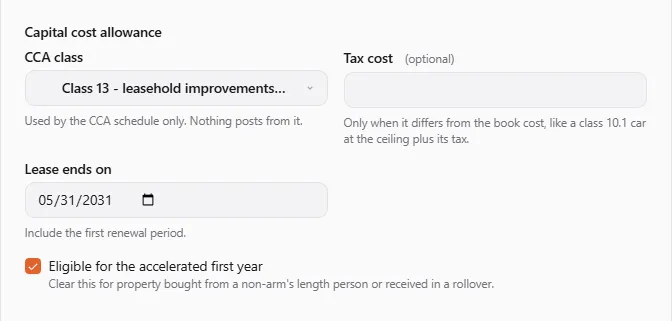
Section titled “Canada: capital cost allowance (CCA)”In the asset’s Tax section, under Capital cost allowance:
- CCA class: like class 8, 10, 10.1, 12, 13, 50 or 54. Choose No tax class to leave the asset out of the CCA schedule.
- Tax cost: only when it differs from the book cost, “like a class 10.1 car at the ceiling plus its tax”.
- Eligible for the accelerated first year: ticked by default. “Clear this for property bought from a non-arm’s length person or received in a rollover.”
- Some classes ask one more question:
- The half-year rule does not apply for class 12 property it doesn’t apply to (“Most small tools in class 12.”);
- Lease ends on for a class 13 leasehold improvement: “Include the first renewal period.”;
- class 10.1 keeps each car in a class of its own, with the cost capped at the year’s ceiling.
On the Tax tab, CCA figures you enter lets you correct what the schedule assumes. “The schedule assumes the maximum CCA in every earlier year.” Choose Add Figures and enter, for a Tax year and Class, the Opening UCC from last year’s return, the CCA claimed when you claimed less than the maximum, or both.
Not worked out: immediate expensing, short fiscal periods, Quebec differences, and classes not offered in the list.
United States: MACRS
Section titled “United States: MACRS”Under MACRS depreciation:
- Property class: like 5-year or 7-year property, or 27.5- and 39-year real property.
- Convention: leave Let the rules decide to get half-year or mid-quarter from what you placed in service that year, or force Half-year, Mid-quarter or Mid-month.
- Business use (%): “50% or less makes it listed property; the schedule flags it.”
- Special depreciation allowance: By the dates (the rate follows the purchase and in-service dates), Elect out (0%), or the Reduced election where it applies.
- Section 179 deduction: the amount elected for this asset in the year it was placed in service.
- Tax cost: only when the tax basis differs from the book cost.
Not worked out: the alternative depreciation system, the automobile limits, and the section 179 business income limit and carryovers.
The tax tables
Section titled “The tax tables”The Tax tables card on the Tax tab lists the CCA and MACRS tables the schedules use, with their sources and review status. “They are applied as final and have not been reviewed by a tax professional.” Tax depreciation schedules exist for Canadian and US entities only; book depreciation and the register work everywhere.
Reports
Section titled “Reports”Open Reports and pick one:
| Report | What it shows |
|---|---|
| Fixed asset register | assets held on a date, the year’s disposals, and a check that the register agrees with the cost and accumulated depreciation accounts |
| Book depreciation schedule | per asset for a period: cost, additions, disposals, depreciation, impairment and net book value |
| CCA schedule | per class for a tax year (the year the fiscal period ends in), in the T2125 Area A layout; Canadian entities |
| MACRS schedule | per asset for a tax year (the year it begins in), with the Form 4562 lines; US entities |
Select an asset’s row to open it. “These reports show here for now. Downloads come when they join the report menu.” Every report says it was prepared from your entries and not reviewed by UPC; the tax schedules add “A guide for your accountant, not a filing.”
If something went wrong
Section titled “If something went wrong”“The books are locked through {date}. Choose a later date.” You can’t post into a locked period. Pick a later date, or ask whoever closed the period: see Year-end and currencies.
“The tax classes couldn’t be loaded. Try again.” Wait a moment and reopen the dialog.
“Running depreciation needs the journals permission. You can see the runs below.” Ask the owner for the journals permission, or ask someone who has it to run depreciation.