

Gifts
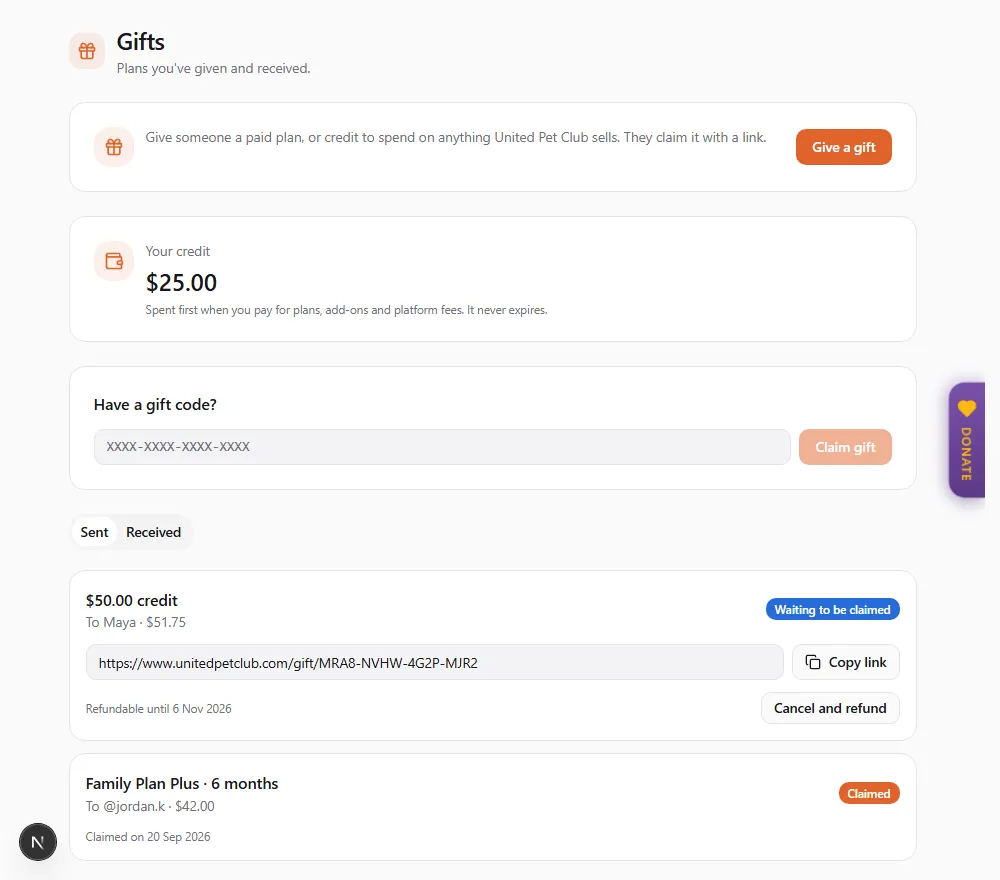
You can give anyone 1, 3, 6 or 12 months of a paid plan, or United Pet Club credit: money they spend on plans, add-ons and other United Pet Club services. You pay once, up front. The person you give it to claims it with a link or a code. A gifted plan doesn’t renew unless they choose to keep it afterwards, and credit never expires. Nobody is ever charged for a gift they did not buy. (Monthly donations to an organization are something else: see Recurring gifts.)
Settings → Gifts in your Dashboard (/dashboard/finances/gifts). From there you can give a gift, redeem a gift
code, and see what you have Sent and Received. You can also give a gift from the website at
www.unitedpetclub.com/gift. A gift you receive by e-mail links to its own page, /gift/ followed by the gift code.
Giving a gift
Section titled “Giving a gift”-
Choose Give a gift.
-
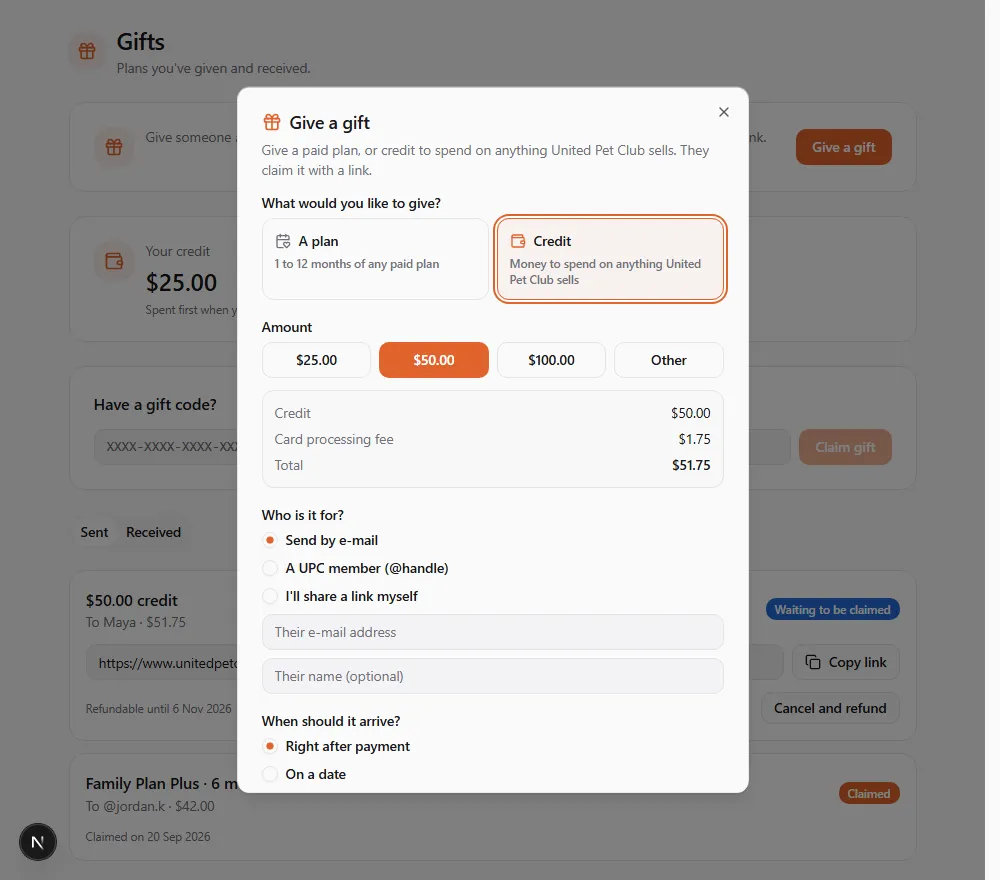
Under What would you like to give?, choose A plan (1 to 12 months of any paid plan) or Credit (money to spend on anything United Pet Club sells). To give credit, follow Giving credit below.
-
Plan: pick the plan. Only paid plans are listed.
-
Length: 1 month, 3 months, 6 months or 12 months. 1, 3 and 6 months cost the monthly price times the number of months. 12 months costs the annual price.
-
Who is it for?
- Send by e-mail: enter their e-mail address. They don’t need an account yet.
- A UPC member (@handle): enter their handle. The gift appears in their Dashboard and they get an e-mail too.
- I’ll share a link myself: no one is told. You get a link and a code to pass on however you like.
You can add Their name (optional). It is shown on the gift.
-
When should it arrive? Choose Right after payment, or On a date between tomorrow and a year from now. The gift arrives on the morning of that day, your time. A link gift is always ready at once.
-
Personal message (optional): up to 1,000 characters. It is shown with the gift.
-
Choose Continue, check the plan, the recipient, the delivery date and the Total, then choose Pay {amount} and pay by card.
When the payment is confirmed you see Your gift is on its way. For a link gift, that screen also has Copy link and Copy code so you can share it.
The e-mails and Dashboard notices about the gift are in your language for you (the one you were using when you bought it), and in the language you picked for the person you’re giving it to, else yours.
Giving credit
Section titled “Giving credit”Credit is money the person can spend on anything United Pet Club sells: plans, add-ons, credit packs and platform fees. It isn’t cash: it can’t be withdrawn or paid out, and it can’t be spent with other sellers on United Pet Club.
- Choose Give a gift, then Credit.
- Amount: choose $25.00, $50.00 or $100.00, or Other and type an amount between $10.00 and $500.00. Credit is always in US dollars.
- Check the summary under the amount: Credit, the Card processing fee, and the Total you pay. The fee is 2.9% of the credit plus 30 cents (for $50.00 of credit, $1.75). It is added on top, so the person receives the full amount you chose.
- Choose who it is for, when it should arrive and add a message, the same way as for a plan.
- Choose Continue. The review shows the gift (“$50.00 credit”), the credit, the card processing fee and the Total. Choose Pay {amount} and pay by card.
If the gift is for a handle, it is checked when you buy it. No one has that handle means the handle doesn’t exist. If they can’t hold that plan (for example, a plan only some kinds of profile can have), you are told before you pay.
Following a gift you sent
Section titled “Following a gift you sent”Open Gifts → Sent. Each gift shows the plan, the length, who it is for, what you paid, and its status:
| Status | What it means |
|---|---|
| Scheduled | Paid, and it arrives on the date shown (“Arrives on …”) |
| Waiting to be claimed | Delivered. They have until the date shown to claim it (“Claim by …”) |
| Claimed | They claimed it (“Claimed on …”). You also get an e-mail when this happens |
| Expired | Nobody claimed it within 12 months of its arrival |
| Cancelled and refunded | You cancelled it and got your money back |
| Cancelled | You cancelled it and the refund has not gone through yet |
While a gift can still be claimed, its link is shown with Copy link. Use it if the e-mail went astray. Share it only with the person it is for, because whoever claims the link first gets the gift.
Cancelling a gift for a refund
Section titled “Cancelling a gift for a refund”You can cancel a gift for a full refund within 30 days of paying for it, as long as it has not been claimed. For a gift of credit, the credit is refunded but the card processing fee is not: the confirmation says so.
- In Gifts → Sent, find the gift. While it can be refunded it shows Refundable until {date}.
- Choose Cancel and refund. The confirmation tells you how much goes back to your card, and that the gift link stops working.
- Choose Cancel and refund again to confirm, or Keep the gift to leave it as it is.
You see Gift cancelled. Your refund is on its way. and you receive a confirmation e-mail. The refund can take 5 to 10 business days to show on your statement.
If you see Refund not available right now, the refund could not be made at that moment, and your gift was not cancelled. Try again a little later. You will never be refunded twice.
Claiming a gift you received
Section titled “Claiming a gift you received”Claiming is free. The plan goes to the profile you are acting as when you claim, so switch to the right profile first.
From the gift e-mail. Open the link. The page shows who gave you which plan and for how long, their message, and the date to claim by. Choose Claim gift. If you aren’t signed in, choose Sign in to claim. If you don’t have an account yet, create one for free, then claim your gift.
With a code. Go to Settings → Gifts. Under Have a gift code?, type the code, then choose Claim gift. Upper or lower case both work, with or without the dashes.
Sent to your handle. The gift is waiting in Gifts → Received with a Claim gift button. A gift sent to a handle can only be claimed by that profile. If you see “This gift is for @…”, switch to that profile and claim it there.
Once claimed, you see either Gift claimed. Your plan is active until {date}. or, if you already pay for a plan, Gift claimed. It starts on {date}, when your current plan ends; that plan won’t renew. The gift then shows under Received, and the plan appears under Finances → Billing with a Gift badge.
Claiming credit
Section titled “Claiming credit”A gift of credit is added to the credit of the account that owns the profile you are acting as. You see Gift claimed. {amount} of credit was added to your account. Once in a while it takes a few minutes; then you see Gift claimed. {amount} of credit will be in your account in a few minutes. The gift shows under Received as “Added to your credit on {date}”.
If you already pay for a plan
Section titled “If you already pay for a plan”You won’t pay twice. The plan you pay for runs to the end of the time you already paid for, and stops renewing. Your gift starts that day. If you turn your own plan’s renewal back on and pay for another period, the gift waits until that period ends too.
When your gift ends: keeping the plan
Section titled “When your gift ends: keeping the plan”A gifted plan doesn’t renew. 7 days before it ends you get an e-mail, “Your gifted {plan} ends on {date}”, and a notice in your Dashboard. You then have two choices:
- Keep the plan. Choose Keep my plan, either from the e-mail or from the gift under Gifts → Received. The gift shows “Add a card to keep this plan when the gift ends. It then renews at the regular price.” In the Add a card to this plan window, use your card on file or add a new one, and choose Save card. Your bank checks the card and nothing is charged now. The gift then shows Renews on {date}, and the plan renews on that date at the plan’s regular price, in US dollars.
- Let it end. Do nothing. The plan ends on that date, nothing is charged, and your profile goes back to its free features.
Your credit
Section titled “Your credit”When you have credit, the Gifts page shows Your credit with the amount you can spend. It never expires.
How it is spent. Your credit is used first, automatically, whenever you pay United Pet Club:
- Plans, add-ons and credit packs. At checkout the credit is applied and your card pays the rest. You see “{amount} of your credit is applied. Your card pays the rest.” above the card form. If your credit covers the whole price, there is nothing to pay by card: the purchase is done at once and you see “Paid with your credit. You’re all set.”
- Plan renewals. A renewal is paid from your credit when your credit covers the whole renewal. Otherwise your card is charged in full and your credit stays for something else. If there is no card on the plan and not enough credit, the plan ends at the end of the time already paid for.
- Platform fees (for example Prospecting or video minutes), as they come due.
If you start a checkout and don’t finish it, the credit set aside for it goes back to your balance within a day. In the meantime the page shows “{amount} is set aside for a checkout you haven’t finished.”
Refunds. If something you paid for partly with credit is refunded, the part paid with credit comes back as credit, and only the part paid by card goes back to your card.
Good to know
Section titled “Good to know”| Question | Answer |
|---|---|
| Which plans can I give? | Any paid plan. Free plans can’t be gifted. |
| How long can a gift be? | 1, 3, 6 or 12 months. |
| How far ahead can I schedule it? | Up to a year. |
| How long does the recipient have to claim it? | 12 months from the day it arrives. |
| Can I get my money back? | Yes, within 30 days of paying, if it hasn’t been claimed. |
| Can a claimed gift move to another profile? | No. It stays on the profile that claimed it. |
| How much credit can I give? | From $10.00 to $500.00 per gift, in US dollars, plus the card processing fee. |
| Does credit expire? | No, never: not before it is claimed and not after. |
| Can credit be paid out or spent with another seller? | No. It is spent on what United Pet Club sells: plans, add-ons, packs and platform fees. |
| I give or claim gifts for a business I work for. Whose account is it on? | The business’s. A gift you buy or claim while acting as a profile belongs to the account that owns that profile, not to your personal account. |
| What if the claim keeps failing? | After 10 failed tries within an hour, claiming is paused. Wait an hour, then check the code and try again. |