

Payment receipts
When you pay United Pet Club — for an order, a booking, a plan or its renewal, membership dues, a recovery plan or a donation — we e-mail you a receipt as soon as the payment goes through. It comes from United Pet Club, in your account’s language, and it is the only receipt for that payment.
What the receipt shows
Section titled “What the receipt shows”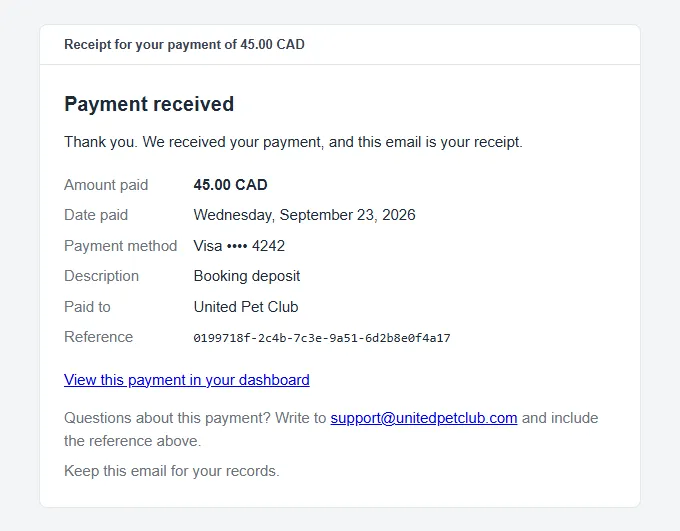
| Line | What it means |
|---|---|
| Amount paid | What was charged to your card, with the currency code. If you chose to pay in your own currency, this is the amount in your currency. |
| Date paid | The day the payment went through, in your account’s timezone. |
| Payment method | The card you paid with: its brand and last four digits. |
| Description | What the payment was for, as your Dashboard shows it (for example Booking deposit). |
| Paid to | United Pet Club. |
| Reference | The payment’s reference. It matches the Reference on the payment’s page in your Dashboard. Quote it if you contact us about the payment. |
View this payment in your dashboard opens the payment under Dashboard → Finances → Payments, with its full status history and any refunds.
When the payment includes GST/HST
Section titled “When the payment includes GST/HST”When you paid GST or HST on a United Pet Club fee (see Taxes on United Pet Club fees), the receipt adds:
| Line | What it means |
|---|---|
| Subtotal | The price before tax. |
| The tax line, for example HST 13% | The tax you paid for your province or territory. |
| Total | The price plus the tax: what you paid. |
| GST/HST Reg. No. | United Pet Club’s GST/HST registration number, after the Reference. |
The subtotal, tax and total are in the currency the fee is priced in (US dollars). If you chose to pay in your own currency, Amount paid still shows what your card was charged in your currency. A payment with no tax shows none of these lines.
Where the receipt goes
Section titled “Where the receipt goes”- To your account’s Billing email, when one is set.
- Otherwise to the e-mail address of the profile that owns the account.
To send receipts somewhere else, for example to your bookkeeper, set the Billing email under Account Settings → Account Type → Account details. See Account settings.
Language and date
Section titled “Language and date”The receipt is written in your account’s Default language & region and dated in its Default timezone. Both are under Account Settings → Regional Defaults. These are the account’s defaults, so a language you picked only for yourself doesn’t change the receipt.
If the account has no default timezone, the date is in UTC. A payment made late in the evening in North America can then show the next day’s date.
Payments that send a different confirmation
Section titled “Payments that send a different confirmation”A few payments already send you an e-mail that states what you paid, so they don’t send this receipt as well:
| Payment | What you get instead |
|---|---|
| Your platform fees, taken from your card on file or paid with Pay now | The e-mail saying your platform fees for the period are settled, with the amount. See Fees. |
| A deposit on an animal listing | The e-mail confirming your deposit and reserving the animal. See Protected deposits. |
| A donation made without signing in | The donation receipt, with the link to add the gift to an account later. |
If a receipt doesn’t arrive
Section titled “If a receipt doesn’t arrive”- Look in your spam or junk folder for a message from United Pet Club.
- Open Dashboard → Finances → Payments and check the payment is there and went through. A checkout you closed before paying isn’t a payment, so it has no receipt.
- Check where the receipt was sent: the account’s Billing email, or if that is empty, the e-mail address of the profile that owns the account.
- Still nothing? Use our contact form and include the payment’s Reference from the Payments page.