

Your professions
Your professions say what you do with animals as a career. They belong to you as a person: a vet who owns a clinic is a Veterinarian on their own profile, and the clinic is a separate business profile.
Professions show on your profile and your career portfolio, and they are how people find you in the People search. They do not open the business tools in your Dashboard. What you offer, like breeding, grooming or training, is a service: add it under My Profile → Services and the matching tools open (see Services you offer). A groomer who works at a salon has the Groomer profession; a groomer who takes their own clients also offers Grooming.
Adding your first profession turns your personal profile into a professional one. You stay a pet parent too, so your own pets and everything else stay as they are.
Where to add them
Section titled “Where to add them”- Right after signup. If you ticked I’m a pet professional, the welcome step asks What do you do? Tick every profession that fits, add the animals for each one, and select Save and continue. You can skip it and come back later.
- Any time later. In the Dashboard, open My Profile → Professions and select Add profession. Choose a profession, then the animals, and select Add.
The professions you can choose
Section titled “The professions you can choose”| Profession | Animals |
|---|---|
| Veterinarian | One or more species |
| Veterinary Technician | One or more species |
| Veterinary Pharmacist (licensed; dispensing and compounding veterinary medicines) | Optional |
| Vet Practice Team (practice manager, reception, client service, administration) | Optional |
| Breeder | One or more species, optionally a breed. To breed and sell yourself, also offer Breeding under Services |
| Groomer | One or more species, optionally a breed |
| Trainer | One or more species, optionally a breed |
| Pet Sitter & Walker (sitting, walking, boarding, daycare) | One or more species, optionally a breed |
| Judge | One or more species, no breed |
| Event Planner | Optional |
| Animal Behaviorist (behavior consultants, applied behaviorists) | One or more species, optionally a breed |
| Rehab Therapist (physiotherapy, hydrotherapy, massage, fitness) | One or more species, optionally a breed |
| Pet Nutritionist | Optional |
| Farrier & Equine Care (farriers, equine dentists, saddle fitters, stable work) | One or more species, usually Horse or Donkey |
| Show Handler | One or more species, optionally a breed |
| Advocate (education, policy, animal law) | Optional |
| Emergency Responder | Optional |
| Foster Caregiver (fostering for a shelter or rescue) | Optional |
| Pet Transporter (pet taxi, transport, relocation) | Optional |
| Pet Loss & Aftercare (grief support, cremation, memorials) | Optional |
| Pet Photographer (photography, video, pet portraits) | Optional |
| Writer & Journalist (bloggers, journalists, authors) | Optional |
| Content Creator (influencers, YouTubers, podcasters, pet accounts) | Optional |
| Academic Researcher | Optional |
Pet Sitter & Walker used to be called Pet Care Provider, and Advocate used to be called Welfare Advocate. If you chose one before, you still have it under its new name.
Each animal you add is its own entry, so a groomer of dogs and cats has two: Groomer · Dog and Groomer · Cat.
Judges
Section titled “Judges”Choose Judge if you judge at shows, trials or competitions: conformation, performance sports such as agility or obedience, or grooming competitions.
- Add one entry per species you judge: Judge · Dog, Judge · Cat, Judge · Horse.
- There is no breed to pick. Which breeds or groups you judge, and for which kinds of judging, will be added later as judging details on each entry.
- If you also train new judges, set the entry to I do this work and teach it (see Teaching your profession).
- Being a judge in a club (the Judge role in a club’s team) is separate. That role belongs to the club. The profession belongs to you.
Anyone can add Judge as a profession. A verified judge badge, approved by our team from your registry’s approval, is still to come.
Event planners
Section titled “Event planners”Choose Event Planner if you plan and run pet events: shows, trials, meet-ups, fundraisers or expos. Adding animals is optional. Leave it empty if your events are for all animals, or add a species when you only work with one, for example dog shows.
The newer professions
Section titled “The newer professions”- Pet sitters and walkers choose Pet Sitter & Walker. Boarding and daycare businesses use it too.
- Writers, bloggers and journalists choose Writer & Journalist. Content creators (influencers, YouTubers, podcasters and pet accounts) have their own entry.
- Photographers choose Pet Photographer, also for video and pet portraits.
- Behaviorists choose Animal Behaviorist. If you also train, add Trainer as well.
- Rehab therapists cover non-vet physiotherapy, hydrotherapy, massage and fitness. Veterinarians who do rehabilitation stay under Veterinarian.
- Farriers and equine pros choose Farrier & Equine Care. Add Horse, Donkey or both.
- Show handlers show other people’s animals in the ring or at trials. Add one entry per species.
- Foster caregivers look after animals at home for a shelter or rescue until they are adopted.
- Vet practice teams are practice managers, receptionists and client service staff. Licensed vets and vet techs choose their own professions.
- Veterinary pharmacists choose Veterinary Pharmacist. It shows on your profile and career portfolio and opens no business tool. A pharmacy itself is a business profile with the business type Vet pharmacy (see Veterinary pharmacies).
Pet Photographer, Farrier & Equine Care, Pet Transporter and Pet Loss & Aftercare can also describe an organization, such as a photo studio, a farriery business, a pet transport company or a pet crematorium.
Your specialties
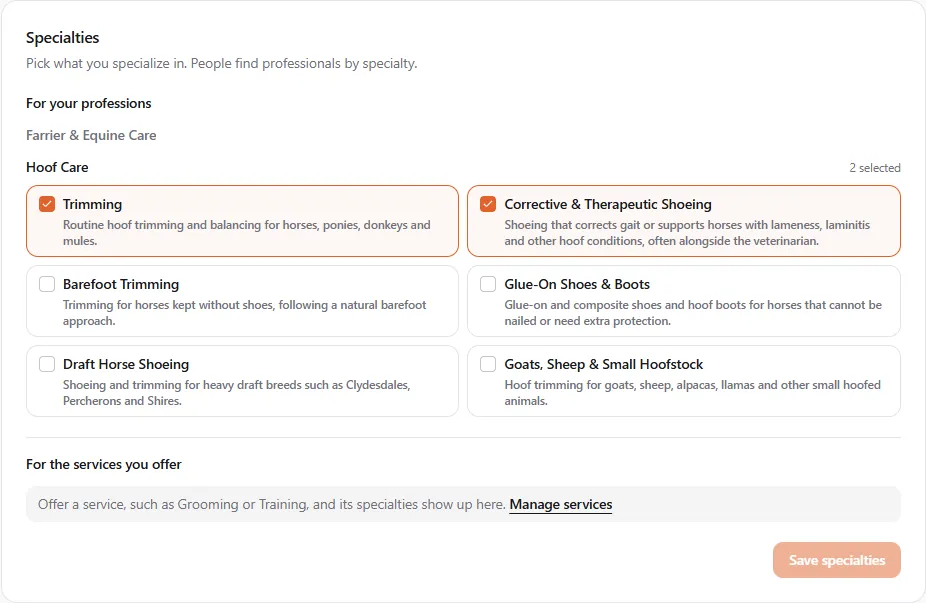
Section titled “Your specialties”Under your professions, the Specialties card is where you say what you specialize in. People find professionals by specialty. A farrier, for example, can pick from six hoof care specialties: Trimming, Corrective & Therapeutic Shoeing, Barefoot Trimming, Glue-On Shoes & Boots, Draft Horse Shoeing and Goats, Sheep & Small Hoofstock.
The card has two groups:
- For your professions: the specialties of each profession you have, one block per profession. A profession with nothing to pick says so.
- For the services you offer: further specialties that come with the services you offer. If you offer Farrier & hoof care without the Farrier profession, the six hoof care specialties show up here. With no such service, or when every specialty your services bring already shows under a profession, the card says Offer a service, such as Grooming or Training, and its specialties show up here. and links to Manage services.
Each specialty shows up once, so a farrier who also offers Farrier & hoof care sees the hoof care specialties under Farrier only.
Tick the ones that fit and select Save specialties. Saving replaces your whole list. The card shows your specialties even before you add a profession, as long as a service you offer lists some.
If you remove a profession or stop offering a service, the specialties that came with it stay on your profile until your next save. The card names them (Saving removes … They no longer match a profession or a service you offer.) and saving takes them off.
Change an entry
Section titled “Change an entry”Open My Profile → Specializations and select Edit next to the entry. You can change:
- The animals: another species, a specific breed, or All breeds for the whole species.
- Whether you teach it, and who you teach (see Teaching your profession).
- Whether it’s your primary specialization. Only one entry can be primary. Choosing a new one replaces the old.
Select Save changes. The profession itself can’t be changed. To switch, for example from Trainer to Animal Behaviorist, add the new one and remove the old one.
If you already have the entry you’re changing to (say you change Groomer · Poodle to Groomer · Beagle and Beagle is already there), you’ll see That specialization is already on this profile. Breeders have the same breed limit as when adding: moving a breed to another species counts toward that species. See Limits on listings, breeds, litters and posts.
Remove a profession
Section titled “Remove a profession”Open My Profile → Specializations and select the bin button next to the entry. If you remove your last profession and nothing else on your profile is professional (such as a verified licence or a career portfolio), your profile goes back to a personal one.