

Giving to an appeal
Sometimes the United Pet Club website shows a card asking for help: after a disaster near you, for a rescue effort, or for a cause the club supports. These cards are appeals. Each one says who receives the gifts, and giving takes a minute, with or without an account.
Where you will see appeals
Section titled “Where you will see appeals”- On the home page, under the row of section links. When there are several, they show one after another.
- On the About page, under Where donations go.
- On the store home page, under the featured products.

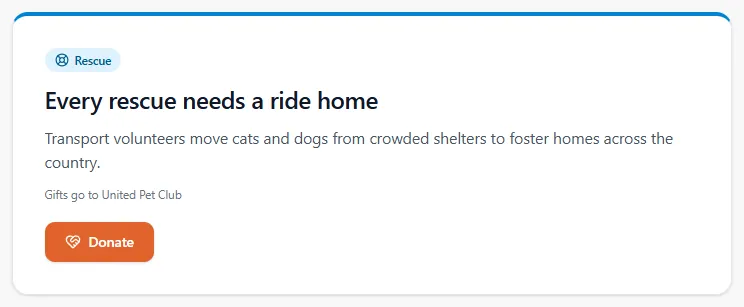
On the About and store pages you usually see one appeal at a time:
Why you see the appeals you see
Section titled “Why you see the appeals you see”Appeals are shown for where you are and in your language, so a friend somewhere else may see different ones, or none. An appeal for a state or province shows only to people in it. Your place is worked out roughly from your internet connection; the site never asks for it for this. If we cannot tell where you are, you see only the appeals meant for everyone.
Appeals come and go: most run for a set time. If a page shows none, there is simply no appeal for your area right now.
Moving through several appeals
Section titled “Moving through several appeals”When the home page has more than one appeal, they change on their own every few seconds. You can:
- press the arrow buttons to go back or forward;
- press a dot under the card to jump to that appeal;
- press Pause (the button before the arrows) to stop them changing, and Resume to start them again.
They also stop while your pointer or keyboard is on them, and they never move on their own if your device is set to reduce motion. On a phone you can swipe.
If you came from an ad or a link
Section titled “If you came from an ad or a link”On our own pages (a United Pet Club ad on the website, in your dashboard or on a upc.pet page, including the small card in the corner), pressing an appeal’s ad opens the donation window right there: you stay on the page you were reading, and closing the window takes you back to it. To read the appeal on its own page instead, open the ad in a new tab.
An ad for an appeal elsewhere (on social media, in an email or on another website) opens the Help animals in need page on the United Pet Club website. The appeal’s card is there, and the donation window opens for it straight away, so you can give at once. Close the window if you only want to read: the card stays, and its button opens the window again.
- A link opens its appeal for everyone who follows it, wherever you are: the rules about places in Why you see the appeals you see do not apply to it.
- Your gift goes to the organization named on the card (Gifts go to …), and counts toward its fundraiser when the card shows one, just as when you give from the home page.
- If the appeal has ended, the page says This appeal has ended, but animals still need help. You can still give. Press Donate now to give to United Pet Club instead.
United Pet Club counts how many people open each appeal’s link, and from which kind of ad, to see which ads work. Nothing about you is kept for this: no name, address or device, only the count.
Give to an appeal
Section titled “Give to an appeal”-
Read the card. The line Gifts go to … names the organization that receives your gift. If the appeal counts toward a fundraiser, the bar shows how much has been raised so far.
-
Press the appeal’s button (for example Help Florida pets, or Donate), or press one of the amounts on the card to start with that amount chosen.
-
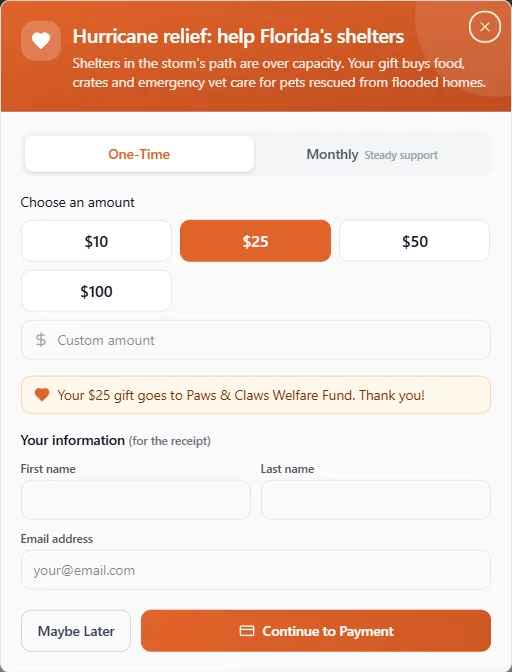
The donation window opens with the appeal’s own title. Choose One-Time or Monthly, then an amount or type your own in Custom amount (at least 2).
-
Check the line above your details: Your $25 gift goes to … names who receives it.
-
If you are signed in, you give as the profile shown under Donating as (press Change to pick another). If you are not, enter your First name and Email address (the Last name is optional).
-
Press Continue to Payment, enter your card and confirm. When the payment has gone through you see Thank you!, and a receipt is sent to your email.
The amounts are in the organization’s own currency, which is the currency you are charged in. Your bank may convert it for your card.
Monthly gifts
Section titled “Monthly gifts”Choosing Monthly gives the same amount to the same organization every month. Your card is stored securely with our payment provider for this; you can stop the gift at any time from the link in your receipt, or under Fundraising → My Giving in your dashboard (see Recurring gifts).
The small card in the corner
Section titled “The small card in the corner”Now and then a small card slides in at a bottom corner of the page, a few seconds after it opens: an appeal or another message from United Pet Club. It does not block the page; you can keep reading or scrolling.
- Press × on the card, or the Esc key, to close it. Once closed, it does not come back that day: you see it at most once a day on each site.
- It never shows in the store, on membership and program pages, or while you are giving, signing in or checking out.
- In your dashboard, it shows only if you are on the free plan, and not before you have been there for half a minute. Members on a paid plan never see it in the dashboard.
- On a upc.pet profile page it can show too, unless the page’s owner has a plan with fewer ads or no ads.
If something went wrong
Section titled “If something went wrong”I can’t see any appeals. There is no appeal for your area or language right now. The club’s own donate tab (the DONATE tab at the side of the page) is always there if you want to give anyway.
The appeal is in another language. The appeal has no text in yours yet, so it shows in the closest language it has.
The link I followed shows no appeal. The appeal has ended or been paused. You can still give to United Pet Club from the same page.
The card in the corner keeps coming back. It shows at most once a day on each site. If your browser does not keep site data (a private window, or cleared site data), the site cannot remember that you closed it.
The payment didn’t go through. You have not been charged. Press Try again in the window when you are ready.
Is my gift tax deductible? United Pet Club is not a registered charity, so gifts to the club are not tax deductible and do not come with a charitable receipt (see the About page). An appeal for another organization names it on the card: ask that organization about its own status.