

Remittances, year-end slips and owner pay
Once pay runs are posted, your books know what you owe each agency and what each person earned in the year. Remittances tells you when each amount is due, Year-End prints worksheets for the slips and returns, and Owner Pay records what the owners take out of the business.
Finances → Accounting, then the entity, then the Payroll tab, then Remittances
(/dashboard/finances/accounting/{entity}/payroll/remittances), Year-End (.../payroll/year-end) or
Owner Pay (.../payroll/owner-pay).
Remittances
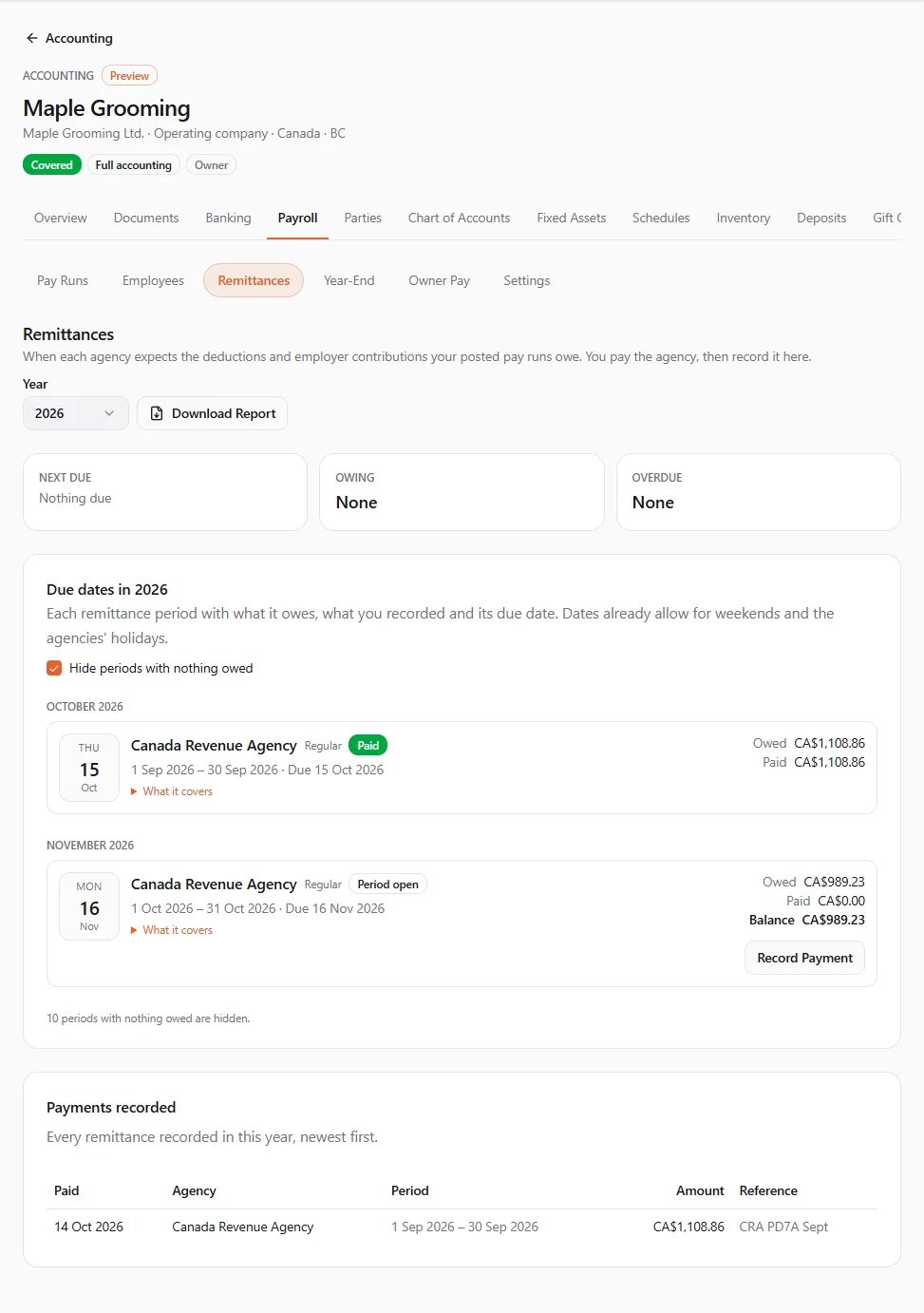
Section titled “Remittances”“When each agency expects the deductions and employer contributions your posted pay runs owe. You pay the agency, then record it here.”
At the top, choose the Year. The summary shows what is Next due, what is Owing and what is Overdue. Due dates in {year} then lists each remittance period by agency, with what it Owed, what you Paid, the Balance and the due date. “Dates already allow for weekends and the agencies’ holidays.”
| Agency | Schedule it follows |
|---|---|
| Canada Revenue Agency | your CRA remitter type from the payroll settings |
| Revenu Québec | your Revenu Québec remitter type |
| IRS (Form 941 deposits) | your IRS deposit schedule, monthly or semiweekly |
| IRS (FUTA deposits) | quarterly; a small amount carries forward to the next quarter |
| State agencies | monthly, with No set due date: follow the state’s own schedule |
| Plans, boards and insurers | paid on their own schedule (pension plans, workers’ compensation boards, benefit insurers) |
A period’s status is Nothing owed, Period open (the period isn’t over), Due, Overdue, Part paid, Paid or Carried forward. Some periods carry a note, for example Revenu Québec’s December grace date, or the IRS next-day rule after a large payroll. Tick Hide periods with nothing owed to shorten the list.
Recording a payment
Section titled “Recording a payment”After you pay the agency (through your bank or the agency’s own site):
- Find the period and choose Record Payment.
- Check the Balance to record: the books post the balance this period still owes.
- Enter the Date paid, choose Paid from (the money account the payment left from), and add the Reference (your confirmation number).
- Choose Record Payment. You see “Payment to {agency} recorded”.
The payment clears what you owe the agency in your books. If a pay run posted into the period afterwards, the period owes a new balance and shows Part paid until you record a second payment. Payments recorded lists every remittance of the year. Download Report saves the remittance report as a PDF.
Year-end slips
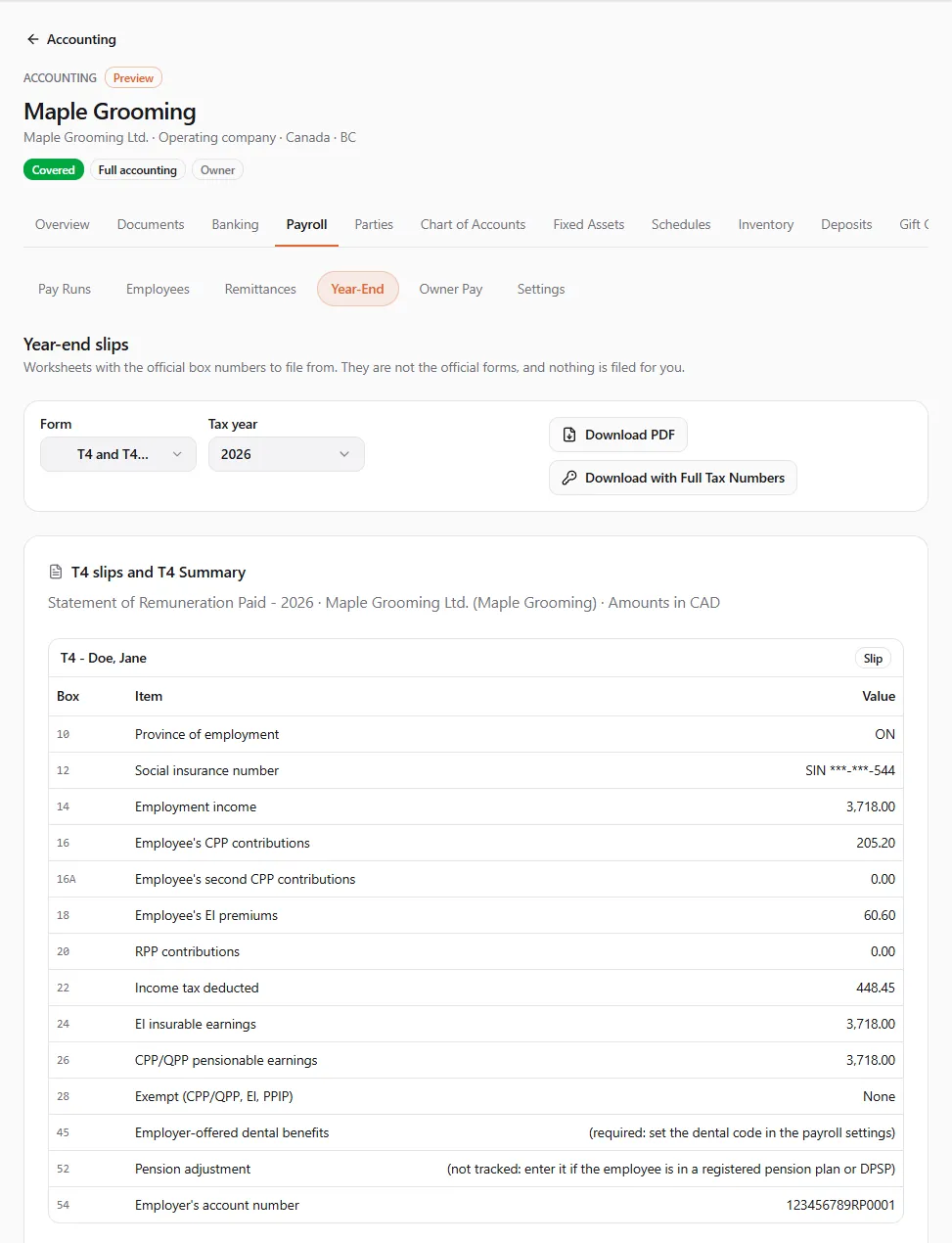
Section titled “Year-end slips”“Worksheets with the official box numbers to file from. They are not the official forms, and nothing is filed for you.”
- Choose the Form, the Tax year and, for Form 941, the Quarter.
- Read the worksheet on screen: each Box, its Item and its Value, and the currency it is in.
- Choose Download PDF to save it with tax numbers masked.
| Form | What it holds |
|---|---|
| T4 and T4 Summary | Canadian employees’ employment income, deductions and the summary, including the remittances you recorded |
| RL-1 and RL-1 Summary | Quebec employees, and the summary lines |
| T4A (contractors) | contractors paid more than $500 in the year (box 048); the ones under it are noted |
| T5 (dividends) | dividends paid in the year to each shareholder |
| W-2 and W-3 | US employees, with the state boxes summed from what you entered |
| 1099-NEC and 1096 | US contractors paid $2,000 or more (from 2026; $600 before) |
| 1099-DIV and 1096 | US dividends |
| Form 941 (quarterly) | the quarter’s wages, taxes and the deposits you recorded |
| Form 940 (FUTA) | the year’s FUTA wages, credit and deposits |
Worksheet lines and notes are in English for now. Where a box needs something payroll doesn’t track (such as the pension adjustment in T4 box 52, or W-2 box 12 codes other than D, E, G and AA), the worksheet says what to complete by hand.
Printing full tax numbers
Section titled “Printing full tax numbers”To file, you usually need the full SIN or SSN on each slip. Download with Full Tax Numbers needs Manage employees.
- Choose Download with Full Tax Numbers.
- Read the warning: the PDF “prints every person’s full SIN or SSN. UPC records that you downloaded it. Keep the file somewhere safe and delete it once you’ve filed.”
- Choose Download Full Numbers, or Keep Them Masked.
Each full printing is listed on the employee’s Tax-Number History as “Printed in full on a slip”.
Contractor slips
Section titled “Contractor slips”Contractor slips lists every contractor party paid in the year: Paid per the books (the expenses that name them) and On the slip. When the books don’t tell the whole story, choose Change and enter the Amount on the slip (the total paid for services in the year); leave it blank to report what the books show. The slip then shows Entered by hand. Only parties of the kind Contractor get a T4A or 1099-NEC: see Parties.
Owner pay
Section titled “Owner pay”“How the owners of this entity take money out of it.” What you see depends on the kind of entity.
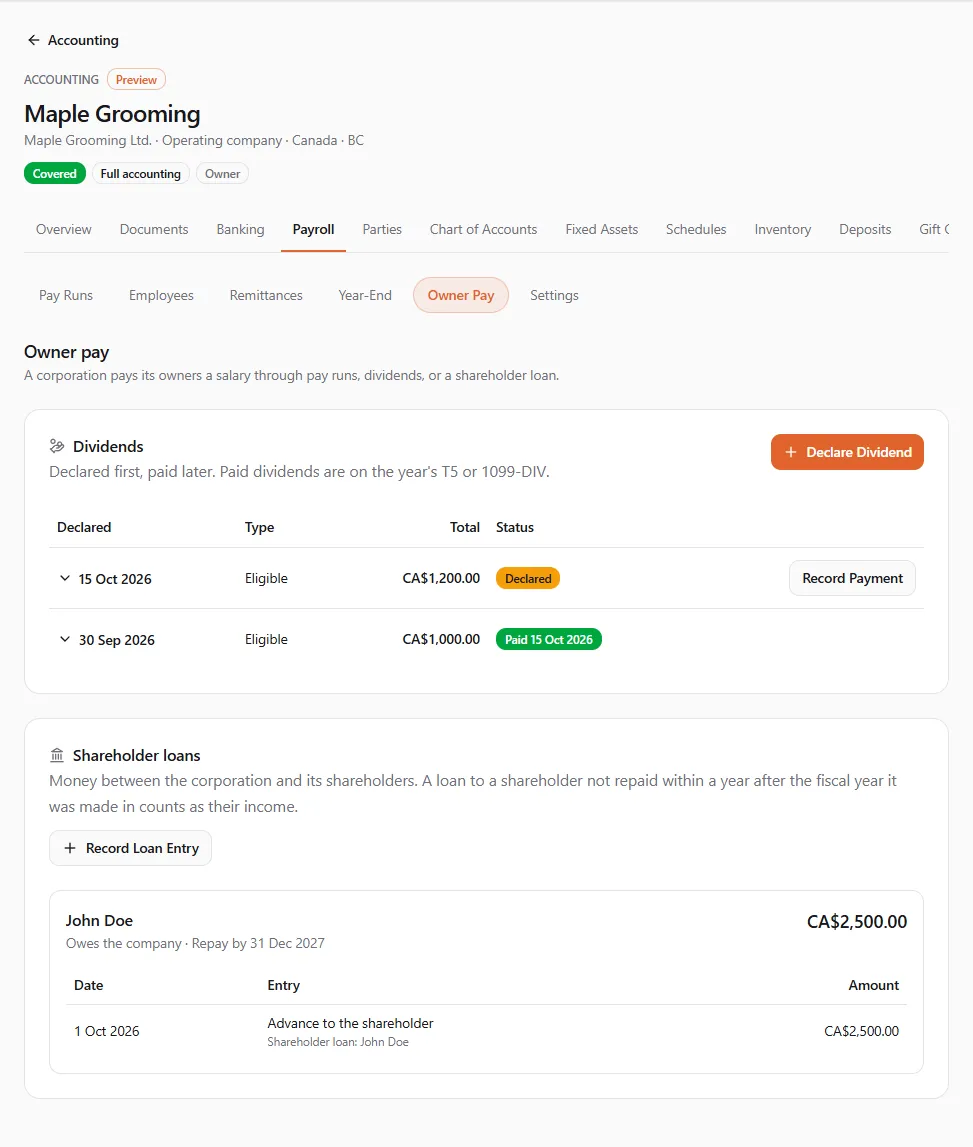
- “A corporation pays its owners a salary through pay runs, dividends, or a shareholder loan.”
- “A sole proprietor or partner takes owner draws. They aren’t wages and aren’t on a T4 or W-2.”
Dividends (corporations)
Section titled “Dividends (corporations)”- Choose Declare Dividend.
- Enter the date it was Declared on and the Dividend type: Eligible or Other than eligible in Canada, Qualified or Ordinary in the US.
- Add each Shareholder with their amount (Add Shareholder for more). Tick This shareholder is a corporation where it applies.
- Choose Declare Dividend. The books now owe each shareholder their share.
- When you pay it, choose Record Payment, enter the date it was Paid on (on or after the declaration) and the account it was Paid from.
Paid dividends appear on the year’s T5 or 1099-DIV.
Shareholder loans (corporations)
Section titled “Shareholder loans (corporations)”Choose Record Loan Entry, pick the Shareholder and the Kind of entry: Advance to the shareholder, Repayment by the shareholder, Loan from the shareholder or Repayment to the shareholder, then the Date, Amount and Money account. Repayments apply to the oldest advances first.
Each shareholder’s balance shows Owes the company, The company owes them or Settled.
- Canada: an advance not repaid within a year after the end of the fiscal year it was made in counts as the shareholder’s income. The balance shows Repay by (date), and a reminder appears ahead of it and once it is overdue.
- US: a loan to a shareholder needs written terms and interest at least at the applicable federal rate; the balance reminds you.
Talk to your accountant before an advance comes due.
Owner draws (sole proprietors and partnerships)
Section titled “Owner draws (sole proprietors and partnerships)”Choose Record Draw, pick the Owner, the Date, the Amount and the account it was Paid from. “The books move it to the owner’s drawings from the account it came out of.”
If something went wrong
Section titled “If something went wrong”“Nothing is owed for this period (or it is already remitted).” The period has no balance left. Check Payments recorded for a payment already entered.
“No active money account in {currency}. Add one in Banking first.” Add a money account in the remittance’s currency on the Banking tab: see Banking and reconciliation.
“Tax numbers stay masked. A PDF with full numbers needs the manage employees permission.” Ask the owner for Manage employees, or have someone who has it download the slips.
“Dividends and shareholder loans are for corporations; a sole proprietor or partner records owner draws.” The entity’s kind decides which owner pay it has. Check the entity’s kind in its settings.