

Getting paid for bookings
When a client books you through United Pet Club, the money for that booking is collected by the platform and paid out to you through your Receive payments account. This page follows one booking from the deposit to your payout statement. For the rates themselves see Fees; for marking a booking the client paid you directly see Marking a booking paid in cash. Connecting your Receive payments account is also the first step of the Schedule setup checklist.
Schedule → Appointments → an appointment (/dashboard/appointments/{id}) — the Payment
card sits under the appointment’s details. Finances → Billing (/dashboard/finances/billing) —
the Platform fees card lists every fee-bearing line and anything you still owe. Finances →
Receive Payments (/dashboard/finances/receive-payments) — the Payout settings card, where you
choose how often you’re paid.
What a client pays, and when
Section titled “What a client pays, and when”A booking asks the client for money at up to three moments. Each one is a payment request on the appointment; the client pays each request separately, with a card, from their own dashboard.
| Request | When it is raised | Amount |
|---|---|---|
| Deposit | At booking, when your deposit policy applies (the appointment waits on HOLD until it is paid) | The deposit your policy sets — a percentage of the quote or a flat amount |
| Balance | When you complete the appointment | The quoted total minus the deposit already paid, plus the tip the client left |
| No-show fee | When you mark the client a no-show and a no-show fee policy applies | The fee tier your policy sets |
A tip is entered when the appointment is completed (the complete action accepts a tip amount) and rides the balance request. Tips carry the Platform Processing Fee only — never the Commission.
Tax is added on top of each request: United Pet Club works out the tax on your quoted service total for your location and the kind of service, and splits it across the deposit and the balance — a no-show fee is taxed on its own, a tip is never taxed. The client sees “incl. tax” on the row and pays amount + tax; the tax reaches you with the payment, for you to remit. The Commission is charged on the pre-tax total only.
The kind of service comes from the catalog category of the service you offer. Some provinces don’t charge their sales tax on services to animals, so the same booking can carry different taxes:
| Service | British Columbia | Manitoba | Saskatchewan |
|---|---|---|---|
| Grooming | GST | GST + RST | GST |
| Boarding, daycare, pet sitting, dog walking, training | GST | GST | GST |
| Veterinary care | GST | GST | GST + PST |
| Educational experiences | GST | GST + RST | GST + PST |
| Any other service | GST + PST | GST + RST | GST + PST |
In the other provinces and territories the usual GST or HST applies, plus QST in Quebec.
The Payment card on an appointment
Section titled “The Payment card on an appointment”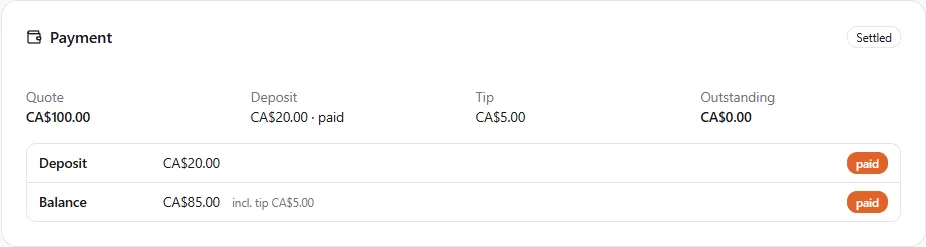
- Quote — the service total the booking was priced at.
- Deposit — the deposit amount and its status (
pending,paid,waived,released,forfeited). - Tip — the gratuity entered at completion.
- Outstanding — the total of requests still waiting to be paid.
- The badge in the corner is the booking’s settlement status: Deposit due, Deposit paid, Balance due, Settled (every request paid through the platform) or Paid outside.
- Each row is one payment request — Deposit, Balance (with the tip it includes) or
No-show fee — with its amount and status:
requested,paidorcancelled. A row marked Paid outside is a cash or transfer settlement you recorded (see the sister page).
The client sees the same card from their side with a Pay button on each open request.
The Commission, once per booking
Section titled “The Commission, once per booking”The Commission is worked out once, when the booking first asks for money, on the booking’s total — not on each payment. It is then taken from the first payment the client makes, and whatever does not fit in that payment (a small deposit, a large Commission) is taken from the next. The balance never re-calculates it. On your statement this shows as a Commission on the deposit line and, usually, none on the balance line.
The rate depends on what was booked:
| Booking | Commission |
|---|---|
| A service booking | 1.25%, minimum $0.50 |
| A class held in person (a service with more than one client per session) | 7% per enrolment, minimum $0.50 |
| A class held by video | 17% per enrolment, minimum $0.50 |
The Platform Processing Fee is charged on each card payment at the published rate (see Fees); the tip is included in its base.
Your statement under Billing
Section titled “Your statement under Billing”The Platform fees card on Finances → Billing says Your commission on each sale is charged once on the total, also on bookings you mark as paid in cash or by transfer, with the Platform Processing Fee on card payments and the Stripe Payout Fees on each payout. Fees are deducted from your next payout. See your rates opens Fees. It shows one block per currency you earn in:
| Line | What it is |
|---|---|
| Booking deposit / Booking payment / No-show fee | Money a client paid through the platform, shown net. The second line gives the gross, the commission taken on that payment and the Platform Processing Fee charged. |
| Commission — booking paid outside | The Commission on a booking you marked as paid in cash or by transfer (a deduction). |
| Commission returned (refund) | The Commission given back after you refunded a client. |
| Stripe Payout Fees | Stripe’s per-payout fee on a payout to your bank (0.25% + $0.25), at Stripe’s cost. |
| Stripe Payout Fees — monthly fee | Stripe’s $2.00 fee for a month in which you got a payout, once per calendar month. |
| Fees paid by card | Outstanding fees settled from your card on file, or paid now from this card. |
| Dispute fee | The card network’s chargeback fee on a disputed booking; returned if you win. |
| HST 13% on … / GST 5% on … | For businesses in Canada: the GST or HST on a fee, for example HST 13% on the commission on a booking payment, on the Stripe Payout Fees or on the dispute fee. It’s owed with your platform fees, and given back in proportion when the fee is (… returned on …). See Taxes on United Pet Club fees. |
| Prospecting usage | One line a day of Sales & Marketing usage — businesses added and messages sent or received. |
| Paid from prepaid balance | Fees paid from your prepaid balance. |
Every booking line links to its appointment. Under the statement, the Credit limit panel shows how much you can owe before we charge your card — see Credit limit and prepaid balance.
When you owe fees and there is nothing to net them against
Section titled “When you owe fees and there is nothing to net them against”Fees are normally deducted from your next payout. If your balance goes negative — typically after a few cash bookings with no card bookings in between — the Platform fees card shows the amount owed and a notice:
- Upcoming month-end charge on <date> — on the first of the month, if no payout has netted the fees, the amount is charged to your card on file. If what you owe reaches your credit limit first, it is charged then.
- Pay … now — settles the amount immediately with a card. The card you use is kept as your card on file for future month-end charges. Payment is by Stripe; United Pet Club never sees your card number.
- Platform fees are overdue — the month-end charge found no card on file (or the card was declined). Pay now to clear it. Your booking software keeps working meanwhile.
You are told when this happens: an in-app notice and an email — Action needed: … in platform fees for <month> — say why the charge failed and link back here; once the fees are collected (by the month-end charge or by Pay … now) a second notice confirms it.
When the money reaches your bank
Section titled “When the money reaches your bank”Your earnings are paid out to the bank account on your payout account once a week, on Fridays, by default, as soon as your available balance is at least $50. Under Payout settings on Finances → Receive Payments you can switch to monthly payouts (on the 1st), or to daily ones with the instant payouts add-on, and ask for a payout of any amount at any time. See Payout settings.
Every payout carries the Stripe Payout Fees, Stripe’s own charge passed on at cost: 0.25% + $0.25 per payout, plus $2.00 in each month with a payout (and GST/HST for Canadian accounts). They are added to your statement and netted from your next earnings, not taken out of the payout. See Fees.
The Get paid now card on Finances → Billing → Add-ons shows the schedule your payout account is on right now, for example Automatic payouts: Weekly, on Friday, with a Change payout schedule link to Payout settings. Its description reads Weekly payouts are the default. Instant payouts and daily payouts are the instant-payout add-on. Every payout carries the Stripe Payout Fees.
With the instant payouts add-on ($10 a month, see Pro plan and add-ons) you can also:
- Get paid now. Before you start, the card shows what you would receive, where it goes and the fees: Get $89.10 now to Visa •••• 4242. Instant payout fee: $0.90. Stripe Payout Fees on this payout: $…. Press Pay out now, check the instant-eligible balance, the instant payout fee, the Stripe Payout Fees (and the Stripe monthly fee (first payout this month) when it applies), what you receive and the debit card or bank it goes to, then press Pay out $89.10. The money usually arrives within 30 minutes, any day and at any time.
- Choose daily payouts. Pick Daily under Payout settings: your balance is then paid out every day it allows instead of every Friday. Each daily payout carries its own Stripe Payout Fees.
Good to know:
- Not every card or bank takes instant payouts. In Canada only a debit card does; elsewhere some banks do too. If nothing on your payout account takes instant payouts, the card says so and links to your payout account settings, where you can add an eligible debit card.
- GST/HST on the fee. If your business is in Canada, the confirmation also shows the GST or HST on the instant payout fee on its own line, for example HST 13%. It isn’t taken from the payout: it’s added to your platform fees. See Taxes on United Pet Club fees.
- You always see the fees before you pay. The instant payout fee comes out of the payout; the Stripe Payout Fees don’t (The Stripe Payout Fees are netted from your earnings, not taken from this payout.). If your balance or the fees change while the confirmation is open (a new booking payment arrives, for example), we show you the new figures and ask you to confirm again. Nothing is sent until you do.
- An instant payout sends everything that is instant-eligible. Money still pending goes out with your next automatic payout.
- When the add-on ends, daily payouts end too. If you cancel the add-on, it runs out, or it is paused because your platform fees are unpaid (see above), your payouts go back to weekly by themselves.
- Payout history. Under the button the card lists your payouts and every change to your schedule: automatic and requested payouts (Payout of $… with Automatic payout, Requested in the Dashboard or Paid out before Stripe’s holding limit, and their Stripe Payout Fees), instant payouts (amount, fee, Stripe Payout Fees and where the money went), and schedule changes with the reason: Changed in the Dashboard, The instant-payout add-on ended or was paused, or Moved to the weekly default.
Refunds and disputes
Section titled “Refunds and disputes”- Full refund to the client: the Commission comes back to you; the Platform Processing Fee does not, as with any card processor.
- Partial refund: the Commission is recalculated on what the client kept — with the minimum still applying — and the difference is returned.
- Chargeback: the network’s dispute fee is deducted from your balance when the dispute is opened and returned if the dispute is won. If it is lost, the disputed amount is taken back like a refund.
- Inquiry: sometimes the client’s card issuer only asks for details about a payment first, most often on American Express and Discover cards. An inquiry costs you nothing. If it turns into a chargeback, the dispute fee is deducted at that point.
Frequently asked
Section titled “Frequently asked”The client paid the deposit but the balance request has not appeared. The balance is raised when you mark the appointment complete. Until then the card shows Deposit paid.
The client wants to pay in cash on the day. Complete the appointment as usual, then use Mark paid outside on the Payment card — see Marking a booking paid in cash.
My daily payouts went back to weekly. Your instant payouts add-on ended or was paused — cancelled, run out, or paused while platform fees were unpaid. The Payout history on the Get paid now card shows when and why. Once the add-on is active again you can pick Daily again under Payout settings.
My payout didn’t come on Friday. Automatic payouts wait until your available balance reaches $50. Use Request a payout on Finances → Receive Payments to be paid a smaller amount now, after confirming its Stripe Payout Fees. See Request a payout.
Pay out now is greyed out. Either nothing is instant-eligible yet, or no card or bank on your payout account takes instant payouts; the card tells you which.
Why is there a Commission on the deposit and none on the balance? Because the Commission is calculated once on the whole booking and taken from the first payment. The total across both is the same as if the client had paid in one go.