

Quote requests
When a buyer asks for a quote on one of your quote ads, the request arrives in your quotes inbox. You price it and send a quote. The buyer reads it in their account, accepts it and pays the deposit by card through UPC. The balance is paid to you directly, outside United Pet Club, with no fee.
UPC’s Commission on the deal is 1.25% of the quote’s total. It comes out of the deposit first. Anything the deposit can’t cover is charged to your card on file when the buyer accepts.
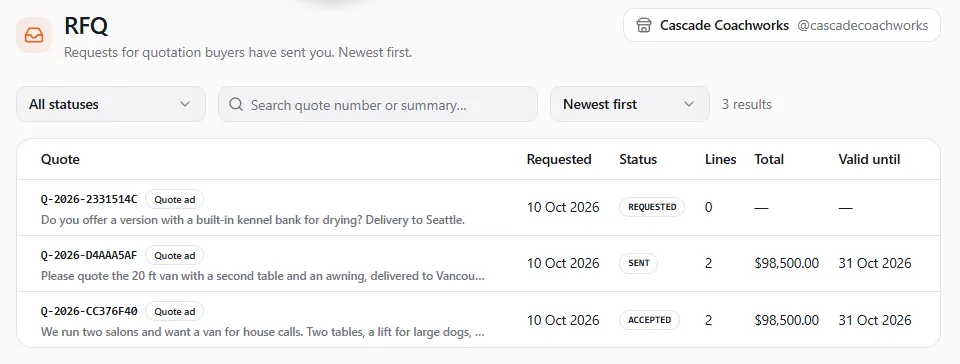
Commerce → Sales → RFQ in the Dashboard (/dashboard/commerce/sales/rfq). It lists every request for
quotation your store received, newest first. Requests that came from a quote ad carry a Quote ad
badge. You can filter by status, search by quote number or by what the buyer wrote, and sort.
You also reach a request from the ad’s page (Commerce → Quote Ads, then the ad, under Quote requests), and from the notice we send you when a buyer asks.
| Column | What it shows |
|---|---|
| Quote | The quote number, a Quote ad badge, and the start of what the buyer wrote. |
| Requested | When the buyer asked. |
| Status | Where the quote stands (see Statuses). Expired is added as soon as the date has passed. |
| Lines | How many lines the quote has. |
| Total | The quote’s total once you’ve sent it, and the deposit under it. |
| Valid until | The last day the buyer can accept it. |
Send a quote
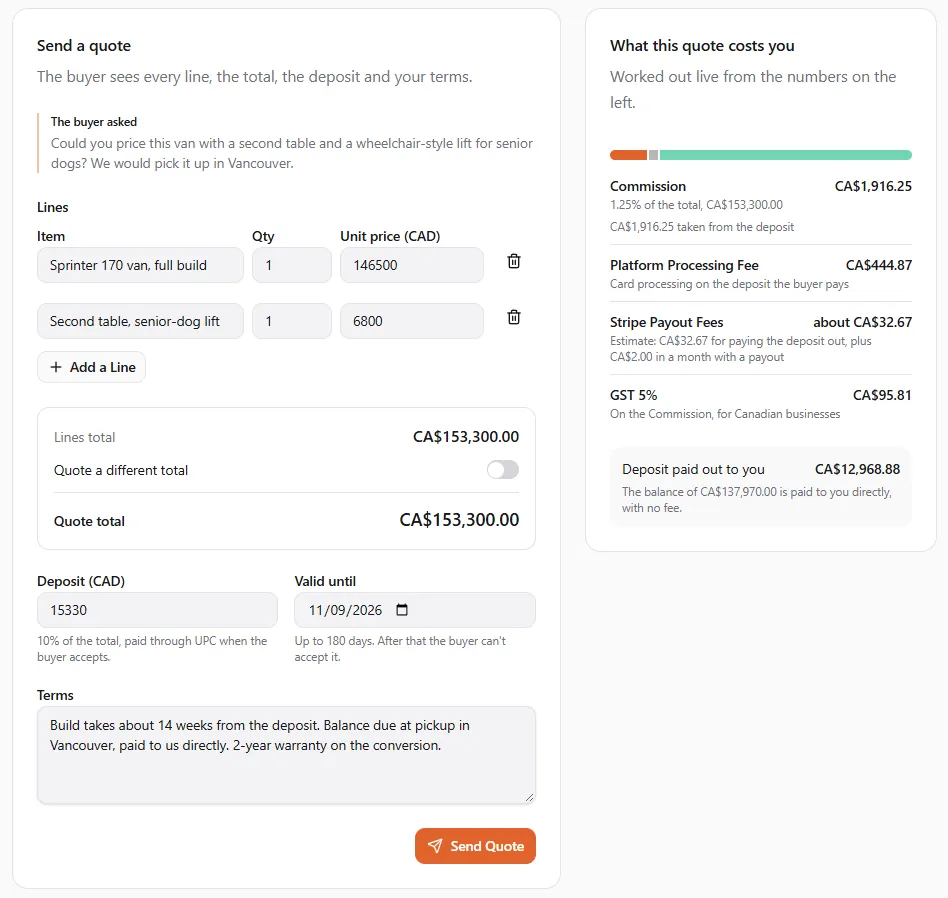
Section titled “Send a quote”Open a request with the status Requested. The page says A buyer asked for a quote. Price it and send it., names the ad under For the ad, and opens Send a quote. What the buyer wrote is shown under The buyer asked.
- Lines. Add one line per item: Item (up to 500 characters, for example 20 ft grooming van, fully fitted), Qty and Unit price. Select Add a Line for more; up to 100 lines.
- Total. The Lines total is the quote’s total. To quote a different total (a package price, for example), tick Quote a different total and enter it. The difference shows to the buyer as an adjustment. The total must be above zero.
- Deposit. It starts with the deposit set on the ad and shows what share of the total it is. You can change it to anything from zero up to the total. No deposit: the buyer pays you everything directly.
- Valid until. 30 days from today unless you change it. Pick a date from tomorrow up to 180 days ahead. After that date the buyer can’t accept the quote.
- Terms. Build time, what the deposit secures, how the balance is paid, delivery. Up to 8,000 characters. The buyer accepts these terms with the quote.
- Check the fee panel on the right, then select Send Quote.
Quote sent. The buyer can accept it now. The buyer gets a notice and sees every line, the total, the deposit, the balance and your terms. If something stops the quote from going, the button stays off and says why, for example The deposit can’t be more than the total.
You can send or revise a quote only while its quote ad is Live, and a quote with a deposit only once your payout account is ready. Otherwise the quote isn’t sent and you see:
| Message | What to do |
|---|---|
| This quote ad isn’t live | Resume the ad, or pay any overdue platform fees to restore it (see Quote ads), then try again. |
| Finish your payout setup first | The deposit is paid out to your payout account. Finish setting up payouts under Finances → Receive Payments (see Receive payments), then send again, or send the quote without a deposit. |
| We couldn’t check your payout account | Something on our side didn’t answer. Try again in a minute. |
The fee panel
Section titled “The fee panel”What this quote costs you works the fees out live from the numbers you type. It uses the three fee names you see everywhere on United Pet Club:
| Line | What it says |
|---|---|
| Commission | 1.25% of the total, then how it’s collected: the part taken from the deposit and, when the deposit can’t carry it all, the part charged to your card when the buyer accepts. With no deposit: No deposit runs through UPC on this quote, and the whole Commission goes to your card. |
| Platform Processing Fee | Card processing on the deposit the buyer pays. With no deposit: No card payment, so no processing fee. |
| Stripe Payout Fees | An estimate of what Stripe charges to pay the deposit out to you, plus Stripe’s monthly fee in a month with a payout. |
| GST/HST | For businesses in Canada: the tax On the Commission. |
| Deposit paid out to you | The deposit less the Commission taken from it and the Platform Processing Fee. |
Under the lines: The balance of … is paid to you directly, with no fee.
If the panel says We couldn’t work out the fees right now, you can still send the quote. The Commission is always worked out again, by UPC, when the buyer accepts.
What a deal costs you
Section titled “What a deal costs you”| Fee | How much | When |
|---|---|---|
| Commission | 1.25% of the accepted quote’s total, before any taxes you collect from the buyer. No minimum. | Once, when the buyer accepts. Out of the deposit first; the rest is charged to your card on file at once. |
| Platform Processing Fee | Your country’s published card rate, on the deposit only. | When the buyer pays the deposit. |
| Stripe Payout Fees | Stripe’s charges for the payout, at cost. | When the deposit is paid out to you. |
| GST/HST | On the Commission, by province, for businesses in Canada. | With the Commission. |
| The balance | No fee. | Paid to you directly. |
The Commission is worked out on the revision the buyer accepted. The Pro plan doesn’t remove it: Pro covers service bookings only. See Fees for the full fee list.
For example, on a quote with a total of $100,000, the Commission is $1,250. With the online Platform Processing Fee of 2.9% + $0.30:
| Deposit | Platform Processing Fee | Commission from the deposit | Charged to your card | Deposit paid out to you |
|---|---|---|---|---|
| $5,000 | $145.30 | $1,250.00 | $0 | $3,604.70 |
| $1,000 | $29.30 | $970.70 | $279.30 | $0 |
| No deposit | none | $0 | $1,250.00 | none |
The Stripe Payout Fees on the payout come on top. A card charge that’s declined is retried like your other platform fees: see When a charge doesn’t go through.
Revise a quote
Section titled “Revise a quote”While a quote is Sent or Revised (waiting for the buyer), select Revise on its page.
- Change what you need: Total, Deposit, Valid until or Terms. The fee panel in the dialog recalculates for the new numbers.
- Optionally note What changed, for example new chassis price.
- Select Send Revision.
The buyer gets the new revision and has to accept it again: an older revision can no longer be accepted. The same rules as sending apply: the ad must be live, and a deposit needs a ready payout account. If the quote’s date has passed, pick a new one to revise it. Once the buyer has accepted, the quote can’t be revised or withdrawn.
Withdraw a quote
Section titled “Withdraw a quote”Select Withdraw on a Sent or Revised quote, then Withdraw Quote. The buyer can no longer accept it and is told you withdrew it. To quote again, they send a new request.
When the buyer accepts
Section titled “When the buyer accepts”- The buyer accepts a revision and is asked to pay the deposit. The quote shows Accepting and Accepted. The buyer is paying the deposit. The buyer has a limited time to pay, shown to them on the page.
- When the deposit is paid, the deal is confirmed: Accepted, Accepted. The deal is confirmed. We send you a notice with the Commission. A quote with no deposit is confirmed as soon as the buyer accepts.
- If the buyer doesn’t pay in time, the quote goes back to Sent and they can accept it again, or to Expired if its date has passed meanwhile. A payment that arrives after that is refunded to the buyer in full, with no Commission.
Arrange the balance and the delivery with the buyer directly. United Pet Club isn’t part of that payment.
The deal
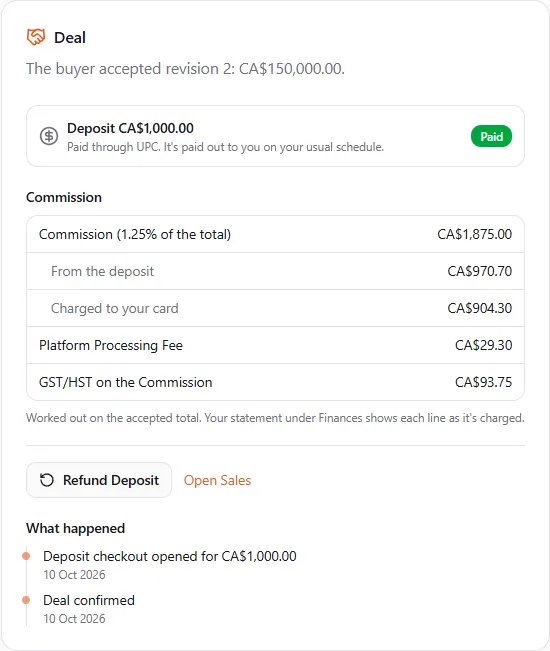
Section titled “The deal”An accepted quote’s page opens with the Deal card: The buyer accepted revision 2: … and:
- The deposit and where it stands: Awaiting payment, Paid (Paid through UPC. It’s paid out to you on your usual schedule.), Partly refunded, Refunded or No deposit (The buyer pays you directly. The Commission was charged to your card.).
- Commission: Commission (1.25% of the total), From the deposit, Charged to your card, the Platform Processing Fee and, in Canada, GST/HST on the Commission.
- What happened: the deal’s history, such as Deposit checkout opened for …, Deal confirmed and refunds.
- Refund Deposit and Open Sales (the deal’s order in Commerce → Sales).
On your statement under Finances, the deposit shows as Quote deposit and a Commission charged to your card as Commission — accepted quote (charged to your card).
Refund the deposit
Section titled “Refund the deposit”- On the deal, select Refund Deposit. The dialog says how much of the deposit can still be refunded and warns: A full refund of the deposit returns the Commission; a partial refund keeps it.
- Enter the Amount (up to what’s left) and a Reason. The dialog tells you the effect:
- This refunds the whole deposit, so the Commission comes back to you.
- This is a partial refund, so the Commission stays.
- Select Refund … to confirm. The money goes back to the buyer’s card.
What happens to the fees:
- Full refund (your refunds add up to the whole deposit): the whole Commission comes back, the part taken from the deposit and the part charged to your card, with its GST/HST.
- Partial refund: the Commission stays.
- The Platform Processing Fee isn’t returned on a refund, as with any card processor.
- A deal with no deposit that falls through keeps its Commission. Contact support if you think it should be reversed: only our team can do that. If we reverse it, the deal is cancelled: you’re told the Commission was returned, and the buyer is told the deal was cancelled.
- A chargeback the buyer wins on the whole deposit counts as a full refund. The dispute fee stays with you, as on any dispute (see Fees).
To change the price after the buyer has accepted, refund the deposit in full and ask the buyer to request a new quote.
Expiry
Section titled “Expiry”A quote that isn’t accepted by its Valid until date expires: Expired, This quote ran out before the buyer accepted it. Quotes are checked every hour. You and the buyer get a reminder about 48 hours before a quote expires (unless it was sent with less time than that), and a notice when it expires. The buyer can ask for a new quote.
Statuses
Section titled “Statuses”| Status | What it means |
|---|---|
| Requested | A buyer asked. Price it and send it. |
| Sent | Sent. Waiting for the buyer to accept or decline. |
| Revised | You sent a new revision. Waiting for the buyer. |
| Accepting | The buyer accepted and is paying the deposit. |
| Accepted | The deal is confirmed. |
| Rejected | The buyer declined the quote, or cancelled their request. |
| Expired | The date passed before the buyer accepted. |
| Withdrawn | You withdrew it. |
Closed quotes (rejected, expired, withdrawn) are read-only.