

Microchips, tags and identity kits
United Pet Club sells three ways to identify a pet, and they cover different situations: a microchip is permanent but needs a scanner, a QR tag is instant for anyone with a phone but lives on a collar, and an identity kit puts both in one box with a passport record book. Most pets do best with a chip and a tag together.
What a microchip does, and what it does not do
Section titled “What a microchip does, and what it does not do”A microchip is not a GPS tracker. It has no battery and sends no signal, so it cannot show you where your pet is. What it carries is one 15-digit number. When a clinic or shelter scans the pet, that number comes up, they look it up in a registry, and the registry shows your contact details.
That is the whole system. It works because there is nothing in it to wear out, and it fails only when the registration behind the number is out of date. Keep your details current and the chip does its job for the life of the pet.
Picking a chip
Section titled “Picking a chip”- Standard ISO is the everyday choice: a 2.12 x 12 mm FDX-B chip any universal scanner can read, with a QR tag in the box and free Essential registration.
- ThermaSense adds a temperature sensor. Scan with a compatible reader and you get the pet’s body temperature along with the ID, with no thermometer and no wrestling. The Plus registry plan is included, for the life of the pet.
- ThermaSenseX reads temperature from minus 40 to 85 degrees Celsius at plus or minus 0.2, which covers reptiles, aquatic species and demanding breeding or research work. Plus is included here too, for life.
- TapSense Core is different: it reads with an NFC phone through the United Pet Club app, not with a vet’s scanner, and it has no public registry. It exists for laboratories and internal facility tracking. If you want a lost pet returned, this is not the chip to pick.
Every chip comes either with an implanter (a sealed single-use unit, ready to place) or needle only (cheaper per chip, clicks into the reusable implanter that breeders and clinics keep on hand).
Adding your chips to your account
Section titled “Adding your chips to your account”A box of United Pet Club chips or tags often comes with a card holding a code and a secret, and a single chip can carry its own on its label. Enter them in your dashboard under Pet ID → Redeem a box and every chip and tag in the box is added to your account at once, ready to put on your pets. The secret stops anyone else registering your chips just by reading a number off the box. Chips that came without a secret are registered by their number. The steps are in Pet IDs → Redeeming a United Pet Club box or chip.
Who puts the chip in
Section titled “Who puts the chip in”Implantation is a quick injection under the loose skin between the shoulder blades, and it belongs in trained hands. Rules differ by region: some allow trained owners, others require a professional. If you are unsure, buy the chip, bring it to your next appointment, and have the clinic place and register it in one visit.
Looking up a lost or found pet
Section titled “Looking up a lost or found pet”If you have found an animal, or want to check what a number on your own pet leads to, use Recover a Pet in the site header (it is also the Lookup an Animal button on the home page). A panel slides in from the side with four tabs: Microchip, Tag, Tattoo and Passport. Pick the one that matches the number you have, type it in and press search.
Signed in to your Dashboard on a tablet or a computer, the paw-print button in the top bar opens the same panel. The Dashboard has no room for it on a phone, so use Recover a Pet on the public site there.
- A microchip number is always 15 digits. The panel will not search until it has all 15.
- A tag number stands on its own; if the tag came from a bulk order and you also have the batch number, adding it speeds the search up but is never required.
- Tattoo numbers are usually inside the ear or on the belly; passport numbers are on the pet’s official passport document.
The lookup is free, works around the clock, and the panel appears in whichever of the 72 site languages you are using. What it tells you is deliberately narrow: whether the number belongs to a registered pet, and whether that pet’s owner can be reached. You never see the owner’s details. If they can be reached, the panel opens a message form so they can see yours.
The owner hears about your search
Section titled “The owner hears about your search”The panel says so before you search: if your search matches a registered pet, its owner is automatically notified — by email, straight away — that this identification was searched, along with whatever details are available to help with recovery. For a finder standing next to a lost animal this is good news: help is already moving before you have written a word.
What the owner’s notification can include:
- Roughly where the search was made. The site works this out from your internet connection — a city, not an address, and the email says so.
- Who searched, when the searcher is signed in. A signed-in member’s name and their account’s email address and phone number are shared with the owner so the owner can reach out directly. An anonymous search is reported as exactly that — anonymous — which is why adding your details to the message form matters: it is the only way an owner can reach an anonymous finder.
Searching the same number again does not send the owner another email straight away — repeat searches from the same place are bundled so an owner is not flooded — but a different person searching later does notify them again.
One search never notifies anyone: your own. If you are signed in and the number you search is registered to you, the panel simply tells you “This is your own pet” — with the pet’s name, so you can confirm the registration — and no notification is sent for that search.
Every microchip number has its own web address
Section titled “Every microchip number has its own web address”Every 15-digit microchip number also has a page of its own on this site:
www.unitedpetclub.com/microchip-lookup/985141000200500 — swap in the number you have.
Typing that address (or searching the number itself on the web, where registered chips can be found) opens a page that says whether the chip is registered with United Pet Club, explains what the number’s first three digits mean, and — if the owner has reported the pet lost or stolen — says so in a banner at the top. As everywhere else, it never shows anyone’s personal details.
Opening the page is not a search: nobody is notified, and it does not use up any of your free searches. When you are ready, press Search this microchip — the lookup panel opens with the number already typed in, and everything on this page about searching applies from there.
The address is also made to be shared: paste it into a group chat or a local lost-pets group, and everyone who opens it lands one press away from messaging the owner.
How many searches you get
Section titled “How many searches you get”Anonymous searches are limited to four in any rolling seven days, counted per internet connection and shared across all four tabs — microchip, tag, tattoo and passport draw on the same four. The panel shows the count as soon as you have searched once, so the limit never arrives as a surprise:
3 of 4 free searches left in the next 7 days.
The limit is there because this panel can confirm whether any number belongs to a registered pet. Without a cap, that turns the registry into something a stranger can trawl through, and the people it would expose are the owners in it.
The window rolls rather than resetting on a fixed day: each search frees up again seven days after you made it, and the panel tells you the date of the next one.
Need more searches than that?
Section titled “Need more searches than that?”Shelters, clinics, rescues and animal control often scan more pets in a week than 40 searches cover. There are two ways to a higher allowance:
- It is added automatically if United Pet Club has recognized you as a shelter or rescue, an emergency responder, a licensed veterinarian or a vet tech. You do not need to apply; the higher allowance stays for as long as your recognition does.
- Or you apply from the panel, once you are signed in and have used all your searches.
To apply:
- Under the count, select Apply for a higher allowance.
- Under Organization (optional), enter your shelter, clinic or rescue.
- Under Why do you need more searches?, tell us who you are and how many pets you scan in a typical week. A sentence or two is enough, but it has to say something: a very short answer cannot be submitted.
- Select Submit application.
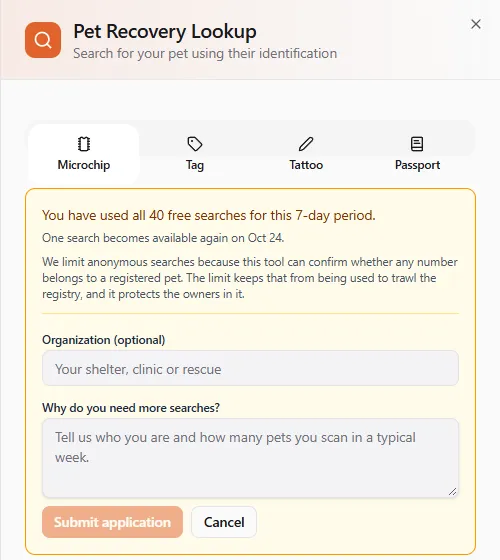
What you’ll see: Your application is in. We review these quickly, and the higher allowance applies automatically once approved. Opening the panel again while it is being reviewed shows Your application is under review. You can only have one application open at a time.
When we have decided, we tell you by email and in your in-app inbox:
- Approved — the message says your new weekly limit, and it already applies: your next search counts against it. Nothing else to do.
- Not approved — the message includes a note from the reviewer explaining why. Your current allowance stays as it was, and you can apply again the next time you run out, for example once your organization is verified.
Every allowance is a cap. The largest one is 2,000 searches a week, and there is no unlimited allowance, for anyone — the same reason the anonymous limit exists.
Contacting the owner
Section titled “Contacting the owner”When a pet is found, the panel first tells you who you have found: the pet’s name, and — where the pet has a public profile — a View name’s profile link that opens the profile in a new tab, so you can confirm the animal in front of you matches its photos and description without losing the search result or a half-written message.
When the owner accepts messages, a form opens directly beneath the result. Write what the owner needs to know — where you found the animal, what condition it is in, and where it is now — then add your own email address (required, so they can reply) and, ideally, your phone number. Most owners will want to call rather than write.
Some owners publish a phone number for exactly this situation. The number is shown only when you are signed in — we disclose contact details to named members only, so the owner can always learn who accessed them. Searching anonymously, you will see that a number exists together with Sign in and Create a free account buttons; the account is free and takes a minute. Signed in, the number appears as The owner can be reached at this number — on a phone with a Call owner button that opens your dialler, on a larger screen as a tap-to-call link. Calling is the fastest route there is. Most owners have not published one, and for them the message form is the way through — that works signed in or not.
Done with one animal? Search another pet at the bottom of the result clears the panel back to a fresh search — as does switching to another identification tab.
Where you are. The panel works out roughly where you are from your internet connection and shows it to you before anything is sent, with a tick box you can clear if you would rather not share it. That estimate is a city, not an address, and the owner’s email says so. If you are willing, Share my exact location instead asks your device for real coordinates and sends the owner a map pin — for an animal that may not stay put, that is worth far more than a city name.
Your name, email address and phone number go to the owner so they can reply to you directly. The owner’s details are never sent back to you.
What each answer means
Section titled “What each answer means”The panel gives one of seven answers. They are deliberately different from each other, because “we did not find it”, “we could not look” and “you have used your searches” are three different things:
| What you see | What it means | What to do |
|---|---|---|
| This pet is registered with United Pet Club. Send the owner a message below and we will pass it straight to them. | The number is registered and the owner accepts messages from finders | Fill in the form beneath it. Keep the animal safe and comfortable while you wait for a reply. |
| This pet is registered with United Pet Club, but we cannot pass a message to the owner right now. | Registered, but no message route is open — the owner has closed it, or the relay is unavailable | Hand the animal to a local shelter or veterinarian, who have other routes to the owner. |
| This identification is registered but no owner has claimed it yet… | The chip or tag exists in the registry but nobody has claimed ownership | Usually a chip implanted but never registered. Take the animal to a veterinarian or shelter. |
| This pet is registered. The owner has chosen not to share their contact details with finders. | Registered, and the owner has asked us not to disclose anything | Nothing more is available to you. Hand the animal to a veterinarian or shelter. |
| No pet found with this identification. Please verify the number and try again. | The number was searched and genuinely is not in our registry | Re-check the digits against the paperwork, try a different tab, or ask the veterinarian who placed the chip. The animal may be on another registry. |
| You have used all your free searches for now, so nothing was searched. | Nothing was searched at all — your allowance for this seven-day window is spent | Sign in for a higher limit, or wait for the date the panel gives you. Already signed in and searching for a shelter or clinic? Apply for a higher allowance. This says nothing about the number you typed. |
| We could not reach the registry just now, so nothing was searched. Please try again in a moment. | Nothing was searched at all — a temporary fault on our side | Wait a moment and search again. Do not read this as “the pet is not registered”. |
If the pet is flagged lost or stolen, that is shown alongside whichever answer you get — even when contact details are withheld. It is a safety signal, not a contact route.
The Essential QR tag is light, water resistant and comes in ten colors. The code on it opens a profile you edit any time: your number, care notes, or a link to a page you run. There is no subscription. A random-color 10-pack exists for litters.
The standard yellow tag is the one we pack with every microchip, sold on its own for spares. The premium metal tag is laser-etched stainless steel for dogs that destroy plastic tags.
Identity kits
Section titled “Identity kits”A kit is everything a new pet needs on day one: a microchip with implanter, a bilingual pet passport record book, a QR tag, and the Plus registry plan already included. You choose the chip (the Standard ISO chip, which is the cheapest kit and all most pets need; ThermaSense; ThermaSenseX; or TapSense in its dual version that vet scanners can read), the passport language (English/French or English/Spanish), and the quantity. Singles come with a navy passport; the 20, 50 and 100 packs ship assorted covers and exist so breeders and shelters can send every animal home complete.
Registry plans
Section titled “Registry plans”Registration starts free and stays free. The paid plans are one payment that covers your pet for life, not subscriptions: there is nothing to renew. Prices are in US dollars.
- Basic (free): the registration, the universal lookup, email alerts on scan, the private finder relay.
- Plus ($9.99, lifetime): a signed-in finder also sees your phone number and can call you straight away. Included with ThermaSense and ThermaSenseX chips and every kit, for the life of the pet: it starts the day you put the chip on a pet and never runs out.
- Deluxe ($19.99, lifetime): adds text-message alerts and where the scan happened, on a map.
- Complete ($49.99, lifetime): every alert channel (email, text, WhatsApp, Telegram, push, voice call, inbox), the scan map, and when you report the pet lost with a location, United Pet Club members and pet professionals in the area are told what to look for.
Every plan stays with the pet if it changes hands; the new owner confirms in their dashboard that they agree to be contacted about the pet’s recovery.
If your pet is chipped and your phone number changes, update the registration the same week. A chip pointing at a dead number is the most common way recovery fails.