

Your dashboard home
Home is the first page of your Dashboard. On a computer it has three columns:
| Column | What it holds |
|---|---|
| Left: the sidebar | Every section of your Dashboard. You choose which ones it shows in Customize Dashboard. |
| Middle | Quick links to your everyday pages (My Pets, My Bookings, My Orders, Pet IDs and more), the reminders that need you (care that’s due, pets waiting for you to claim them, finishing your profile, adding a passkey, verifying a business), then the feed: posts from the profiles you follow and suggestions. A reminder goes away once it’s done. |
| Right | Shortcuts for the profile you’re acting as, then UPC for you on a personal profile (below), an offer from United Pet Club, a cause you can give to, and your Helper points. |
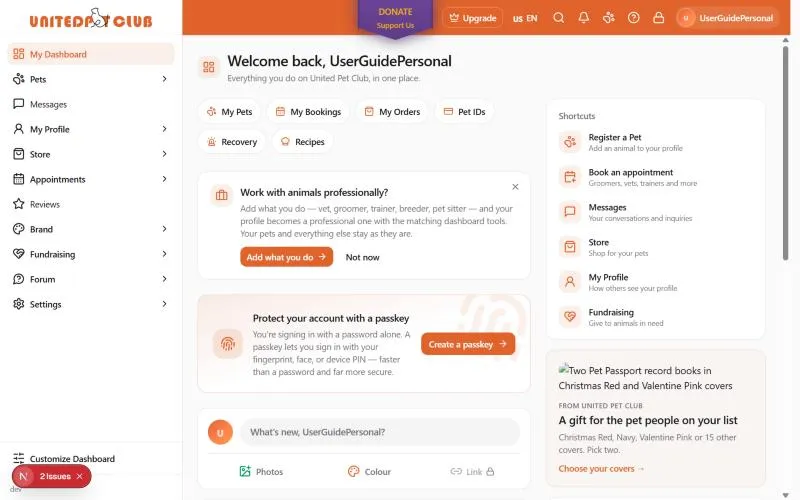
On a phone or a narrow window, the right column moves under the middle one.
Shortcuts by profile
Section titled “Shortcuts by profile”The shortcuts change with the profile you’re acting as. Each one has a short line saying what it’s for, and opens the same page as the sidebar entry with the same name.
| You’re acting as | Shortcuts |
|---|---|
| A personal profile | Register a Pet, Book an appointment, Messages, Store, My Profile, Fundraising |
| A business | My Business, Messages, Services, Hours, Reviews, Photos |
| A place | My Place, Messages, Hours, Location, Reviews, Photos |
To change profile, select your photo at the top right and pick another profile. The shortcuts change with it (more).
UPC for you
Section titled “UPC for you”On a personal profile, the right column has a UPC for you card. It shows the parts of United Pet Club that fit you, one at a time, and moves to the next one every few seconds. Free tools are marked with a green label, such as Free for life or Free, no plan to buy.
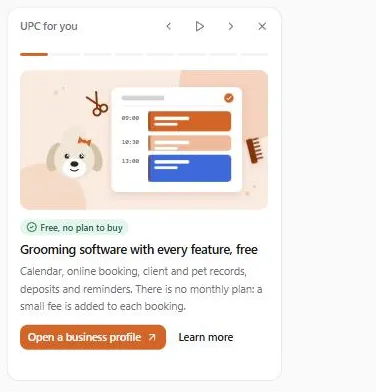
What you see depends on your professions (Specializations under My Profile) and the services you offer:
| Your profile | What UPC for you shows |
|---|---|
| No profession (a pet parent) | Free microchip registration, finding a groomer near you, pet tags and pet passports |
| Groomer | The grooming software (free, with no monthly plan) and client records for your team |
| Breeder | Free litter records, growth charts and pedigrees, puppy and kitten applications, sale contracts and rehoming |
| Any profession | A free business profile, invoicing, the staff time clock and work logs, then a couple of the pet parent items |
Each item has a button that takes you there and, for most, Learn more, which opens a page on the United Pet Club website in a new tab. Business tools such as booking, invoicing and the time clock work on a business profile, so their button is Open a business profile. It opens the new profile form with An organization already picked. Your personal profile stays as it is.
To control the card:
- Previous and Next (the arrows) move one item back or forward. You can also pick an item from the bars at the top, or use the left and right arrow keys.
- Pause stops the card from moving. It also stops while your pointer or keyboard focus is on it.
- Hide for 30 days (the X) hides the card on this browser for 30 days.
If your device is set to reduce motion, the card doesn’t move by itself; use the arrows.
What you won’t see
Section titled “What you won’t see”- Ads from outside networks. The Dashboard only shows offers from United Pet Club and paid partners, never ads from outside networks.
- Empty boxes. A card with nothing to show, such as the cause to give to when none is open in your country, doesn’t appear at all.