

Using a member's website
Many businesses on United Pet Club have their own website, at an address like kennel.upc.pet, rex.petme.vip
or their own domain. You can use your United Pet Club account there: sign in once, then apply, chat with the business
and shop, all on their website.
Signing in
Section titled “Signing in”- On the website, choose Sign in (top of the page) or a button such as Sign in to chat with … or Apply.
- You arrive on United Pet Club. If you are not signed in, sign in, or create a free account if you don’t have one.
- United Pet Club shows Continue to and the business’s name, the website’s address, and the name you are signed in as. Choose Continue.
- You are back on the website, on the page you started from.
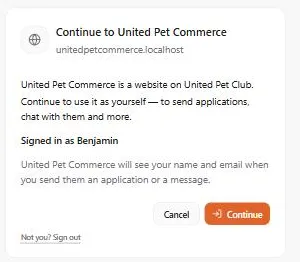
The business sees your name and email when you send them an application or a message, as the page says.
- Cancel takes you back to the website without signing in.
- Not you? Sign out signs you out of United Pet Club so you can sign in as someone else.
- The next time you sign in on the same website in the same browser, United Pet Club continues straight away without asking again.
Your sign-in on a website lasts about two hours. After that, the website sends you through United Pet Club again, which is usually one click. To sign out of just that website, choose Sign out next to your name.
Sending an application
Section titled “Sending an application”- On the website, find the application (for example a Puppy application) and choose Apply.
- The application opens in a window on the page. Answer the questions; Next checks the questions on the current step before moving on.
- Choose Send application. You see Application sent, and the business has it right away.
Your answers are saved as you go. If an application asks for files or for one of your pets, the window offers Continue on United Pet Club, where you can attach them.
Chatting with the business
Section titled “Chatting with the business”Once you are signed in, the website’s contact area becomes a conversation with the business. Type in Write a message… and press Enter or Send.
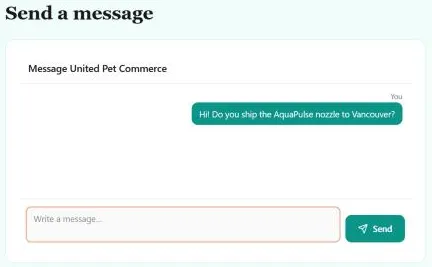
The conversation is the same one you see in your United Pet Club Messages, so you can reply from either place. If you’d rather not sign in, the website still offers a short form to send a single message.
Buying products
Section titled “Buying products”- Add products to the cart on the website, without signing in.
- Open the cart and choose to check out. You continue to the United Pet Club store, with the same products already in your cart.
- Pay as usual: with a card, or with Apple Pay or Google Pay where your device offers them.
- Back to and the business’s name, at the top of the cart, returns you to their website.
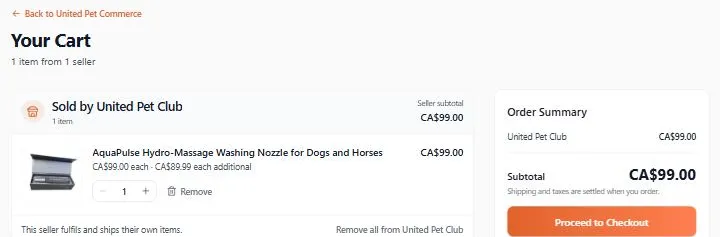
Your order, receipts and any returns are handled like every other United Pet Club store order.