

Animal listings
Animal listings let you offer an animal to a new home and let families find it. Listings appear in the public Find an animal search on the website, on your profile page and on your PetLink, with filters for kind, species and breed, age, size, price, location and distance, health and temperament, and the seller’s verification and rating.
Where things live:
- Dashboard -> Pets -> Animal listings (a group in the Pets menu since 2026-10-09): My listings (allowance, status tabs), New listing, the listing editor (photos, checklist, publish / pause / renew / place, promotion, per-animal items, inquiries, waitlist, deposits), Inquiries, Deposits and Import sources (rescues).
- Account -> Listings: animals you saved, your saved searches and alerts, inquiries you sent, waitlists you joined (accept an offer, pay a deposit) and your deposits.
- Website -> Find an animal (
/animals/listings): the public search, the per-kind / species / breed pages, each listing’s page, and the Listings section on a seller’s profile and PetLink.
Listings are made by signed-in profiles only; saving, inquiring and joining a waitlist ask you to sign in.
What you can list
Section titled “What you can list”| Kind | Who | Notes |
|---|---|---|
| For sale | breeders (Breeder specialization, identity verified) | the animal must be registered to you in UPC |
| Litter / Upcoming litter | breeders | created from a Breeding litter (each puppy or kitten becomes an item with its own availability) or planned with an expected date and a waitlist |
| Stud service | breeders | an intact male you own |
| For adoption / Foster needed | shelters and rescues (organisation profiles) | foster listings can offer foster-to-adopt; adoption inquiries open an application |
| Rehoming | anyone | a UPC animal you own; the rehoming fee is capped by the platform |
Before it goes live
Section titled “Before it goes live”Publishing runs a checklist you see before you submit: title and description (no phone numbers, e-mails or links — contact happens through inquiries), at least one photo, location, species, the animal’s ownership, minimum hand-over age for the species, any rule of your jurisdiction (for example a breeder licence number, microchip, or spay/neuter requirement), what your kind of animal and listing needs (a date of birth, the answers to a few questions, a document — see Rules for this kind of animal), deposit terms within the platform cap, and your profile’s limits. The first listing of a new seller is checked by the platform team before it appears; later listings go live immediately unless something needs a look (a duplicate of another seller’s listing, a flagged phrase, a price far below the usual band).
Every checklist item has its own How to fix steps and a button to where it gets fixed — Publishing a listing explains them all, one by one.
Photos, videos and your limits
Section titled “Photos, videos and your limits”Listing is free. To keep spam off the site, each profile has limits: how many animal listings and litter listings you can have active at the same time, how many new listings you can start in 24 hours, how many photos each listing can carry, whether you can add a video, how many listings you can pin on your profile, how many saved searches you can keep, whether you can take protected deposits, and how many promoted days you get each month. They depend on your profile type, whether it is verified and how old it is, not on a plan: verifying your profile and its age raise them. Placing or removing a listing frees its slot. My listings shows what is in use, or no limit. The usual limits are in Limits on listings, breeds, litters and posts.
When you reach one, the page explains it in place: what you reached, how much you’re using, what sets your limit and what raises it. There is no upgrade to buy.
A litter listing whose litter holds a Litter Pass is outside two of those limits: it does not take a litter-listing slot, and it can take protected deposits whatever your limits. See Litters and the Litter Pass.
Lifecycle
Section titled “Lifecycle”A listing stays live for the platform’s listing period (currently 60 days), then expires; you can renew it inside the renewal window, pause and resume it at any time, mark it placed when the animal has found a home (for litters, marking every animal placed does this for you), or remove it. Reserved listings stay visible but show every animal as reserved.
Inquiries
Section titled “Inquiries”Interested people write to you through the listing; each inquiry opens a conversation in your inbox (with contact details hidden until you choose to share them). For adoption and foster listings the inquiry also starts an application you review in your intake queue. You can close or block an inquiry; people who send too many inquiries are slowed down automatically.
When the shelter or rescue attached a contract to its applications, approving yours creates that contract for you to sign. The application in Dashboard -> Pets -> Animal listings -> Inquiries then shows Contract for this application with where it stands: Awaiting your signature (press Review and sign), You signed, or Signed by everyone. Open contract opens it. You also get an e-mail and a notification, and it is listed under Contracts > Awaiting My Signature.
Waitlists (litters)
Section titled “Waitlists (litters)”Families join the waitlist of a litter or upcoming litter with their preferences (sex, colour, purpose) and receive a position. When an animal is available you offer it to a waitlist entry; the family accepts (paying a deposit if you require one) or declines, and the queue re-packs. Offers expire after the platform’s offer window.
The waitlist of a litter created from a Breeding litter needs a Litter Pass on that litter (since 25 September 2026). Creating the listing switches the waitlist on only when the litter has a pass; without one the listing publishes as contact-only, visitors see the waitlist as closed, and joining, offering or accepting answers Litter Pass required. Put a pass on the litter from its page under Pets → Litters and save the listing again. An upcoming litter you plan by hand, with no Breeding litter behind it, keeps its free waitlist.
Deposits and Reserve (protected deposits)
Section titled “Deposits and Reserve (protected deposits)”If your profile can take protected deposits (a verified or 90-day-old personal profile, or any business or organization, see Limits on listings, breeds, litters and posts), you can require a deposit on each animal and on waitlist offers. There are two ways to take it:
- Contact-only (the default): the deposit is stated on the listing and arranged directly between you and the buyer. Free, ranked the same as every other listing.
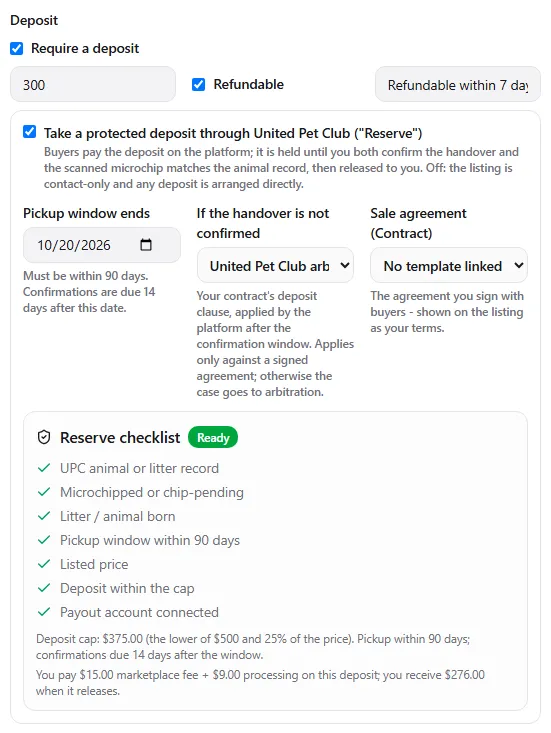
- Reserve — turn on Take a protected deposit through United Pet Club. Buyers see a Protected deposit badge and a Reserve button; they pay the deposit on the platform and it is held until the handover is confirmed.
What Reserve needs
Section titled “What Reserve needs”The editor shows a Reserve checklist; publishing needs every line green:
- a UPC animal or litter record (the microchip is matched against it at handover) that is microchipped or chip-pending and born (planned litters keep the non-monetary waitlist);
- a pickup window ending within 90 days — confirmations are due 14 days after it;
- a listed price, and a deposit no higher than $500 or 25 % of the price, whichever is lower;
- a connected Receive payments account (the release needs somewhere to go).
Pick what happens if the handover is not confirmed by the deadline — this is your contract’s deposit clause: United Pet Club arbitrates (default), Refund the buyer or Release to me. Refund / release apply only against a signed sale agreement with that buyer; otherwise the case goes to arbitration. You can link the sale-agreement template you sign with buyers.
The fee
Section titled “The fee”Reserve deposits carry the pet marketplace fee: 5 % of the deposit, minimum $5, paid by you, plus the published processing rate. Verified nonprofit rescues and shelters pay no marketplace fee (processing still applies). The checklist shows the exact amounts for your deposit and what you receive when it releases.
Confirming the handover
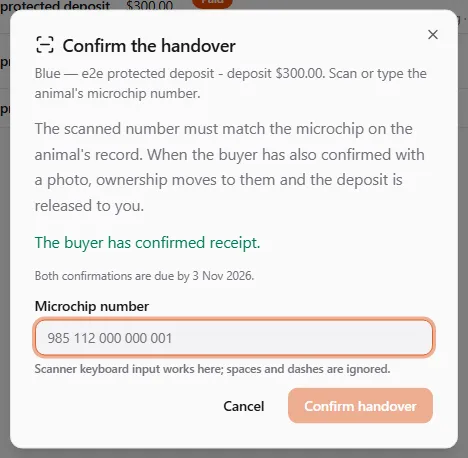
Section titled “Confirming the handover”At pickup, the buyer confirms receipt with a photo from their account, and you confirm from Listings → Deposits → Confirm handover by scanning or typing the animal’s microchip number (a scanner in keyboard mode works in the field; spaces and dashes are ignored). When both confirmations exist and the chip matches the animal’s record, the animal’s owner of record moves to the buyer, the listing is marked placed and the deposit is released to your balance (net of the fee). If the chip does not match, or the deadline passes under arbitrates, a United Pet Club team member reviews both sides and decides — nothing moves until then.
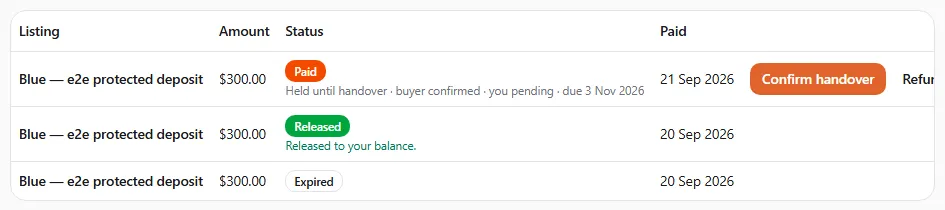
You can refund a held deposit at any time. Dispute replaces forfeit on protected deposits: it sends the case to arbitration instead of keeping the money unilaterally. There is no buyer protection beyond the held deposit — the balance is paid to you directly under your contract — and the listing says so.
Promotion and showcase
Section titled “Promotion and showcase”Plans with promoted days let you promote a listing: it is shown ahead of organic results (always labelled as promoted, rotating with other promoted listings). Rescues’ long-stay animals are boosted automatically. You can also showcase a few listings on your profile page and PetLink.
Saved searches and alerts
Section titled “Saved searches and alerts”Visitors and members can save a search and receive an instant or daily alert when a matching animal is listed; how many searches you can save depends on your profile’s limits.
Rescues: import from your website or feed
Section titled “Rescues: import from your website or feed”Shelters and rescues can connect a Petfinder or RescueGroups account, a JSON or CSV feed, or ask the platform to read their own website with a recipe (a description of where each field sits on the page — no manual re-entry). Imported animals appear as adoption listings with a link back to your site and your attribution; when your site changes layout the import pauses and you are told rather than showing wrong data. If your animals were imported from a public site before you joined, you can claim the source, verify your domain and take over the listings.
Reporting a listing
Section titled “Reporting a listing”Every public listing has a Report action (scam, misleading, welfare concern, prohibited species, underage animal, duplicate, off-platform payment, and more). Repeated reports hide a listing until the platform team has reviewed it.