

Changing your plan
You can move to another plan at any time. A bigger plan starts today, and you pay its price minus a credit for the whole months left on your current plan after the month you’re in. A cheaper plan starts on your current plan’s renewal date, so you keep what you’ve already paid for.
Select Upgrade in the Dashboard’s top bar. The upgrade window opens; you change plan on its Plans tab. The same window opens by itself when you run out of something you buy, such as Litter Passes or contracts. Limits on listings, breeds, litters and blog posts are free and no plan changes them: see Limits on listings, breeds, litters and posts.
Move to a bigger plan
Section titled “Move to a bigger plan”- Select Upgrade in the Dashboard’s top bar. Stay on the Plans tab.
- Choose Monthly or Annual, then select the plan you want. Only plans on sale are listed.
- Under the plans you’ll see what the move costs: the plan’s price, Credit for N unused months of your current plan (when there are any), and Due today. Under it: “Your new plan starts today. The rest of this month on your current plan isn’t credited.”
- Select Switch · amount today and pay in the same window. Your bank may ask you to confirm it’s you.
Your new plan starts as soon as the payment is confirmed, usually within a few seconds, and your current plan ends at the same moment. You’re never billed for both. Your new plan renews a month (or a year) from today, and the window tells you the date: “Then amount per month, next on date.”
If your credit covers the whole price, the button reads Switch now. Nothing is charged, and your new plan starts right away.
How the credit works
Section titled “How the credit works”Your new plan starts today and your current plan ends today. The rest of the month you’re in on your current plan isn’t credited. Every whole month after it that you’ve paid for is: your current plan’s price, divided by the months it covers, times those months.
For example, you pay $48 a year for a plan ($4 a month), and your year started on 1 March. On 15 September you move to a plan at $40 a month. You’re in the seventh month of your year (1 September to 1 October); the five whole months after it, October to February, are credited: $20. You pay $20 today, and the new plan renews at $40 on 15 October. (The prices are only an example.)
A monthly plan has no whole month after the one you’re in, so a move from it to a bigger plan has no credit: you pay the new plan’s full price today.
If the credit is more than the new plan’s price, for example when you move from a yearly plan to a monthly one, you pay nothing today. The window tells you where the rest goes: “The other amount of credit comes off your next renewals.” A renewal your credit fully covers charges nothing.
If your profile is in Canada, GST or HST is added to what you pay today, after the credit: in the example above, the tax is on $4.50, not on $7. A move the credit fully covers has no tax either. See Taxes on United Pet Club fees.
A plan someone gave you as a gift is credited the same way: the whole months of the gift after the month you’re in. No credit is given for any part of your current period that was refunded to you.
Move to a cheaper plan
Section titled “Move to a cheaper plan”- Select Upgrade in the Dashboard’s top bar. Stay on the Plans tab.
- Select the cheaper plan. You’ll see Changes to plan on date and “You keep your plan until then, and nothing is charged today.”
- Select Schedule change. The window closes with Your plan changes on date.
You keep your current plan and all its features until that date. On that date your new plan starts and is charged to the card that pays for your current plan. If that card is declined, your backup cards are tried, as for any renewal (see Paying for your plan). Moving to a free plan charges nothing.
Your renewal reminder e-mail names the plan you’re moving to and its price.
Keep your current plan instead
Section titled “Keep your current plan instead”Changed your mind? Select Upgrade again. The change you scheduled shows at the top of the Plans tab: “Your plan changes to plan on date.” Select Keep my current plan, and you’ll see Scheduled change cancelled — your plan stays as it is.
Choosing another plan also replaces the scheduled change. Another cheaper plan is scheduled for the same date instead; a bigger plan starts today, with your credit, as described above.
If you cancel your plan, or turn off its automatic renewal, after scheduling a change, your plan ends on its renewal date and the change doesn’t happen.
Switch between monthly and yearly
Section titled “Switch between monthly and yearly”You can keep your plan and change how often you pay for it.
- Monthly to yearly works like a move to a bigger plan: the yearly plan starts today and you pay the full yearly price. The rest of your current month isn’t credited. Select Upgrade, choose Annual, select your own plan, then Switch · amount today.
- Yearly to monthly waits for the end of the year you paid for, like a move to a cheaper plan: choose Monthly, select your own plan, then Schedule change. Nothing is charged today; on your renewal date the monthly plan starts and the first month is charged to your card.
A plan you received as a gift can’t switch between monthly and yearly while it runs on the gift: when the gift ends, select Keep my plan in the reminder (see Gifts).
See a scheduled change under Account → Subscriptions
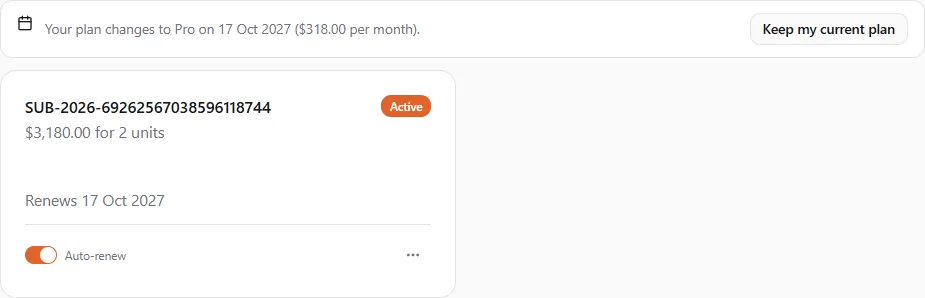
Section titled “See a scheduled change under Account → Subscriptions”A change you scheduled also shows above your plan under Account → Subscriptions: “Your plan changes to plan on date (amount per month).” Select Keep my current plan there to cancel it, exactly as in the upgrade window.
Refunds after a move
Section titled “Refunds after a move”Under the price, the upgrade window shows our refund terms: you can cancel for a refund within 14 days of a payment, less the texts, WhatsApp messages, e-mails and AI credits used by then, and each customer gets one refund. If you’ve already had your refund, it says this purchase can’t be refunded. See Getting a refund.
Good to know
Section titled “Good to know”- Need more of one thing? You don’t have to change plan for it. Litter Passes, contract packs and the other credit packs are bought on their own (Litters and the Litter Pass). (Until 12 October 2026 Breeder Pro sold a yearly “refill” of its passes and contracts; it was retired with the plan.)
- From a free plan: you pay the full price, and your new plan starts today.
- A plan priced in another currency starts on your renewal date too, even when it costs more. This can only happen if you bought your current plan before 24 September 2026: every plan is priced in US dollars now.
- Account → Subscriptions: after a move, your old plan is listed under Past subscriptions.
- Changing a business’s plan: act as the business profile, then change the plan as above. The new plan is billed to the account that owns that profile, even when you signed in through your own account.