

Your pay stubs
If your employer runs payroll on United Pet Club and linked your profile to your employee record, each of your pay stubs appears on your own Pay Stubs page once the pay is posted. You don’t need access to your employer’s books, and you never see anyone else’s pay.
Settings → Pay Stubs (/dashboard/account/pay-stubs). The link shows when you are acting as your personal
profile: an employee is a person, so business profiles don’t list it.
What you see
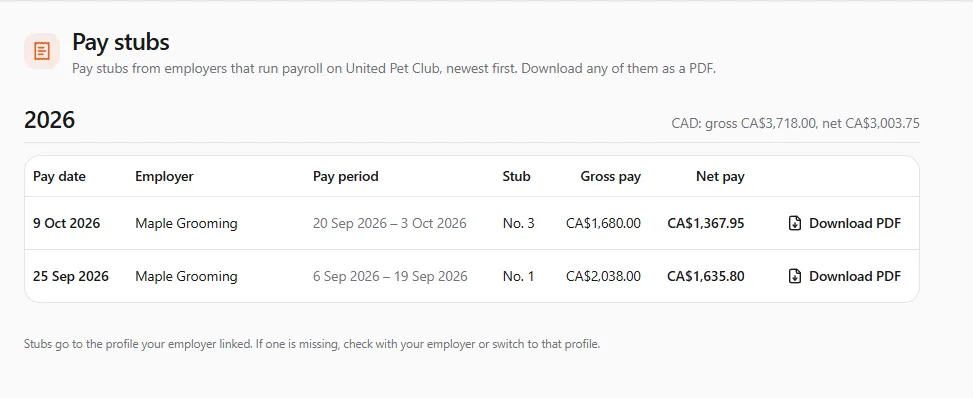
Section titled “What you see”Stubs are grouped by year, newest first. Next to each year are the year’s totals, per currency: “CAD: gross …, net …”.
| Column | What it shows |
|---|---|
| Pay date | the day you were paid |
| Employer | the business that paid you, so two employers are easy to tell apart |
| Pay period | the first and last day the pay covers |
| Stub | the stub’s number, like No. 16 |
| Gross pay | your pay before deductions |
| Net pay | what you were paid after deductions |
Downloading a stub
Section titled “Downloading a stub”- Find the stub and choose Download PDF.
- The file is saved to your device (“Saved …”). Open it from your downloads.
The PDF has your employer’s and your details (your tax number shows only its last digits), the period and pay date, each earning, deduction and reimbursement, the totals, your year to date, and how the deductions were worked out.
Reversed stubs
Section titled “Reversed stubs”If your employer reversed a pay in their books, its stub stays in the list marked Reversed, with the net pay struck through. “Your employer reversed this pay, so it isn’t in the year’s totals.” Ask your employer about any correction they made, for example a new stub for the right amount.
When a new stub is ready
Section titled “When a new stub is ready”A stub appears here as soon as your employer posts the pay run. A notice in the bell tells you a new stub is ready and links to this page.
Questions about your pay
Section titled “Questions about your pay”Your employer is responsible for your pay, the deductions taken from it, and your year-end slips (T4, RL-1 or W-2). UPC only shows the stubs they post. If an amount looks wrong, ask your employer: UPC can’t change a stub.
If something went wrong
Section titled “If something went wrong”“No pay stubs yet”. “When an employer pays you through United Pet Club and links this profile, each stub appears here once it’s posted.” Check that your employer has posted the run and linked your profile.
A stub is missing. “Stubs go to the profile your employer linked. If one is missing, check with your employer or switch to that profile.” Ask your employer which profile they linked, and switch to it.
“The stub couldn’t be downloaded. Try again in a moment.” Wait a moment and try again. If it keeps failing, ask your employer for the PDF.