

Reports
Reports turns the books into statements and lists for any period of their fiscal years. Every report is prepared from your own entries: it is only as right as what was recorded.
The entity’s Reports tab (/dashboard/finances/accounting/{entity}/reports). It needs the View reports
permission (every role from Viewer up except Clerk); downloading files needs Export reports. Without access
you see Reports aren’t part of your access.
The reports
Section titled “The reports”| Group | Report | What it shows |
|---|---|---|
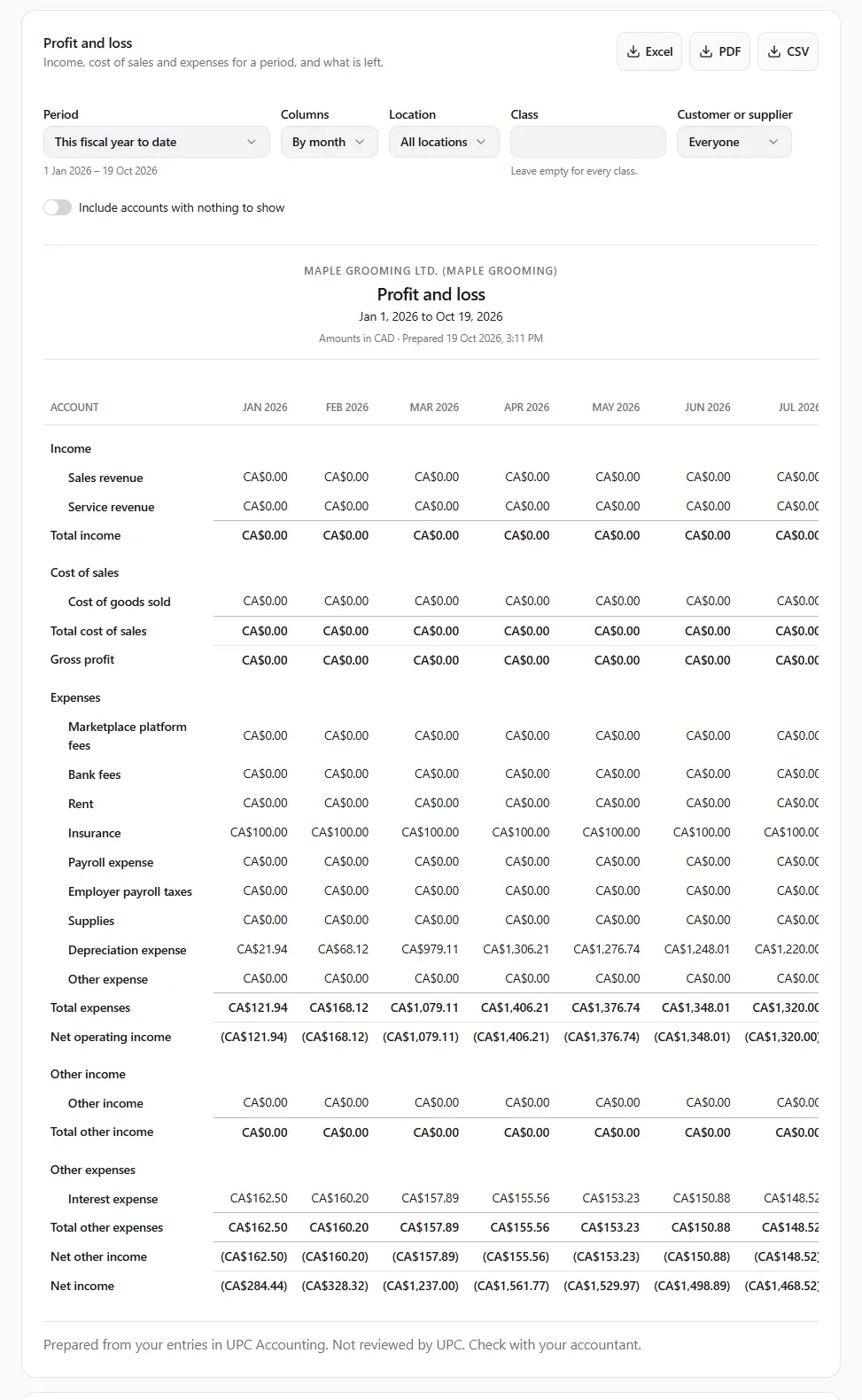
| Statements | Profit and loss | Income, cost of sales and expenses for a period, and what is left. |
| Balance sheet | What the entity owns and owes on a day, and its equity. | |
| Cash flow | Where cash came from and where it went in a period. | |
| Ledger | Trial balance | Every account’s balance on a day. With a period, also its opening balance and movements. |
| General ledger | Each account’s transactions with a running balance. | |
| Journal | Every journal entry in the period, line by line. | |
| Audit trail | Who recorded, posted, voided or closed what, and when. | |
| Customers | Sales by customer, Sales by category, Sales by channel | Net income per customer, per category, or per channel: marketplace, invoices, donations, manual entries and the rest. |
| Receivables aging | Open invoices and unapplied credits by how long they are past due (current, 1–30, 31–60, 61–90 and over 90 days). | |
| Customer statements | A customer’s invoices, credits and payments, with the balance due. | |
| Open invoices | Posted invoices that are not fully paid. | |
| Suppliers | Expenses by supplier, Expenses by category | Net expenses per supplier or per category. |
| Payables aging, Unpaid bills | Unpaid bills and unapplied payments by age; posted bills not fully paid. | |
| Tax | Tax form | Income and expenses by the lines of a tax form, with what is not mapped yet. |
| Banking | Bank reconciliation | A money account’s statement against the books on a day; with no account chosen, every money account’s standing. |
Fixed assets, schedules, inventory, deposits, gift cards and group consolidation show their own reports on their own tabs.
Choosing the period and filters
Section titled “Choosing the period and filters”Each report shows only the choices it uses:
- Period — This fiscal year, This fiscal year to date (the default), Last fiscal year, This quarter, Last quarter, This month, Last month, a past fiscal year (FY 2025), or Custom dates with From and To. Periods follow your fiscal year.
- As of — for the balance sheet, trial balance, agings and open items: Today, the end of a fiscal year, or Another date.
- Columns (profit and loss) — One total, By month, By quarter, Against the previous period, Against the year before, By location, By class.
- Compare with (balance sheet) — A year before, End of the previous month or No comparison.
- Location, Class (Leave empty for every class), Customer or supplier, Account, and Include accounts with nothing to show.
Statements check their own arithmetic and say In balance or Out of balance by ….
Drilling down
Section titled “Drilling down”A report row links to what it came from: an entry, its document, a money account, or the account’s general ledger (Open this account’s general ledger). See the journal entry behind a document.
Salaries
Section titled “Salaries”Without the View payroll permission, Wages show as one line. Payroll detail needs payroll access. Payroll accounts are summed, payroll entries lose their descriptions and parties, and employees fold into one line in the supplier reports. The same applies to every downloaded file.
Personal books
Section titled “Personal books”For personal books the balance sheet shows Net worth in place of retained earnings.
Tax form
Section titled “Tax form”The Tax form report sorts the year’s amounts by the lines of a tax form, using the category each amount was filed under. Pick the Tax form, or leave Your country’s form:
| Country | Kind of entity | Forms |
|---|---|---|
| Canada | Corporation (operating, holding, asset-holding, branch) | GIFI (T2 Schedules 100 and 125) |
| Sole proprietorship | T2125, T776 (rentals), T1 line 34900 (donations) | |
| Partnership | T5013 Summary, GIFI statements, T2125 (a partner’s share), T776 | |
| Nonprofit | T1044, GIFI statements | |
| Personal books | T2125, T776, T1 line 34900 | |
| GST/HST registrant | GST/HST return (GST34) lines 101–114 | |
| United States | Sole proprietorship, personal books | Schedule C, Schedule E |
| Partnership | Form 1065 | |
| Corporation | Form 1120 (C corporation, the default) or Form 1120-S (S corporation) |
Other countries have their chart of accounts but no tax form lines yet.
The report lists each form line with the categories under it, amounts the form deliberately doesn’t take (with the reason), and anything not mapped. Some lines carry a deductibility hint (for example 50 % for meals); hints are never applied to the amount. Canadian forms use the tax year your fiscal year ends in, US forms the year it begins in.
Downloading a report
Section titled “Downloading a report”Under Download as, choose Excel, PDF or CSV. You see Preparing the … file…, then the file saves to your device (… file downloaded.).
- Excel keeps real numbers and dates, one sheet per section.
- PDF repeats the headers on every page and ends each page with the disclaimer.
- CSV is one block per section, for any spreadsheet.
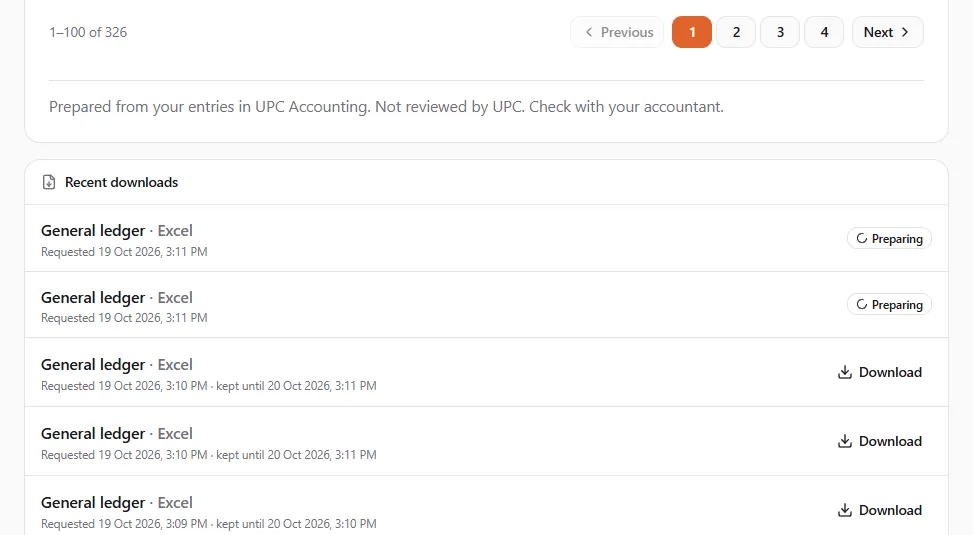
A long report is prepared in the background: Still preparing. It will be under Recent downloads when it’s ready. Recent downloads lists your files with Download, the date requested and kept until a date (24 hours). If a report is too long to show on screen, you see This report is too long to show here — download it as a file, or choose a shorter period or one account.
If something went wrong
Section titled “If something went wrong”- “Choose both dates to see the report.” / “The start date is after the end date.” — fix the custom dates.
- “The file couldn’t be prepared. Try again, or choose a shorter period.” — try a shorter period.
- “The file didn’t download. If it has expired, download the report again.” — files are kept for 24 hours.
- The balance sheet notes unclosed years — earlier fiscal years that were never closed are shown as earlier years’ earnings; see Year-end.