

Rewards on posts
A reward turns a post into an offer: the first 50 people get 20% off their first groom. Members claim it on the post; each one gets your code or link, and once the last one is claimed, the code is no longer shown and the link stops working. On a quiz, you can give it only to people who score a pass mark.
My Dashboard (/dashboard/home) → Create post → Text, Media or Interactive → Add a reward under the
text box. A reward is set when you post; it can’t be added to a post afterwards or changed.
Add a reward
Section titled “Add a reward”- Select Add a reward.
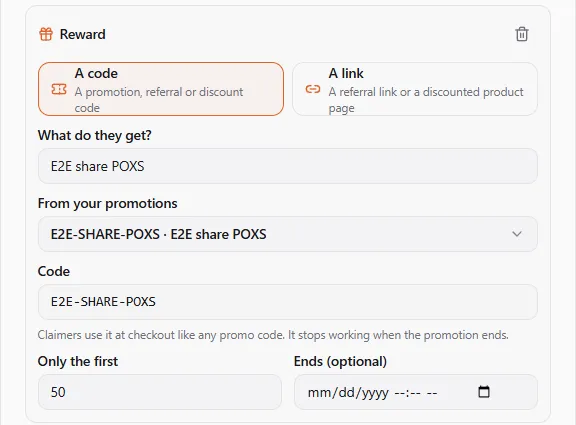
- Choose what people get:
-
A code: a promotion, referral or discount code (WELCOME20). It’s hidden until someone claims it. If you run your own promotions, From your promotions lists the codes of your active promotions: pick one instead of typing it. Claimers then use it at checkout like any promo code, and it stops working when the promotion ends. If you leave What do they get? empty, the promotion’s name is used.
-
A link: a referral link or a discounted product page, starting with
https://. Claimers get aupc.petlink to it, which stops working when the reward ends. Only verified profiles can add a link, as with other links in posts.
-
- Say what they get in What do they get? (up to 120 characters). Everyone sees this.
- Set Only the first to how many people can claim it (1 to 100,000).
- Optionally choose when it Ends.
- Post as usual.
A reward for passing a quiz
Section titled “A reward for passing a quiz”On an Interactive post with a Quiz, the reward has a Pass mark too: only people who score that much or more on the quiz can claim it (Score 80% or more on the quiz to claim). With a pass mark you may leave Only the first empty, so everyone who passes can claim it. If you Let people retake the quiz, their latest answer counts.
What people see
Section titled “What people see”Under the post: what the reward is, how many people claimed it (12 of 50 claimed, with a bar), how many are left and when it ends. Members select Claim; the code appears on the post (with Copy) or the link (Open the offer). They can come back to the post to see it again. With a pass mark, someone who scored less sees You scored 60%. You need 80%.
When every claim is taken the box says All claimed, and past its end This reward has ended. Nobody can claim it any more, the code isn’t shown to anyone new, and the link no longer opens.
On your public profile page, visitors see the reward too; Sign in to claim takes them to sign in and back to the post, on a phone as on a computer.
Your own reward
Section titled “Your own reward”You always see your code or link on your own post (Only you and the people who claim it see this.), and you can’t claim your own reward. The claim count is live.
Good to know
Section titled “Good to know”- One claim per member. A member who claims again sees the same code.
- A code you give out here is yours to honour: if it’s a promotion in your store, the promotion’s own rules (dates, products, limits) still apply when it’s used.
- A reward can’t be put on a share of someone else’s post.