

E-mails about your plan
We tell you what’s happening with a paid plan or add-on before it costs you anything, and whenever something needs your attention. Every message comes as an e-mail and as a notification in your dashboard. Both come from United Pet Club, in your account’s language.
What we send, and when
Section titled “What we send, and when”| You’ll get… | When |
|---|---|
| Your subscription ”…” renews on … | 7 days before a yearly plan renews, or 3 days before a monthly one. It tells you the price and the card we’ll charge. |
| Your subscription ”…” ends on … | 7 or 3 days before the end of a plan that won’t renew: you cancelled it, or turned automatic renewal off. |
| Add a card to keep your subscription ”…“ | 7 or 3 days before the renewal date of a plan that has no card to renew with. Also right after you buy a plan, if no card was saved with that payment. |
| The payment for your subscription ”…” did not go through | Soon after a renewal payment is declined. It tells you when we’ll try again. |
| Last try on …: update your card to keep ”…” | After the payment has failed eight times. The next try is the last one. |
| Your subscription ”…” has been canceled | When the last try failed too. The plan’s features stop. |
| Your subscription ”…” has ended | When a plan that wasn’t going to renew reaches its end date. |
If you’ve scheduled a move to a cheaper plan, the renewal reminder names the new plan and its price, since that’s the plan you’ll be charged for.
If your profile is in Canada, the amounts in these e-mails include GST or HST, with the breakdown after them: for example 11.29 USD per month (9.99 USD + HST 13% 1.30 USD). The reminder’s figure is worked out ahead of time from your profile’s address; the renewal itself is taxed on the day it’s charged. See Taxes on United Pet Club fees.
We don’t send these for free plans, or for a plan you pay through the App Store or Google Play, except to say it has ended. Membership dues send their own renewal reminders. A recurring donation gets its own, donor-worded e-mails when a payment is declined, and no reminder: see Recurring gifts.
What to do when a payment fails
Section titled “What to do when a payment fails”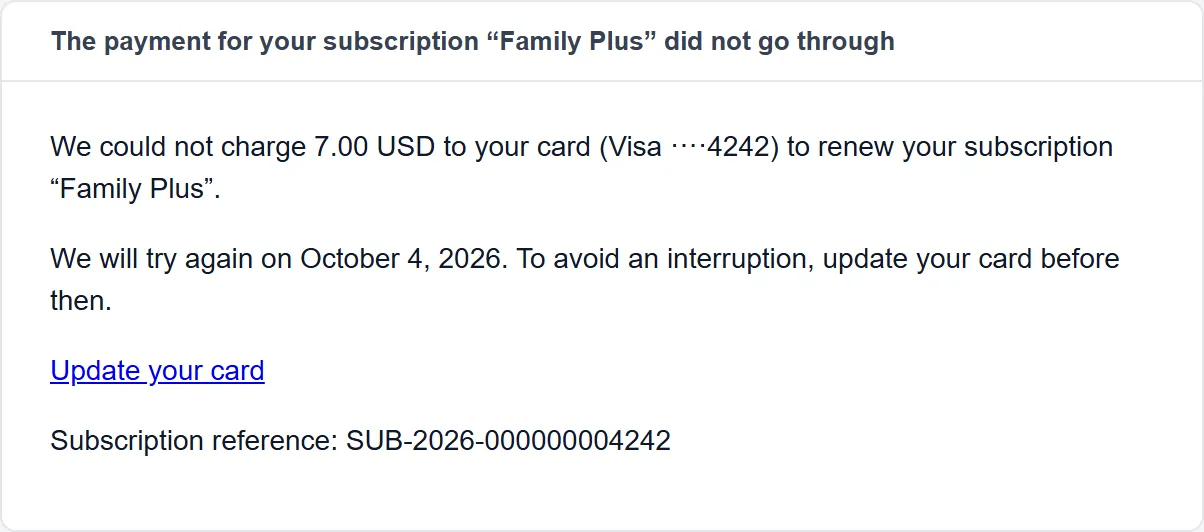
- Select Update your card in the e-mail, or select the notification in your dashboard. Both open Account → Billing → Funding sources on the plan that failed.
- Change the card, or add a backup card. See Paying for your plan.
- To pay straight away instead of waiting for the next try, select Pay now on that plan.
You keep the plan’s features while we try again. See When a payment fails for when each try happens.
Where the messages go
Section titled “Where the messages go”- E-mail: to your account’s Billing email when one is set, otherwise to the e-mail address of the profile that bought the plan. To send them somewhere else, set the Billing email under Account Settings → Account Type → Account details. See Account settings.
- Notification: in the bell in your dashboard, for the profile that bought the plan. Selecting it opens the right page: the plan’s cards for anything about payment, Account → Subscriptions for the rest.
The messages are written in your account’s Default language & region, and dates follow its Default timezone. Both are under Account Settings → Regional Defaults. If the account has no timezone, dates are in UTC.
You can’t turn these messages off: they’re about your payments and your plan.
If you didn’t get one
Section titled “If you didn’t get one”- Look in your spam or junk folder for a message from United Pet Club.
- Check the bell in your dashboard: every e-mail has a matching notification there.
- Check where it was sent: the account’s Billing email or, if that’s empty, the e-mail address of the profile that bought the plan.
- Check the plan under Account → Subscriptions. A monthly plan’s reminder comes 3 days ahead, so a plan you changed within those 3 days may renew without one.
- Still missing? Use our contact form with the plan’s reference (
SUB-…). It is the title of the plan’s card under Account → Subscriptions, and the last line of every e-mail.