

Answering, voting and accepting
The forum ranks answers by what helped real pets, not only by what people liked. Three things feed that: votes, Worked for us from owners who tried an answer, and the asker’s own Did it work? a week after accepting.
On any question’s page (/forum/q/<number>/<title>). Signed out you see Know the answer? with Sign in to
answer. Signed in, the controls appear on the question and on each answer.
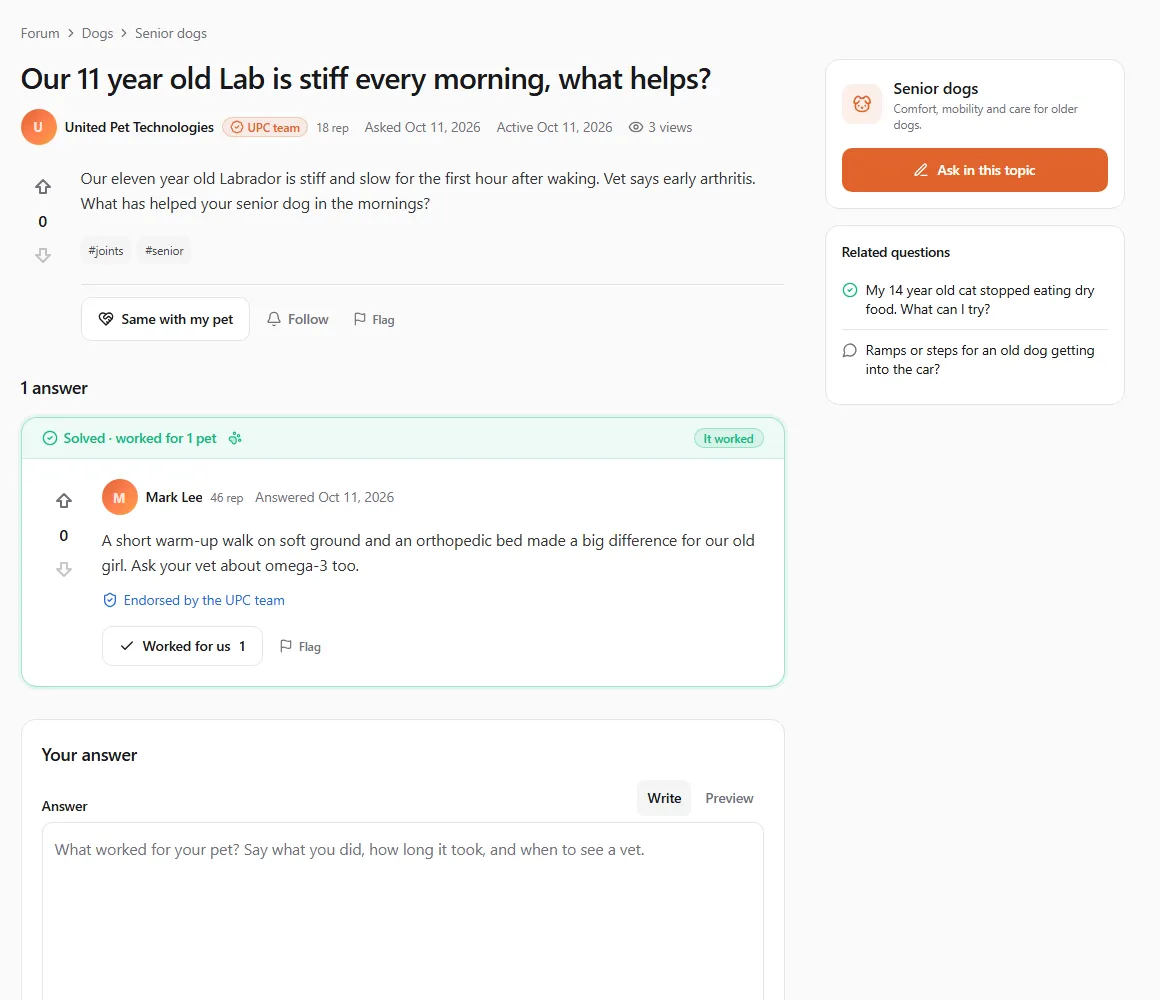
Answering
Section titled “Answering”- Scroll to Your answer (on a discussion: Join the discussion).
- Write what worked for your pet: say what you did, how long it took, and when to see a vet. Answers need at least 15 characters. Preview shows how it will look.
- Click Post answer (Post reply on a discussion).
Answer from experience, and for anything urgent tell the owner to call a vet. Posting an answer also follows the question, so you hear about new answers.
You can’t answer when:
| You see | Why |
|---|---|
| This post is closed to new answers. | The asker or a moderator closed it. Its answers stay readable. |
| This post is locked. | A moderator froze it: nobody can answer, comment, vote or edit. |
| This question is protected. New members can answer once they have 10 reputation. | A moderator protected a busy question from drive-by answers. Verified professionals can always answer. |
| You’re posting quickly. Wait a minute and try again. | Under 10 reputation you can post one answer every 2 minutes. |
| Join this group to post here. | The question is in a group you haven’t joined. |
Voting
Section titled “Voting”Next to every question and answer are an up arrow (This is useful) and a down arrow (This isn’t useful), with the score between them. Click again to take your vote back.
- Everyone can vote up from their first day. Until you have 15 reputation your up-votes count in the score and the ranking but don’t give the author reputation (Your votes earn others reputation from 15 reputation). This stops brand-new accounts from handing each other points. Voting down unlocks at 125 (Down-voting unlocks at 125 reputation). Verified professionals can do both straight away.
- Down-voting an answer costs you 1 reputation, so it is kept for answers that are wrong or unsafe.
- You can’t vote on your own posts (You can’t vote on your own post), nor on posts you wrote under another of your profiles.
Worked for us
Section titled “Worked for us”Worked for us under an answer says I tried this with my pet and it helped. It is the strongest signal on the forum: it raises the answer, gives its author reputation, and adds to the Worked for N pets count readers see.
Clicking it opens a short form:
- Which pets did it work for? Tick one or more of your own pets (the pets on the profile you are using), and/or A pet that isn’t on United Pet Club, then choose its species.
- What happened? is optional: a short note such as cleared up in 3 days (up to 280 characters). It shows under the answer with your name.
- Tick I tried this with my pet and it helped. and click Confirm it worked.
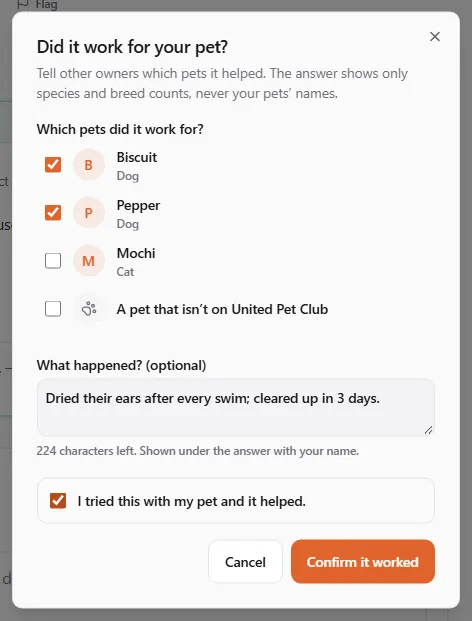
The answer then shows Worked for N pets with the species and the most common breeds (for example Dog 9, Cat 5, Labrador Retriever 4) and the latest notes. Your pets’ names and photos are never shown: other owners see only species and breed counts. Each pet counts once per answer, so if it worked for three of your cats, tick all three.
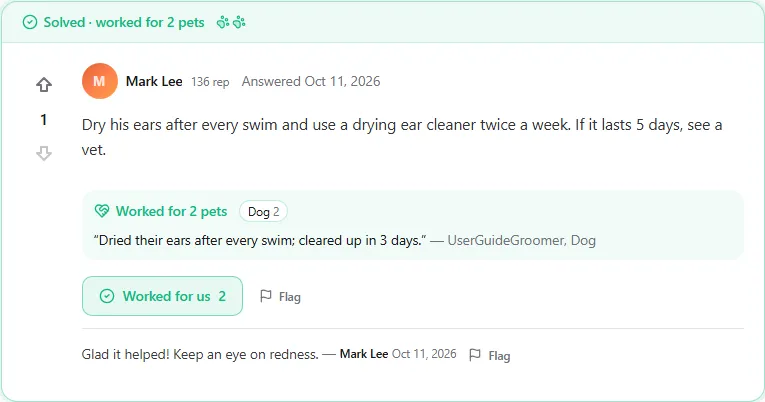
Click Worked for us again to change the pets or the note (Save changes) or to remove it (Take it back). Everyone can use it; from 15 reputation it also gives the author 5 reputation. You can’t use it on your own answers.
Same with my pet
Section titled “Same with my pet”Same with my pet under a question says my pet has this problem too, instead of a “+1” answer. It needs no reputation. The question shows how many owners have the same problem, it rises in the Hot feed, and you start following it, so you get a notice when someone answers.
Comments
Section titled “Comments”Add a comment under a question or an answer is for asking for details or adding a short note (up to 600 characters). Comments are not answers: if you know the answer, post it as one.
You can always comment on your own question, under answers to your own question and on your own answer. Commenting anywhere else unlocks at 50 reputation (verified professionals can comment straight away).
Accepting an answer
Section titled “Accepting an answer”When an answer solves your question, click Accept answer under it. The answer moves to the top marked Solved, its author earns 15 reputation and you earn 2. Undo accept takes it back. Only the asker can accept, and only one answer at a time.
Did it work?
Section titled “Did it work?”Right after you accept, the question shows Did the accepted answer work? to you, and a week later you get an e-mail and a bell notice asking the same. The question also waits in the Did it work? card of your Dashboard forum home.
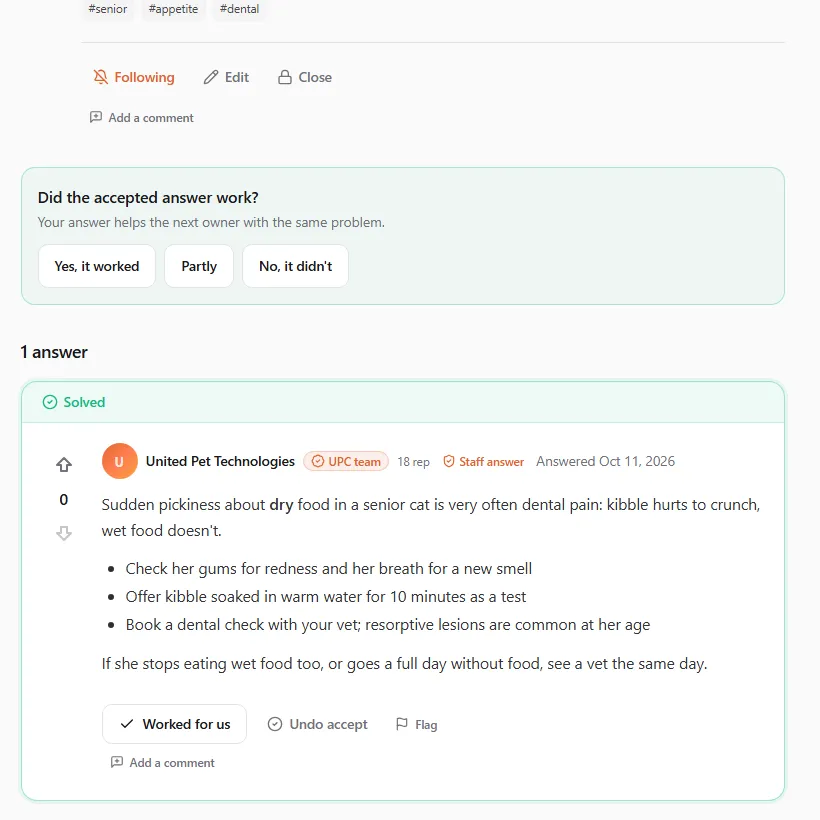
Choose Yes, it worked, Partly or No, it didn’t. Readers then see It worked, It partly worked or It didn’t work on the accepted answer. After Yes, it worked, the Did it work for your pet? form opens, with the pet on your question already ticked when it is one of your pets, so the answer counts the pets it helped. That honest follow-up is what makes the forum useful to the next owner.
Endorsements and credential chips
Section titled “Endorsements and credential chips”When verified professionals vote an answer up or mark it as worked, the answer shows who: Endorsed by 2 vets, 1 groomer. Authors carry their credential chip (Verified vet, Verified vet tech, Verified groomer, Verified trainer, Verified behaviorist, Verified breeder, Verified shelter, Verified business, UPC team) and their reputation (33 rep). United Pet Club grants a chip only after checking a licence, certificate or business; see Verifying your business.
Vet notes (for verified vets)
Section titled “Vet notes (for verified vets)”A vet note is a short safety correction under an answer, for example a dose that is wrong or advice that needs a vet visit first. Only verified vets can add or back one (Only verified vets can add or back vet notes).
- Under the answer, click Add a vet note.
- Keep it to the safety point (20 to 600 characters) and click Propose note.
- The note publishes once another verified vet backs it (Note proposed. It publishes once another verified vet backs it.). The United Pet Club team can also publish or retract it.
A published note shows as Vet note with Backed by N verified vets, and its author earns 10 reputation. The answer’s author gets an e-mail and a bell notice.